
Magnum 3
-
Compatibility After Effects Please check exact version compatibility under the "COMPATIBILITY" tab below
 Adding to cart...
Automagically detects edits in footage. Now with an all new detection engine that is easier to use and gives better results. What's not to love?
Features
- Now over 2x faster!
- Brand new detection engine that works with all footage types
- Easier to set visual change threshold setting
- Search range feature to compensate for dissolves
- Thumbnail export with optional spreadsheet data
- Highly customizable naming options
- NEW: Average scene color detection, with the option to use the first frame of the previous edit for cut reference.
- NEW: Option to trim resulting clips
- NEW: Refactored UI for easier use
Now sporting a brand new detection engine that will work out of the gate without any adjustments necessary in most cases. There is also a new feature to tell Magnum how many frames to search across for changes to compensate for dissolves as well as a setting for the minimum scene length to avoid detecting cuts in quick pans or strobing footage.
Use the Detection Analysis Graph to accurately set the threshold
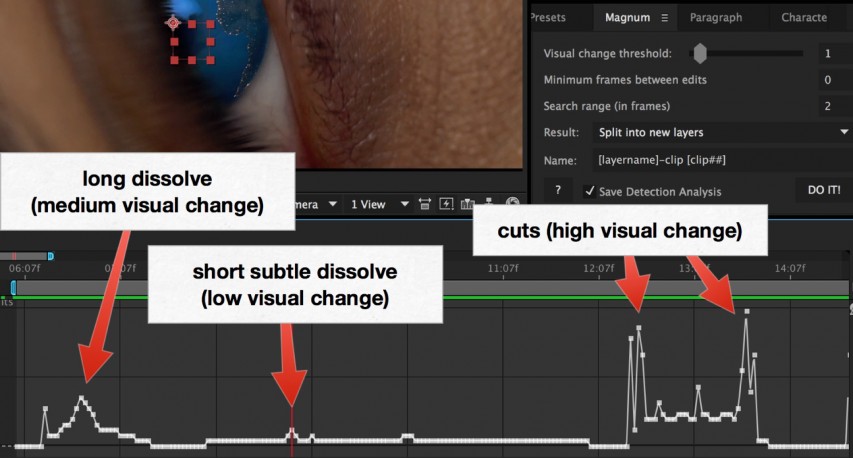
The powerful Detection Analysis feature lets you graphically see the edits in your footage and set the threshold setting accurately. Magnum will detect a cut at any point higher than the setting.
After it detects the scenes or edits you have these options:
- Split into new layers: This mode will split the selected layer into individual layers at every edit.
- Trimmed pre-comps: This mode will split the layer and then pre-comp it into a comp that is the length of the split layer.
- Full-length pre-comps: This mode will split the layer and pre-comp it into a comp that is the same length as the original comp.
- Trimmed adjustment layers: This mode will create a new adjustment layer that is trimmed to the length of every detected scene.
- Place markers on layer: This mode will create and place markers at every detected edit point.
- Save thumbnails for each cut/marker: This mode will export a thumbnail for the selected layers or all layers if none is selected. If you add a text layer named: slate it will burn it into each thumbnail. All special keywords work here as well. Position and style your text before running the export. If you add a text file named: export_template.txt in the export folder it will use it to create an export report file.
Again special keywords work here and if you use tabs or commas it will be a spreadsheet. Replace 'layer' with 'marker' in the keywords when exporting thumbnails from markers. Thumbnail size will match the comp resolution.
There is also a very customizable naming system for the newly created layers, comps, markers, etc. You can set the name however you want with the assistance of some special keywords:
- [layerName]
- [layerInpoint]
- [layerLength]
- [compName]
- [projectName]
- [clip#]
(the number of #'s indicates the number of leading zeroes) - [num=##,inc=##]
(will insert a padded number and increment by the optional inc; add leading zeros to pad. For example [num=0010,inc=20] yields 0010,0030,0050, etc) - [sceneColor]
(Will add the average color of the scene in hex value - [roundSceneColor]
Will round the average color and add it as a hex value. This is useful to find similar clips
There is built-in help and help-tips that are shown when hovering over the UI.
Known Issues
We've had some reported cases where edits in dpx format image sequences are not detected by Magnum. If you are experiencing this, please convert your dpx files to a different format before processing with Magnum
Upgrade Notice: If you own Magnum v2 (licensed version, the old NYOP version does not qualify) can upgrade for $30. Simply login to the same account that you purchased v2 with and the upgrade price will be automatically displayed.
| After Effects | 2024, 2023, 2022, 2021, 2020, CC 2019, CC 2018, CC 2017, CC 2015.3, CC 2015 |
|---|
3.3.2 (Current version) - Aug 22, 2019
3.3.1 - Jun 4, 2019
3.3 - May 15, 2019
- Added Use Scene Color for cut detection
- Reformatted UI with advanced settings section
3.2 - Feb 12, 2019
3.1 - Dec 12, 2018
- Added support for floating licenses
- Fixed [num] keyword.
- Fixed detection to clip at 0 to avoid false cuts
3.0.2 - Feb 5, 2016
3.0.1 - Nov 18, 2015
3.0 - Oct 27, 2015
New detection engine. Easier to use, better results!
New search range feature to compensate for dissolves
-

- Compatibility After Effects
pt_ImportSubtitles
Add to CartUseful if you need to embed subtitles onto video for web or tape delivery. Import subtitles into After Effects using Encore Text Script, SubRip SRT or WebVTT formats, render with alpha to import into your editing software, or use directly in Premiere Pro with Dynamic Link.
-

- Compatibility After Effects
pt_ExpressEdit 2
Search, apply and edit expressions throughout your project. Expressions can be saved, or instantly applied to one or more properties. It can also check for broken expressions, re-enabling them automatically where possible.Add to Cart -

- Compatibility After Effects
lipsyncr 2
Automatic high quality viseme–based mouth animations. In a matter of seconds.Add to Cart$59.99 As low as: $47.99 -

Events - A.I. Image & Video Sorter
Add to CartEvents uses A.I. based face recognition to automatically find and categorize all photos and videos by subject
$49.99 -

- Compatibility After Effects
Smart Posterizer
Add to CartAutomatically detects visual change in animation and uses it to control time posterization on other properties.
-

- Compatibility After Effects
- Compatibility Premiere
LetsMotion Bundle
Add to CartSave 25% on LetsMotion Bundle, featuring bestsellers and our latest & greatest: Subtitle Pro, Stock Search Pro, and Particle Pro
-
- Compatibility After Effects
Automate to Sequence
Mimics the Premiere Pro tool of the same name in After Effects. It shifts or sets the in point and out point of selected layers to markers set on a marker layer.Add to Cart$9.99 -

- Compatibility After Effects
Marker Batch Editor
Batch edit all marker attributes. Now supports comp markers and marker duration. Also has an option to export the marker to a text file.Add to Cart$24.99 -
- Compatibility After Effects
Layer Random Shifter
Randomly shifts the selected layers in time within user defined range.Add to Cart$9.99 -

- Compatibility After Effects
Arrange Project Items Into Folders
Arranges project items into folders based on a matching prefix.Add to Cart$4.99 -

- Compatibility After Effects
ExpressionUniversalizer 4
Add to CartConverts the expressions in your projects so that they are compatible with After Effects running in any language. Now with batch processing.
$49.99 -

- Compatibility After Effects
Zorro-The Layer Tagger
Zorro lets you group layers in after effects by adding tags to layers. Similar to the way you would tag photos in Flickr, you can tag layers in your comps and then select or isolate those layers in groups by using the tags.Add to Cart$29.99