
3D Widgets
-
Compatibility After Effects Please check exact version compatibility under the "COMPATIBILITY" tab below
 Adding to cart...
 This product has been discontinued.
3D Widgets is a collection of 3 scripts that help you navigate the After Effects 3D space:
- BR_Grid
- BR_Horizon
- BR_Widget
If you are familiar with 3D Animation software these widgets should be very familiar to you. They allow you to quickly orient yourself while animating your 3D comps.
BR_Widget
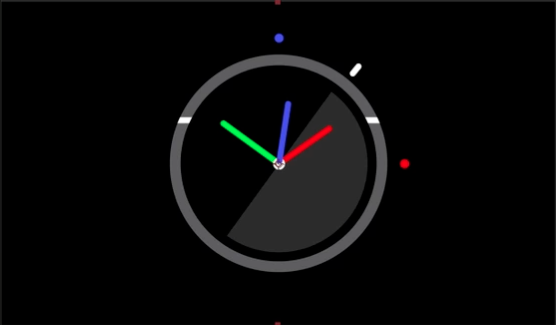
This script renders this "widget" in the corner of your comp and will quickly let you see your camera pitch, heading and horizon. It will also warn you when the camera goes below the horizon or floor or is upside down.
BR_Grid
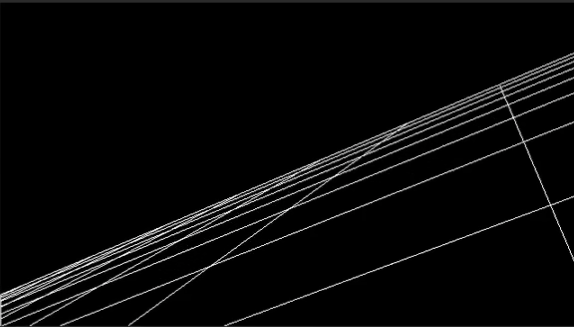
This script renders a grid that moves and reacts with the 3D camera. It utilizes a very clever procedural method that will add very little rendering overhead to your workspace.
BR_Horizon
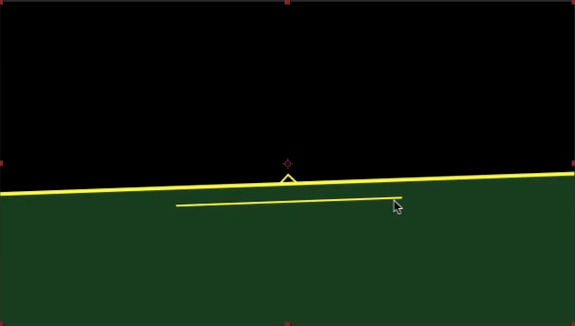
This script draws a triangle, base line and ground fill to further help you in navigating the 3D space. It also utilizes a very clever procedural method that will add very little rendering overhead to your workspace.
| After Effects | CS6, CS5.5, CS5, CS4, CS3 |
|---|
1.01 (Current version) - Jul 24, 2012
1.01 - Initial version - Jun 2010
-

- Compatibility After Effects
BAO Mask Brush
Add to CartApply custom brushes to mask paths in After Effects, in 3D space, with Motion Blur and Squash and Stretch!
-
- Compatibility After Effects
BAO Boa
Add to CartBoa is a plugin for After Effects built to distort layers along mask paths.
-
- Compatibility After Effects
Pastiche2
Add to CartProduce and animate creative layer collages easily!
Apple Silicon M1 Native
Trial version of Pastiche2 is limited to 25 layers. Full version has no limitation
Pastiche2 is discounted 50% for students and faculty.
More info here. -

- Compatibility After Effects
Plexus 3
Add to CartNow with Multi-Frame Rendering (MFR) Support! Rowbyte Plexus is a next-gen particle engine for After Effects that lets you create, manipulate and visualize data in a procedural manner. Not only you can render the particles, but also create all sorts of interesting relationships between them based on various parameters.
$249.99 As low as: $199.99 -

- Compatibility After Effects
Particle Pro
Add to CartThe easiest way to create professional particle effects in After Effects. Powered by Stardust (required and must be purchased separately)
-
- Compatibility After Effects
3D Layer Distributor
Distributes layers in 3D space within set ranges (you can set the ranges by editing the user variables at the top the script).Add to Cart
-
- Compatibility After Effects
3D Extruder
Add to Cart3D Extruder makes light work of creating high-quality 3D extrusions in After Effects.
3D Extruder is now compatible with CS6 and above!
$10.00 -
- Compatibility After Effects
Illumination
Illumination adds a new dimension of lighting control to After Effects. By automating the creation and control of banks of point lights, Illumination brings a new type of lighting to AE - the softbox. Soft lights mean soft shadows, making objects feel much more believable.Add to Cart$14.99 -
- Compatibility After Effects
Skydome
Creates a 3D environment for your After Effects compositions at the touch of a button. The environment then responds to your camera's position, orientation, rotation and lens properties.Add to Cart$10.00 -
- Compatibility After Effects
Projection
Add to CartThis product has been discontinued. Please use Projection 3D instead
$19.99 -
- Compatibility After Effects
Smart Precomposer
Smart Precomposer allows you to do a "precompose and leave all attributes" on text and shape layers, which After Effects otherwise doesn't allow. What's more, Smart Precomposer allows you to precompose any type of layer and selectively move some attributes into the new precomp, while leaving the rest in the original comp.Add to Cart$10.00