
BatchProcessor
-
Compatibility After Effects Please check exact version compatibility under the "COMPATIBILITY" tab below
 Adding to cart...
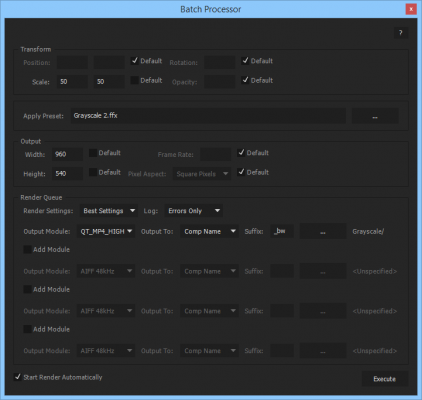
 Batch process the selected project items. For instance, it can be used to apply the same preset to a collection of movies or comps. You can add multiple output modules if you want different types of output for each rendered item.
| After Effects | 2024, 2023, 2022, 2021, 2020, CC 2019, CC 2018, CC 2017, CC 2015.3, CC 2015, CC 2014, CC, CS6 |
|---|
2.6 (Current version) - Apr 7, 2016
- Added the ability to specify a suffix that is appended to the name of the rendered files
- Removed the 31 characters limit in comp names
- Removed the 31 characters limit in comp names
- 2.5 Added CS6 Compatibility - Dec 2012
- 2.2 Fixed foreign language compatibility with CS5.5 - Nov 2011
- 2.1 Pixel aspect ratio bug fixed and CS5 compatibility (Aug 2010)
- 2.0 Initial release on aescripts.com (Jul 2009)
-

- Compatibility After Effects
QueueUp
It's easy to make mistakes when you're working on multiple jobs with different deliverables for previews and final renders. QueueUp saves the output folder and render settings for each of your jobs, so you can easily switch between them throughout the day.Add to Cart -

- Compatibility Cinema 4d
Batch Processor for Cinema 4D
Add to CartEasily batch convert between all the 3D formats that are supported by Cinema 4D
-

- Compatibility After Effects
Layers Pro
Add to CartManipulate layers, compositions, properties and effects globally throughout the project!
-
- Compatibility After Effects
Queue Work Area
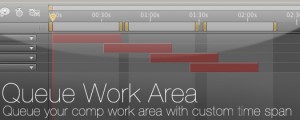
Queue your comp with the work area set as a custom duration. This way you can set several work areas to one queue and render them all at once.Add to Cart -

- Compatibility After Effects
- Compatibility Photoshop
- Compatibility Premiere
- Compatibility Illustrator
Stock Search Pro
Add to CartSearch and download unlimited free stock assets directly from any Creative Cloud application.
-

- Compatibility After Effects
Render Frame at Markers
Add to CartWill send to the render queue any frames that are marked by layer markers that are within the comp work area. This would be equivalent to going to a point in time in your comp and selecting "Save Frame As->File"
$14.99
-

- Compatibility After Effects
SimplifyMasks
Allows you to simplify the selected masks by removing the least important vertices. For instance, it can be used for smoothing a path generated by the built-in Auto-trace command.Add to Cart$14.99 -

- Compatibility After Effects
ReverseMaskPath
Reverses the direction of the selected masks.Add to Cart$9.99 -

- Compatibility After Effects
SequenceLayers
Sequences the selected layers from the current composition time, by offsetting their inpoint.Add to Cart$9.99 -

- Compatibility After Effects
Randomizer
Assigns random values within a certain range to the transform properties of the selected layers.Add to Cart$19.99 -

- Compatibility After Effects
MasksToLayers
Places the masks of the selected layer on individual layers.Add to Cart$14.99 -

- Compatibility After Effects
AudioAmpToVideoSpeed
Allows you to speed up or slow down a video according to an Audio Amplitude layer.Add to Cart$19.99
View all nab products