
EFX Render Elements Z Depth Tools
-
Compatibility After Effects Please check exact version compatibility under the "COMPATIBILITY" tab below
 Adding to cart...
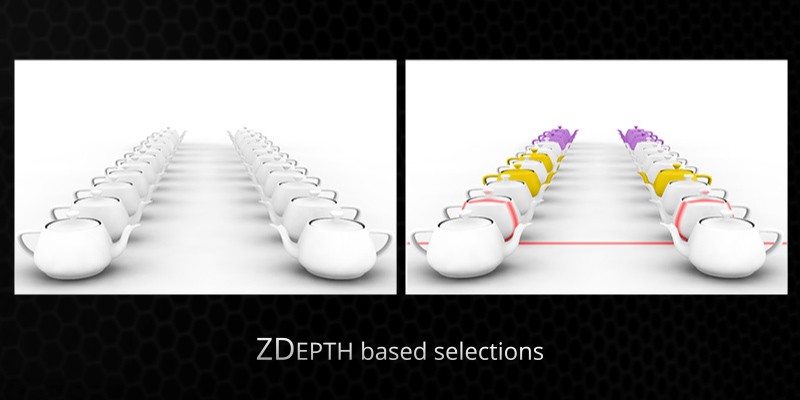
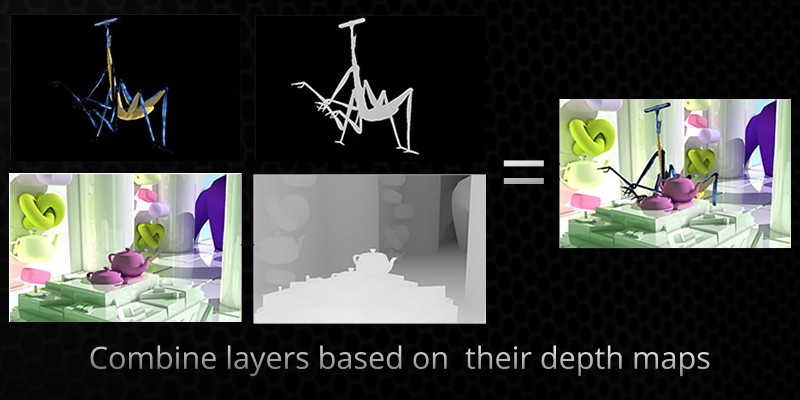
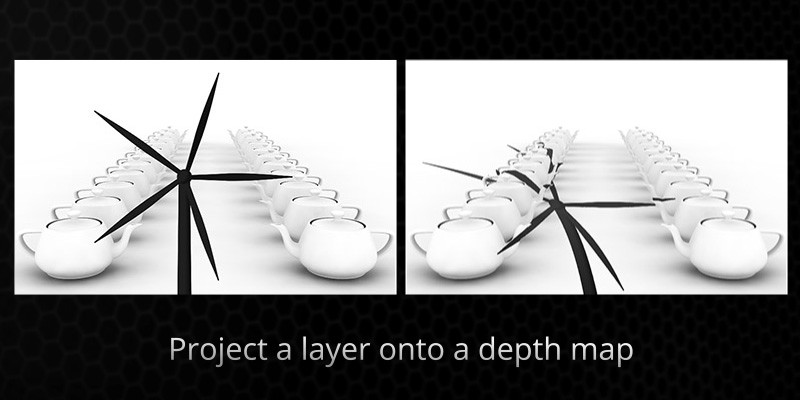
 These plugins will let you make the most use of a ZDepth pass that you often render out from a 3d application. It's a pass that stores the information about the distance from camera for each pixel - there is really a lot you can do with this data.
The package contains 3 plugins:
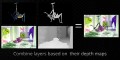
- Z_Depth Compose - composite two layers based on their depth maps,
- Z_Depth Cut - select pixels based on a depth map,
- Z_Depth Shadow - project a layer onto depth map.
Note: The plugins in this package are also a part of the EFX Render Elements suite. If you already have it, you don't need these. If on the other hand you buy these and later decide that you'd like to have the full EFX Render Elements suite, you will get a discount equal to the amount you spent on EFX ZDepth tools.
Upgrade offer: If you already purchased ZDepth Tools and want to upgrade to the full Render Elements suite just log in and the full suite will be automatically discounted by the full price of the the ZDepth Tools.
You can download the User Manual for details on individual plugins.

| After Effects | CC 2015, CC 2014, CC, CS6, CS5.5, CS5, CS4 |
|---|
1.5 (Current version) - Feb 9, 2023
Improved compatibility with 2023
1.4.3b - Aug 1, 2022
1.4.3 - Jun 3, 2017
1.4.2.1 - Dec 7, 2015
1.4.2 - Nov 3, 2015
1.4.1 - Apr 7, 2015
1,4 - Mar 25, 2015
- 1.2 - Updated licensing framework (will require that you re-enter your license code) - Dec 2013
- 1.1 - Converted to native plugin, added CS6 compatibility - April 2013
- 1.0.3 (May 2012)
- ZDepth Cut:
- added an option for inverting the depth map
- ZDepth Compose:
- added an option for inverting the depth maps
- added a Fade parameter for softening the intersection between the two layers
- Manual: fixed the Tip for non-AntiAliased ZDepth map - it was unnecessary all along ;)
- 1.0.2 - Initial release - Feb 2012
-

- Compatibility After Effects
Matte-Kit
Add to CartCreate and manage mattes between multiple layers with FX and track-mattes - without the confusion...
-

- Compatibility After Effects
MP4 + Alpha Converter
Add to CartConvert videos with alpha channel to MP4/h264, keeping the background transparent, just with one click.
-
- Compatibility After Effects
Layer Slayer
Add to CartPerfectly sync layers across the layer stack with a single click.
$40.00 -

- Compatibility After Effects
Position Matte 2
Add to CartNow with Apple Silicon and MFR support. Position Matte is a powerful compositing tool that allows for the simple creation of mattes based on 3D Position Passes. This means more flexibility, less matte passes required and far less roto.
-

- Compatibility After Effects
Effect Matte
Add to CartEffect Matte adds a perfectly sized and customizable matte to your layer, removing the need for an additional layer to act as a track matte.
-

- Compatibility After Effects
Copy Mattes
Add to CartCopy Mattes allows you to copy a specific layer’s track matte and paste it to one, or to multiple other layers.
-
- Compatibility After Effects
EFX AB Compare
Add to CartThis plugin lets you compare the current layer (or composition if applied to an Adjustment Layer) to a reference layer.
Please note that this plugin is not compatible with CS6 or above
$2.99 -

- Compatibility After Effects
EFX Keying-Alpha Plugin Suite
Add to CartA full suite of plugins aimed to help you get better keys and alpha mattes.
$49.99 -
- Compatibility After Effects
EFX Render Elements Plugin Suite
A full suite of plugins to help improve everyday compositing workflows.Add to Cart$49.99 -
- Compatibility After Effects
- Compatibility Premiere
EFX Chromatic Aberration
This plugin lets you apply (or remove) the chromatic aberration effect to a layer.Add to Cart$14.99 -

- Compatibility After Effects
EFX Keying-Alpha Free
Three free plugins from the full EFX Keying/Alpha Plugin Suite. These plugins are useful when keying or creating alpha mattes. Check out the full suite for the rest of the toolbox.Add to Cart$0.00 -

- Compatibility After Effects
EFX Render Elements Free
Add to CartTwo free plugins from the full EFX Render Elements Plugin Suite. These plugins are useful to help select object from an ID pass and remove artifacts from the resulting alpha channel. Check out the full suite for the rest of the toolbox.
Please note that this plugin is not compatible with CS6 or above
$0.00