
Expression Toolbox
-
Compatibility After Effects Please check exact version compatibility under the "COMPATIBILITY" tab below
 Adding to cart...
 THIS PRODUCT HAS BEEN DISCONTINUED
The Expression Toolbox was created to help take the pain out of using and locating expressions. At some point you've probably come across an expression that you find yourself using on every other project you work on. The question is where do you store this expression? I noticed that a lot of people were storing their expressions in text files, without documentation of how they were used or where it could be found. Without knowing who created the expression or how to use it, you're left waiting on an answer from a mailing list or web forum on how to properly apply it.
Enter the Expression Toolbox:
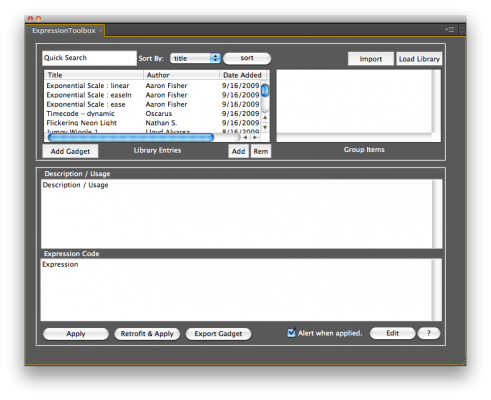
The Toolbox is a centralized location for you to store commonly used expressions, as well as making it easy to apply and retrofit to the comp you're currently working on. You can group expressions that require multiple properties and controls to be enabled.
A Few Features:
- Grouping (assign a group 'name' - or select an existing one at any time to view all of expressions in the group only at the same time)
- Retrofitting ( this will pull layer names out of the expression, and allow you to select from a list generated from the current comp, which layer SHOULD be referenced)
- Auto generation of layer effects ( based on expression code; Sliders, radio buttons, angles, points, etc.. will be generated automatically if they are referenced in the expression you are using, this is optional of course )
- Sort by expression name, author and date ( these are created as expressions are entered into the library )
- Expression Editing ( go back and edit author name, expression name, description - usage information, or the expression itself at any time )
- Ability to apply current expression to the currently selected property of any layer.
- Distributable ( the library file names and content is entirely up to you, and they are lightweight and transferable to others)
- Merging of libraries ( you are able to import libraries from others and consolidate them into one "main" library if you wish )
So go ahead and give the Expression Toolbox a try, and see how easy it can be to organize your expression collection without having to dig through text files or forum posts to find your expressions.
Sharing expressions on a global scale:
The next step for the Expression Toolbox will be an online entry system that will allow you to enter your expressions to a global web driven database that anybody can access. You will then be able to download the most recent version of this database directly from the script. This will be in the next big release of the Toolbox. For user support or feature requests for the Toolbox, please visit: http://support.croedesign.com
*** Important note for Windows 7 Users :
Windows 7 has a LOT of security built in, which keeps you from writing to all directories except My Documents. This is causing the script to silently fail, it will go through the motions of saving but the library remains unchanged, this is because you don't have permission to write to the file or directory. Follow this link for information on how give yourself permission to modify directories / files.
http://www.blogsdna.com/2159/how-to-take-ownership-grant-permissions-to-access-files-folder-in-windows-7.htm
Thanks for your patience, hope this helps :)
| After Effects | CS6, CS5.5, CS5, CS4 |
|---|
1.5 (Current version) - Jul 1, 2010
Note: There is a known issue within the CS5 ScriptUI where the multi-column listbox doesn't refresh properly when it is populated with content (in this case expressions). The simple workaround is to slide one of the dividers and it will display the scrollbar and fix any overlapping text.
- 1.11 Fixes a failure to load when descriptions contain symbols. Also fixes a few behind the scenes issues to tidy things up. - Dec 2009
- 1.1 Fixes a few bugs. One was causing retrofit and apply to fail on load. The other was a problem with line breaks carried over from websites when pasted. - Nov 2009
- 1.0 Initial Release - Nov 2009
-

- Compatibility After Effects
- Compatibility Premiere
Animated Illustrations bundle for Animation Composer
Add to CartThis product has been discontinued. You can now purchase all Mister Horse products through a single subscription plan. -

-
- Compatibility After Effects
Layer Library
Automate your workflow by saving groups of layers as presets. Then let Layer Library create them all for you, along with their effects, masks, markers, keyframes, expressions ...Add to Cart -
- Compatibility After Effects
Expression Calculator
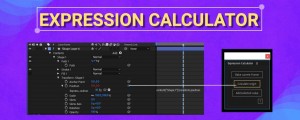
Add to CartA handy tool to calculate the difference value of a selected property, before and after an expression. Use it to design smarter After Effects templates that use expressions.
-

- Compatibility After Effects
- Compatibility Premiere
Colorful Style Pack for Animation Composer
Add to CartThis product has been discontinued. You can now purchase all Mister Horse products through a single subscription plan. -

- Compatibility After Effects
REACH: AEssential Kit
Add to Cart
Ready to take your motion design workflow to uncharted territories? Reach is an all-encompassing, adaptable, and ever-evolving toolset.
It infuses the After Effects toolkit with a medley of uniquely innovative utilities. From elementary to intricate, Reach takes the expected and elevates it into the realm of the extraordinary. Simplify the complex, streamline the cumbersome, and catalyze your creativity with Reach - the quintessential companion for every After Effects adventurer
Elevate your art. Reach for the stars.