
KeyTweak
-
Compatibility After Effects Please check exact version compatibility under the "COMPATIBILITY" tab below
 Adding to cart...
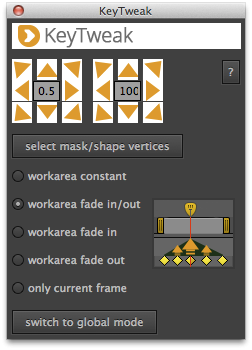
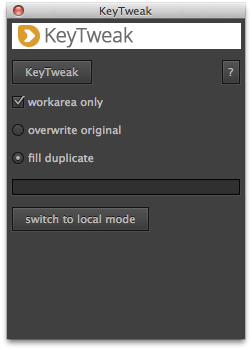
 Have you ever animated a mask with 100 keyframes then had to modify each and every one of them by hand to correct errors? With KeyTweak, you only need to modify one or two keyframes and the others are automatically changed for you. What’s more, with KeyTweak you can modify not only masks, but any other keyframed property too. For example, you can for example also use it to correct a drifting track, or quickly refine the keyframed movement of a layer.
Modifying Position Keyframes with KeyTweak
Modifying tracked Masks with KeyTweak
Watch more tutorials about KeyTweak at mamoworld.com
Other Voices
If you're a #VFX artist, and you use @AdobeAE, check out this plugin, "KeyTweak" on @aescripts. It's like having an Mocha-like Uber key right in After Effects. Huge time saver. https://t.co/B5FZdYPntA
— Eric M. Levy (@ericmlevy) November 13, 2017
Thank you for this! I'm amazed AE hasn't added an Uber Key like Mocha has, but, we have KeyTweak!
— Chris Heuer (@FreefallFX) March 13, 2019
Modifying Position Keyframes with KeyTweak
Modifying tracked Masks with KeyTweak
Quick Tip: Modifying Keyframes with KeyTweak
Tutorial: Bring Your Letters to Life with the Puppet Tool!
This After Effects tutorial shows how to use the tool KeyTweak to create animations with the puppet tool very easily.
Tutorial: Tetris part 2
In this tutorial we move Tetris bricks according to the music with Beat Assistant and KeyTweak. Usage of KeyTweak starts around 17:00.
Watch more tutorials about KeyTweak at mamoworld.com
| After Effects | 2024, 2023, 2022, 2021, 2020, CC 2019, CC 2018, CC 2017, CC 2015.3, CC 2015, CC 2014, CC, CS6, CS5.5, CS5, CS4, CS3 |
|---|
2.5.002 (Current version) - Feb 4, 2021
2.5.001 - Dec 1, 2020
2.5.000 - Aug 5, 2019
- improved installation instructions
2.4 - Nov 7, 2016
2.3 - Sep 2, 2013
- 2.3 - Sep 2013
- updated user interface to match new CI
- 2.2 - Nov 2012
- more compact user interface
- more robust creation of images
- fixed bug with bezier handle interpolation
- 2.1 - Feb 2011
- In local mode, several properties can now be modified simultaneously (if the property is not a mask)
- global mode works now also with 1d-properties
- images are embedded now in script source
- 2.0 - added local mode - Nov 2010
- 1.0 - initial release
-
- Compatibility After Effects
TimeMarker
Add to CartA smarter way to add custom markers to comps and layers in After Effects. Adjust the color, add a comment, set a duration, and protect a range of keyframes from being time-stretched.
-
- Compatibility After Effects
Roll it!
Painless and super fun way to roll any shape or mask in After Effects.Add to Cart -

- Compatibility After Effects
TrackerViz
Provides a tool box for visualizing positional data. Indispensable if you do any kind of serious tracking in After EffectsAdd to Cart -

- Compatibility After Effects
Super Resize Me!
Name Your Own Price!Add to CartBatch resize After Effects projects.
-
- Compatibility After Effects
Rift
Provides methods to shift, sequence, stagger, or randomize layers properties like in and out points, keyframes, markers and more, presented in a compact UI.Add to Cart -
- Compatibility After Effects
Exte
Add to CartA tool for extending paths. You can create an extended line from a shape with an animation. All you have to do to get the extended line is to pick two points on the path.
-
- Compatibility After Effects
Glitch Bundle for Squash & Stretch Pro
Add to CartThis bundle includes 18 behaviors with 69 variants and more than 50 sound effects to create glitch effects with Squash & Stretch Pro.
$0.00 -

- Compatibility After Effects
TextExploder V2
Add to CartSplit text layers into characters, words, lines and more. The placement of each character is accurately preserved without expressions, text animators or other tricks.
$19.99 -
- Compatibility After Effects
Automation Blocks for After Effects
Add to CartAutomation Blocks is an infinite collection of premade, one-click tools for any task. With Automation Blocks, you can fully customize all the tools, and even create your own!
$59.99 -

- Compatibility After Effects
Tracker2Mask
Move masks with trackpoints. Importantly, you don't need one trackpoint for each maskpoint.Add to Cart$9.99 -

- Compatibility After Effects
MochaImport+ V6
Add to CartMochaImport simplifies your workflow between mocha and After Effects. Create stabilized precomps, move masks, effect points and layers, and distort them in perspective.
$49.99 -
- Compatibility Premiere
Automation Blocks for Premiere Pro
Add to CartAutomation Blocks is an infinite collection of premade, one-click tools for any task. With Automation Blocks, you can fully customize all the tools, and even create your own!
$59.99