
Throttle-n-Purge
-
Compatibility After Effects Please check exact version compatibility under the "COMPATIBILITY" tab below
 Adding to cart...
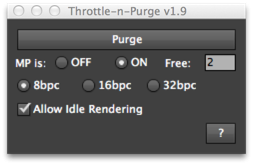
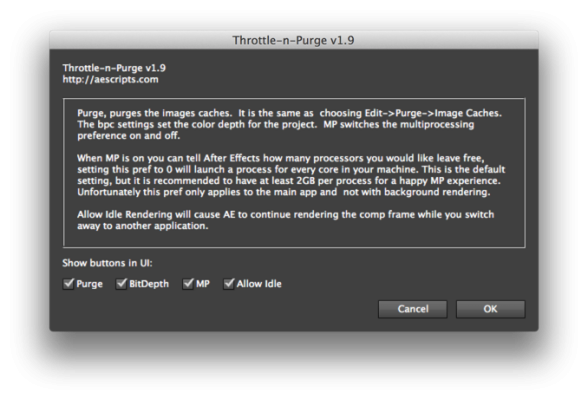
 A dockable UI for quickly accessing preferences to speed up After Effects. Change project bit-depth, multiprocessing, and idle rendering as well as quickly purging the image caches.
Starting with After Effects CS4, there is a new multi-processing throttle system that manages how many CPU's are to be left free for other applications. Also adds access to a little known hidden preference that allows you to set the quality of the Toggle Pixel Aspect Correction button in the Comp View. (Please note that After Effects needs to be restarted after changing the PAR quality, this pref is only available in CS3)
Has the option of showing or hiding the Purge button to suit your preference.
| After Effects | 2022, 2021, 2020, CC 2019, CC 2018, CC 2017, CC 2015.3, CC 2015, CC 2014, CC, CS6 |
|---|
1.9 (Current version) - Feb 28, 2013
- 1.8 Added CS6 support, combined into one version 02/2013
- 1.7 Added CS5.5 support 05/2011
- 1.6 Disabled PAR Correction Quality feature in cs5 since it is no longer necessary 10/2010
- 1.51 fixed idle rendering in CS5 06/2010
- 1.5 Made CS5 compatible - 05/2010
- 1.3 Fixed PAR Quality bug if it has never been selected and is missing from prefs - 11/2009
- 1.2 Updated for CS4, added PAR Correction Quality - 11/2008
- 1.1 Added 8.0.2 prefs - 08/08
- 1.0 Original Release - 10/07
-

- Compatibility After Effects
BG Renderer MAX
Add to CartNow supports native multi-threaded render. The power to render compositions in the background with full control!
Multiprocessing, rendering to both sequence and mp4/ProRes, remote monitoring, lots of integrations, notifications – all in one super tool.
-

- Compatibility Davinci Resolve
ColorTwist for Davinci Resolve
Add to CartColorTwist is a powerful bundle of professionally developed Look Development DCTLs
Nx ColorWarp – Control / Shift Hues to any other hues with amazing precision!
Nx Saturation – Control saturation of any hue/color with extreme precision and control.
Nx Luma – Control the luminance or brightness of any specific hue/color.
Nx Density – Add density to any or all the colors for a filmic / cinematic look. -

- Compatibility Premiere
Ultimate Titles
Add to CartGenerate title animation procedurally or edit and use pre-generated presets
-

- Compatibility After Effects
Pixy Halftone
Add to CartPixy Halftone is a simple and easy After Effects Pixelated halftone effect plugin. Add vintage retro style to any animation video text or anything else. Pixy can also handle alpha very well and that's very interesting :)
-

- Compatibility After Effects
Dresser
Add to CartLayer Styles the Easy Way! Dresser is the tool for editing applying and saving Layer Styles in After Effects.
It will help you save more than 50% of your time when working with Layer Styles, by reducing a ton of clicks.
And with it's built-in Preset Browser it will make it easy for you to save and access your pre-made styles with customisable thumbnails. -

- Compatibility After Effects
animationPATTERNS
animationPATTERNS is a keyframebased easing assistance, that allows you to edit and create new easing types.Add to Cart
-
- Compatibility After Effects
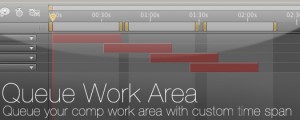
Queue Work Area
Queue your comp with the work area set as a custom duration. This way you can set several work areas to one queue and render them all at once.Add to Cart$14.99 -

- Compatibility After Effects
Layer Handles
Adds a user definable number of frames to the in and out points of the selected layers.Add to Cart$4.99 -

- Compatibility After Effects
Fit2Frame
Fits selected layers proportionally to fill the Comp frame by giving you the choice of either cropping or letterboxing.Add to Cart$9.99 -

- Compatibility After Effects
Immigration
Add to CartA smart import and batch replace tool that greatly improves the workflow of importing and replacing files especially file sequences and highly nested hierarchies.
$44.99 -

- Compatibility After Effects
AE Global Renamer 2
Add to CartBulk rename anything in After Effects. Completely rewritten with lots more functionality and a super tiny UI!
$29.99 -

- Compatibility After Effects
Render Frame at Markers
Add to CartWill send to the render queue any frames that are marked by layer markers that are within the comp work area. This would be equivalent to going to a point in time in your comp and selecting "Save Frame As->File"
$14.99