
Expressionist
-
Compatibility After Effects Please check exact version compatibility under the "COMPATIBILITY" tab below
 Adding to cart...
Features
- Monospaced font
- Syntax highlighting
- Line numbers
- Word wrap
- Active line highlighting
- A whole bunch of shortcuts for faster editing
- Adjustable font size
- Automatic bracket closing
- Smart indentation
Expressions
Add an expression to multiple properties at once, load an existing expression for editing, toggle your expressions on/off and clear multiple expressions.
Selections
Make multiple selections and block selections.
Inline Errors
Any error that occurs will be shown on the line that causes it.
Pick Whip
Use the pick whip on all the usual suspects; properties, layers, comps and of course items from the project panel.
Scripting Mode
Use the editor to quickly write and execute a script without leaving After Effects.
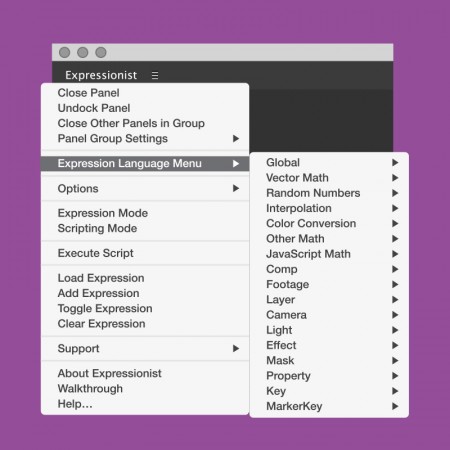
Expression Language Menu
Use directly from the panel to insert your references.
Shortcuts
You can use a selection of shortcuts from the popular Sublime Text editor, right in Expressionist.
Reactions
Yet another script that should be standard in After Effects: Expressionist https://t.co/VQm9XFkIPU pic.twitter.com/eGe6C1s3Jl
— Motionographer (@motionographer) March 21, 2016
Nice work @klustre! Expressionist - Sublime text editor like functionality within @AdobeAE https://t.co/Zhn4U3UkfO https://t.co/ykNE6trndZ
— Michelle Higa Fox (@higapod) March 22, 2016
Expressionist Brings a Wicked, Modern IDE to Ae: https://t.co/ZejPcZUBpO #AfterEffects
— lesterbanks (@lesterbanks) March 21, 2016
Discovered Expressionist by @Klustre today. I'm so happy, can't wait. This is what Adobe should have done years ago. This is soooo great!
— Terkel Gjervig (@terkelg) November 14, 2015
@Klustre Expressionist is the greatest addition to AE of all time. You've saved me hours and hours of dev time. Your are the man!
— Matt Jylkka (@MtMograph) January 22, 2016
Compatibility
In order to do its cutting edge magic, Expressionist requires After Effects CC2015.1 (13.6). It will not be possible to make it work with previous versions.
Documentation
You can read the Expressionist documentation for detailed info.
| After Effects | 2024, 2023, 2022, 2021, 2020, CC 2019, CC 2018, CC 2017, CC 2015.3, CC 2015 |
|---|
1.5.6 (Current version) - Sep 11, 2019
- Editor not showing
1.5.5 - Sep 5, 2019
- Support for MacOS 10.15 Catalina
1.5.4 - Sep 4, 2018
- Conflict with Templater 2
- Update check not connecting to server
ADDED
- Support for floating licenses
1.5.2 - Aug 16, 2018
- Pickwhip only showing 2 axes for light and camera properties
Added
- Missing data-driven animation methods to expression reference for AE 15.0+
- New project properties to expression reference for AE 15.1+
1.5.0 - Apr 6, 2018
http://www.klustre.nl/expressionist/1.5.0/known-issues.html
ADDED
- Support for AE CC2018 (15.0)
- Path Property reference for CC2018+
- Pickwhip a dimension from a multidimensional property
- More Sublime shortcuts (https://www.sublimetext.com/)
- Better licensing experience, with update notifications and improved support tickets
- Code folding
- Specific comments to fold arbitrary code
- Similar word highlighting
- Scroll past the end of the editor
- Shortcut to toggle between expression-/scripting mode
CHANGED
- The default shortcuts have changed
- The trial version is now unlimited for 7 days
- Errors now appear in the gutter, not as a widget
- New syntax theme
FIXED
- Edit all properties, i.e. paths, puppet-pins, etc
- Errors not appearing or disappearing
- Shortcut Cmd-A/Ctrl-A for Select All
1.0.0 - Feb 27, 2016
-

- Compatibility After Effects
BAO Mask Avenger 2
Add to CartControl mask vertices (and tangents) individually using a native plugin in After Effects!
-

- Compatibility After Effects
- Compatibility Premiere
Blace - AI Face Detection & Blurring
Add to CartArtificial Intelligence-based plugin for face detection and blurring.
Please check full compatibility details below.
-

- Compatibility After Effects
RasterFast
Add to CartContinuously rasterize entire project with a click.
-
- Compatibility Davinci Resolve
Pixel Sorter for Resolve
Add to CartPixel Sorter was the first tool to bring the pixel sorting glitch effect available for motion designers and video editors within After Effects and Premiere Pro. Experimenting with Pixel Sorting just became so much easier! Since its launch, AEPS had a huge success in Broadcast TV, Live performances, VJs, Music Videos, Video Games, Photography and even Apparel! Version 3 brings a lot of new useful features.
Pixel Sorter is also available for After Effects & Premiere Pro and Nuke as a separate license.
-
- Compatibility After Effects
GuidesUp!
Add to CartCreate a magnetic 3D isometric Map in 1 click, set up Golden Ratio Guides, 16:9 Guides, Hex Map...And above all, manage items, anchors and guides like never before!
-

- Compatibility After Effects
Stroky
Add to CartAdd countless strokes with perfect corners and unlimited width to any object while keeping the effects intact with just ONE click.