Pixel Pusher
-
Compatibility After Effects Please check exact version compatibility under the "COMPATIBILITY" tab below
 Adding to cart...
Overview
Pushes layers by your pixels. Works recursively on multiple layers and uses transform position (XYZ) to push layer(s) by your defined pixels. Additionally You can use a multiplier key to multiply the value by your defined value.
Features
- Keyframes Support
- Multiple Layers Support
- 3D Support
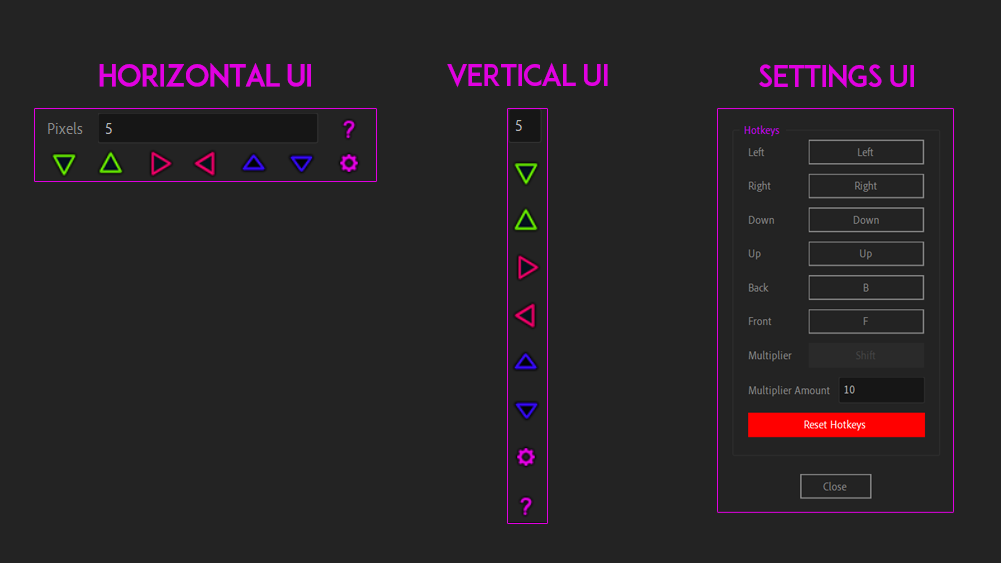
- Responsive panel (UI works horizontally and vertically)
- Supports Decimal Numbers
- Hotkeys Settings - You can define your keys (works when UI is selected).
- Windows and Mac friendly (Supports Mac UI Windows and Mac keys).
| After Effects | 2024, 2023, 2022, 2021, 2020, CC 2019, CC 2018, CC 2017, CC 2015.3, CC 2015, CC 2014, CC, CS6, CS5.5, CS5 |
|---|
1.2.3 (Current version) - Mar 3, 2024
► Pop up a dialog if no items in the project panel.
► Check if the selected item is a composition
1.2.2 - Feb 27, 2024
► Front and Back icon switched
1.2.1 - Feb 27, 2024
► Ctrl + Z works properly
► Vertical tooltips
► Tooltip fixes
► UI Fixes
► Documentation Updates
► Hotkeys: displaying current used key value
► Mac: Hotkey Arrow buttons multiply values
► Script breaks if something other than comp is selected.
1.2.0 - Feb 19, 2024
► Keyframes Support
► Added a little space before horizontal pixels text.
► Hotkeys Mac Compatibility tooltips.
► Updated Settings Horizontal Tooltip
► Disabled hotkeys when updating pixel value.
► Added Active Viewer Selection after pixel's value is updated (Saves one step for Known Bug)
► Added Hotkey for settings.
► Updated Documentation (UI + File)
1.1.6 - Feb 7, 2024
► Mac Hotkeys Fixes
► Mac Reset Button Fixes
1.1.5 - Feb 4, 2024
► More dense UI
► Close button for hotkeys window
► Added About button with Docs and useful links
► UI Fixes
► AE 2024 Compatibility
1.1.3 - Feb 1, 2024
► Dialog fixes
1.1.2 - Feb 1, 2024
► Various bug fixes
1.1.1 - Feb 1, 2024
► Fixed Button's Text for Mac and Windows
► Fixed UI Windows for Mac
► Fixed hotkeys for all UI windows
► Added Hotkeys Reset Button
► Added Mac key support
► Changed default hotkeys Key Values for Mac support(front is "F" and back is "B")
► UI Fixes
► Fixed Push functions (fixed values miss-calculation)
► Updated docs
1.1.0 - Feb 1, 2024
► Fixed Button's Text for Mac and Windows
► Fixed UI Windows for Mac
► Fixed hotkeys for all UI windows
► Added Hotkeys Reset Button
► Added Mac key support
► Changed default hotkeys Key Values for Mac support(front is "F" and back is "B")
► UI Fixes
► Fixed Push functions (fixed values miss-calculation)
► Updated docs
1.0.4 - Apr 15, 2023
► Added: Enter / Space / Esc closes dialogs
► Updated Filename (please remove old file!)
1.0.3 - Jun 3, 2022
1.0.3 - May 25, 2022
- Other fixes
1.0.2 - May 25, 2022
1.0 - May 25, 2022
-
- Compatibility After Effects
Path Duplicator
Path Duplicator duplicates your layer along a path.Add to Cart -
- Compatibility After Effects
Rift
Provides methods to shift, sequence, stagger, or randomize layers properties like in and out points, keyframes, markers and more, presented in a compact UI.Add to Cart -

- Compatibility After Effects
BAO Distortion Bundle
Add to CartGet all of BAO's distortion plugins and save 25%. Use BAO Boa to distort layers along mask paths, BAO Layer Sculptor to warp and sculpt layers with extreme precision and BAO Joint to connect and distort a layer between 2 different parents.
-

- Compatibility After Effects
KeyFast
Add to CartYour Motion Design Copilot!
Auto eased keyframes, 1-click animations, and more.
Try it free! -
- Compatibility After Effects
BAO Boa
Add to CartBoa is a plugin for After Effects built to distort layers along mask paths.
-