
Pixel Stretch
-
Compatibility After Effects Please check exact version compatibility under the "COMPATIBILITY" tab below
-
Compatibility Premiere Please check exact version compatibility under the "COMPATIBILITY" tab below
 Adding to cart...
How it works
Pixels are stretched on a subpixel precision according to their brightness. The stretching is cumulative for every row or column, which means a pixel offsets all the following pixels on its line. This produces much more organic looking patterns compared to what you get using simple effects like "line stretch". The basic effect is similar to what you'd get on an old analog TV, but all the knobs this filter provides give you much more possibilities!
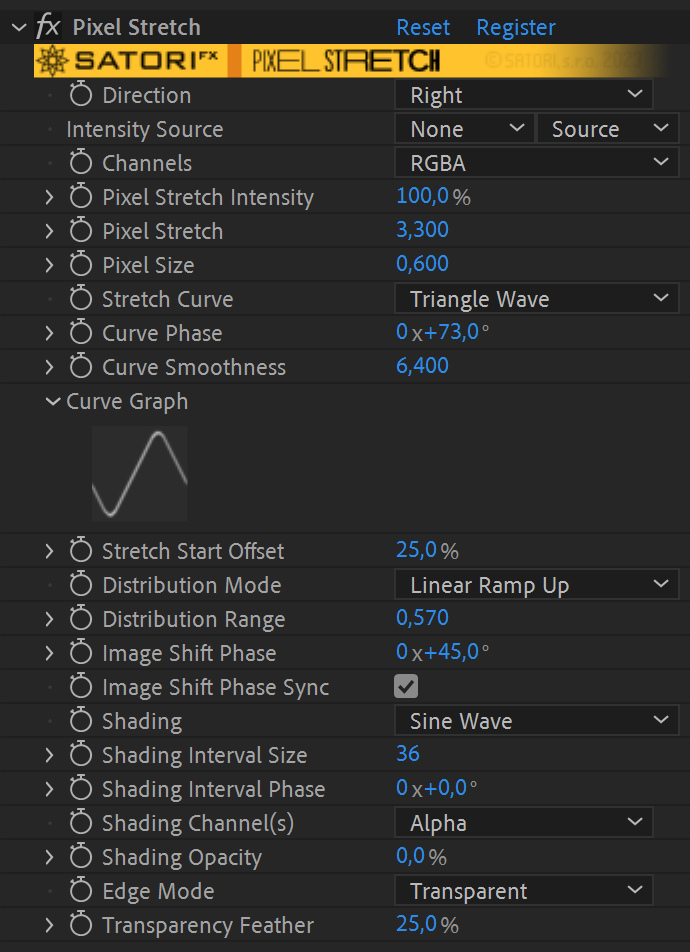
Available parameters rundown
- Direction defines towards which edge the stretching occurs.
- Intensity Source - use a different layer to stretch the current one. This can be thought of as a "stretch mask".
-
Channels - allows you to specify which color channel(s) the effect should be applied to
- Luma - the effect is applied to all channels (including alpha) equally using the overall luminance of a pixel (default behavior in previous versions).
- RGBA - the effect is applied on each of the RGBA components separately.
- Red, Green, Blue, Alpha - affects just the selected channel.
- Luma (no Alpha) - the effect is applied to all channels (excluding alpha) equally using the overall luminance of a pixel, and the alpha channel stays intact.
- RGB (no Alpha) - the effect is applied on each of the RGB components separately, and the alpha channel stays intact.
- Pixel Stretch Intensity - controls how much the effect is applied. At 0%, the effect is not applied at all, and at 100% (default behavior in previous versions), the effect is applied in full. In addition to stretching parameters, it also interpolates shading opacity and image shift, which is helpful for gradually animating the application of the effect without the need to modify other parameters.
- Pixel Stretch - the maximum length by which a pixel can grow. With the default stretch curve, darkest pixels add 0 and brightest pixels add this value to the final length.
- Pixel Size - base size of a pixel. The final pixel size is between Pixel Size and Pixel Size + Pixel Stretch, eg. 0.6 to 3.9 in the UI screenshot.
- Stretch Curve specifies how pixel brightness maps to stretching. The default mode (Linear Ramp Up) doesn't stretch dark pixels at all and stretches bright pixels by maximum amount. Linear Ramp Down is the opposite behavior. The following chart illustrates all the available mappings:
- Curve Phase - offsets the values of stretch curve mapping. See the manual (downloaded with the plugin) for a more detailed explanation.
- Curve Smoothness - helpful for smoothly connecting the beginning and the end of discontinuous curves (linear ramps and exponentials) or smoothing out a triangular curve.
- Curve Graph - visualizes the curve mapping for your convenience. (not available in CC2014 or earlier)
- Stretch Start Offset - skips a percentage of the image before pixel stretching starts.
-
Distribution Mode - defines how pixel stretching is spread over the image
- Constant - the stretching occurs over the whole image evenly.
- Linear Ramp Up - the stretching gradually ramps up from no stretching to the values defined by Pixel Size + Pixel Stretch.
- Linear Ramp Down - the stretching starts at the values defined by Pixel Size + Pixel Stretch and gradually ramps down until no further stretching occurs.
- Distribution Range - defines what percentage of the image should be affected by stretching. Values from 0 to 1 affect from 0 up to 100% of the image width (or height, when stretching vertically). Values above 1 move gradually into infinity - if you use Pixel Size smaller than 1, the image may be repeated and this is when values above 1 come into play. The default value is 2, ie. infinity.
- Image Shift Phase - offsets the image in the stretch direction.
- Image Shift Phase Sync - when shifting the image using Image Shift Phase, the luminosity values can be picked from the shifted image (on) or the original image (off)
- Shading overlays shading patterns over the stretched image.
- Shading Interval Size - defines how thick the shading patterns are.
- Shading Interval Phase - offsets the shading pattern.
- Shading Channel(s) allows you to select whether shading dims the image (RGB) or the alpha channel
- Shading Opacity specifies how opaque the shading patterns are.
- Edge Mode - when using starting pixel sizes lower than 1, the stretched image may not cover the whole frame. The edge mode defines how the image should be repeated, when this occurs.
- Transparency Feather - when using the Transparency Edge Mode, edges where the image ends may be smoothed using this option.
Usage hints
- You can replicate the simple "line stretch" effect like by:
- adjusting the Stretch Start Offset to desired row/column
- increasing Pixel Stretch and Pixel Size values to maximum
- Use more instances of the effect on the same layer/clip. Stretch Start Offset used together with Distribution Mode and Range are handy to alter only the desired part of the image.
- Edge Mode set to Transparent with Transparency Feather on are useful for transitions. The same goes for using Shading Opacity with the layer's opacity.
- Extending narrow images - apply the effect twice in opposite directions. Set Stretch Start Offset on both to around 60-80% according to the aspect ratio, Distribution Mode to 'Linear Ramp Up,' Distribution Range to 0.1-0.2, and finally tweak Pixel Stretch and Pixel Size value until you fill the whole width. Try different Stretch Curves and Stretch Curve Phases to find the ones that best fit your image.
| PLATFORMS | |
| Microsoft Windows | ✓ |
| macOS Intel | ✓ |
| macOS Apple Silicon | ✓ |
| APPLICATIONS | VERSIONS | |
| After Effects | ✓ | CS6 - 2024 |
| Premiere Pro | ✓ | CS6 - 2024 |
| FEATURES | |
| Max. Rendering Resolution | no limit |
| Multi-Frame Rendering | ✓ |
| Utilizing GPU | ✗ |
| After Effects | 2024, 2023, 2022, 2021, 2020, CC 2019, CC 2018, CC 2017, CC 2015.3, CC 2015, CC 2014, CC, CS6 |
|---|---|
| Premiere | 2024, 2023, 2022, 2021, 2020, CC 2019, CC 2018, CC 2017, CC 2015.3, CC 2015, CC 2014, CC, CS6 |
1.6.0 (Current version) - Jul 20, 2023
• Addition of Pixel Stretch Intensity parameter to easily modulate the strength of the filter
• Fix of intensity layer mapping in edge cases (and possible crashes)
• Fix of crash for unregistered version with composition height over 4096 pixels (watermark bug)
• Aescripts framework v4.0.7 - improved stability of license checks
1.5.1 - Apr 28, 2022
• Aescripts framework v4.0.4 - Fixed "invalid format" error for floating licenses
1.5.0 - Mar 8, 2022
• Multi-frame rendering support
• Addition of Curve Smoothness parameter
• Addition of Curve Graph
• Code signed Windows binary
• Fix of rare error pop-up ("attempt to call CheckoutLayer on non layer parameter") in After Effects
• SatoriFX branding
• Latest v4.0.2 Aescripts framework
• Fix of crash while using intensity layer with image shift conjunction
• Correct intensity layer mapping
1.1.0 - Nov 29, 2020
• Alpha channel support
• Numerous bugfixes
1.0.0 - Oct 15, 2020
-
- Compatibility Nuke
Pixel Sorter for Nuke
https://aescripts.s3.us-east-1.amazonaws.com/bskl/Add to CartPixel Sorter was the first tool to bring the pixel sorting glitch effect available for motion designers and video editors within After Effects and Premiere Pro. Experimenting with Pixel Sorting just became so much easier! Since its launch, AEPS had a huge success in Broadcast TV, Live performances, VJs, Music Videos, Video Games, Photography and even Apparel! Version 3 brings a lot of new useful features.
Pixel Sorter is also available for After Effects & Premiere Pro and Resolve as a separate license.
-
- Compatibility Davinci Resolve
Pixel Sorter for Resolve
Add to CartPixel Sorter was the first tool to bring the pixel sorting glitch effect available for motion designers and video editors within After Effects and Premiere Pro. Experimenting with Pixel Sorting just became so much easier! Since its launch, AEPS had a huge success in Broadcast TV, Live performances, VJs, Music Videos, Video Games, Photography and even Apparel! Version 3 brings a lot of new useful features.
Pixel Sorter is also available for After Effects & Premiere Pro and Nuke as a separate license.
-

- Compatibility After Effects
Squash & Stretch
Add to CartCreate animations with Squash & Stretch in no time with a collection of ready to use behaviors, carefully handcrafted by professionals and controlled by an intelligent system – ensuring your animations come to life without starting from scratch each time.
-
- Compatibility After Effects
- Compatibility Premiere
- Compatibility Media Encoder
Pixel Sorter 3 for After Effects and Premiere Pro
Add to CartPixel Sorter was the first tool to bring the pixel sorting glitch effect available for motion designers and video editors within After Effects and Premiere Pro. Experimenting with Pixel Sorting just became so much easier! Since its launch, AEPS had a huge success in Broadcast TV, Live performances, VJs, Music Videos, Video Games, Photography and even Apparel! Version 3 brings a lot of new useful features.
Pixel Sorter is also available for Nuke and DaVinci Resolve as a separate license. PROMO: Get a 30% discount on the regular price on Nuke and Resolve licenses when you already have Pixel Sorter for AE/Premiere
-
- Compatibility After Effects
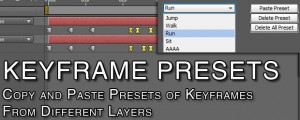
Keyframe Presets
Create presets for keyframes from multiple layersAdd to Cart -

- Compatibility After Effects
Cartoon Bundle for Squash & Stretch Pro
Add to CartThis bundle extends Squash & Stretch Pro with various behaviors and sounds to give your animations an organic and fun cartoon style.