
Trajectory
-
Compatibility After Effects Please check exact version compatibility under the "COMPATIBILITY" tab below
 Adding to cart...
The trajectory script will take all layers in a composition and plot them evenly on a line between 2 nulls.
Getting Started
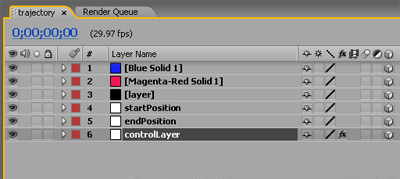
Install the script in the scripts folder. To run the script, simply select the layers you would like to be linked in the trajectory and select the script from the File->Scripts menu. When the script is run, it will take all layers in the selected composition and make them 3d. It then creates 3 nulls, 2 of these nulls are used to create the trajectory along which all layers lie and the third null is a control layer which will be discussed in a moment. The 3 nulls must be the last 3 layers in the comp, and the control layer must be the last layer in the comp. You can move the 2 nulls named "startPosition" and "endPosition" and all the layers in your comp will disperse evenly on a line between the 2 nulls. Add keyframes to the nulls position and the layers will follow.
Control Layer
The "controlLayer" null controls the rotation and opacity of the layers. The "Transform Delay" slider allows you to offset each layers reaction to changes in the control layer...so if you have xRotation on the controlLayer keyframed from frame 1 to 10 and offset set to 5, layer 1 will do the xRotation from frame 1 to 10; layer 2 will transform from 6 to 15; and layer 3 will transform from frame 11 to 20. The reverse delay checkbox will cause the delay to go from last layer to first layer instead of first to last. Check the "Disable Control" checkbox if you would like to individually control these parameters from each layer insted of the control layer.
Compress Expand
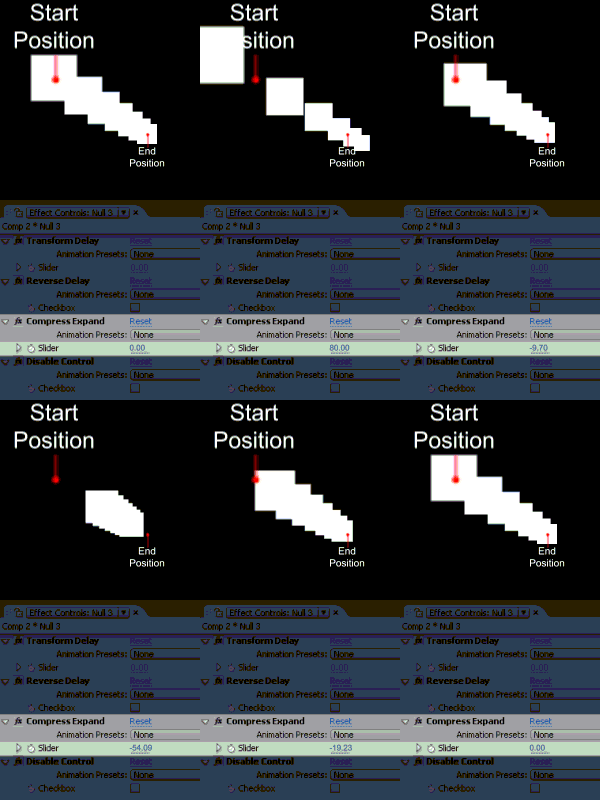
The compress expand slider allows you to dynamically lengthen or shorten the length of your trajectory. A positive number will lengthen your line, a negative number will shorten it. a value of zero will give you a normal trajectory where the first layer will have the same position as the startPosition null and your last layer will have the same position as the endPosition null.
Adding Layers to your Trajectory
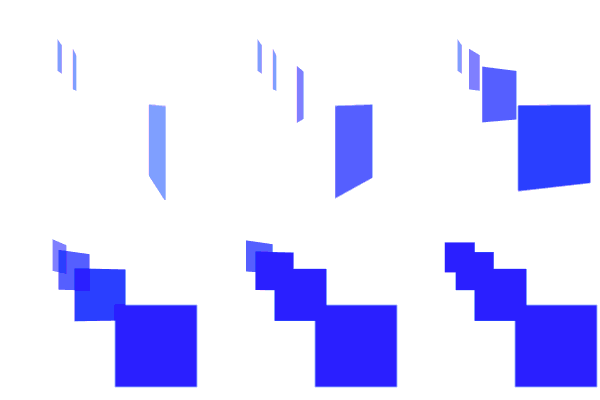
If you want to add a layer from your project to a trajectory comp, simply duplicate any layer in the comp that is not a null, select the dup, and alt+drag the item and drop it on the selected layer and it will become part of the trajectory.
Using Trajectory Comp in another Comp
If you put your trajectory comp inside your main comp and enable "collapse transformations" for that layer, your trajectory comp will become part of the scene and react to cameras.
| After Effects | CS6, CS5.5, CS5, CS4, CS3 |
|---|
- 2.51 Added new slider on the control null that allows you to lengthen and shorten (compress-expand) the length of the line. Thanks to Dan Ebberts for help with the code - 10/2010
- 2.01 Blessed for CS5 and updated to run in any language not just english. Thanks to: François Cora for the French translation and Jakob Behrends for the German translation - 06/2010
- 2.0 Initial release on aescripts.com - 01/2010
-

- Compatibility After Effects
Advanced Composition Grids
Tool that helps you organize your comp better with a wide variety of modular grids.Add to Cart -

- Compatibility After Effects
EFX Render Elements Plugin Suite
A full suite of plugins to help improve everyday compositing workflows.Add to Cart -

- Compatibility After Effects
BAO Boa
Add to CartBoa is a plugin for After Effects built to distort layers along mask paths.
-

- Compatibility After Effects
BAO Layer Sculptor
Add to CartPrecise layer warping and sculpting plugin for After Effects. Draw a mask exactly where you need it and warp it with perfect precision.
-

- Compatibility After Effects
BAO Mask 3D Warper
Mask based 3D modeling and precise 2D warping. Also great for character animation!Add to Cart -

- Compatibility After Effects
Layer Sitter
Add to CartLayer Sitter makes managing parented layers easy. Quickly parent selected layers using a filterable list, by creating new customized nulls, or using Quick Parents.
$8.00
-
- Compatibility After Effects
CompsFromSpreadsheet 5
Create versions of your After Effects comps using a spreadsheetAdd to Cart$49.99 -

- Compatibility After Effects
SpellCheck
Goes through the currently selected composition, and any precomp contained within and checks every text layer for proper spelling.Add to Cart$9.99 -

- Compatibility After Effects
Matrix
Takes a layer in your comp and breaks it into pieces. You choose the size of the pieces, whether to animate in order or random, and how long you want the transition to take.Add to Cart$14.99 As low as: $11.99