
EFX Render Elements Plugin Suite
-
Compatibility After Effects Please check exact version compatibility under the "COMPATIBILITY" tab below
 Adding to cart...
 Working with CG render passes is never simple. Any experienced compositor will tell you that with every step you encounter new challenges. They also know that in this workflow lies an enormous power - you can completely change your shot without re-rendering, or achieve the same look in less time.
This suite has workflow tools developed over many years that incorporate many tricks and solutions that help in everyday compositing tasks.
Feature highlights:
- select objects based on ID, Velocity or ZDepth pass,
- remove artifacts on the edges of objects that are common in render passes workflows,
- fix the 1 pixel gap between objects and their shadows in the shadow pass,
- blur a layer but without crossing the boundary between two objects.
- composite two layers using their ZDepth passes as a guide,
- project a layer onto a CG rendering so that it deforms nicely,
- create a depth wipe through a scene from back to front or the other way.
The suite includes 13 plugins:
- Alpha Streaks
- EFX ID Blur
- EFX ID Edge Blur
- EFX ID Select
- EFX ID-Z_Depth Blur
- EFX Shadow Fix
- EFX Velocity (Motion Vector) Select
- EFX Z-Depth Compose
- EFX Z-Depth Cut
- EFX Z-Depth Shadow
You can download the User Manual for details on individual plugins.
To check some of the plugins you can download the EFX Render Elements Free plugins here.
You can also buy just the Z-Depth plugins in the EFX Render Elements Z Depth Tools
Upgrade notice: If you already purchased ZDepth Tools and want to upgrade to the full Render Elements suite you will get a discount equal to the full purchase price of the ZDepth Tools. Login to see the discounted price if you qualify.
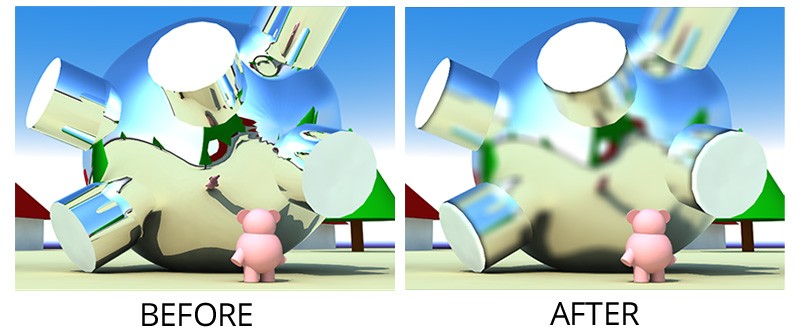
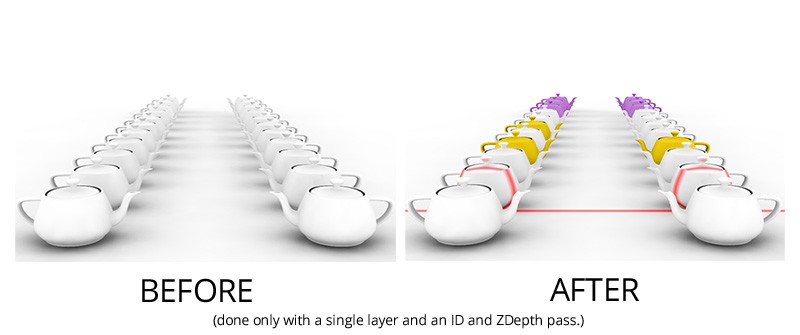
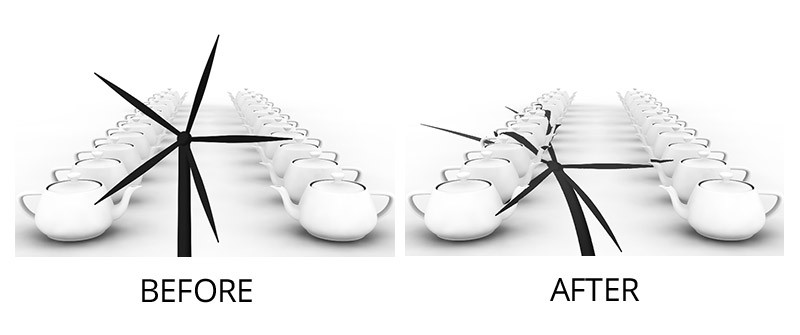
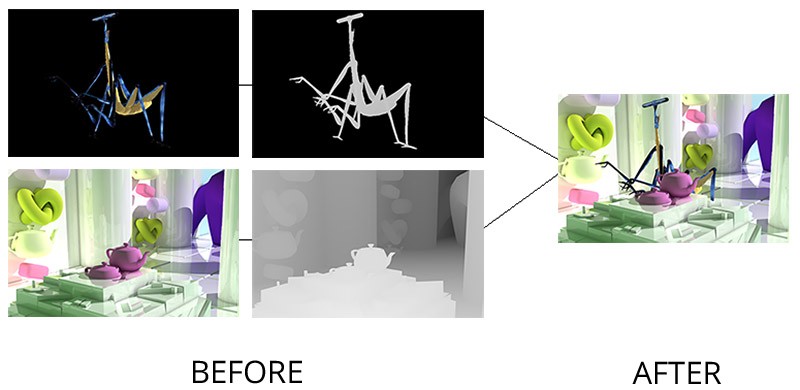

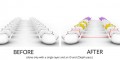

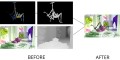
| After Effects | 2024, 2023, 2022, 2021, 2020 |
|---|
1.5 (Current version) - Feb 9, 2023
Improved compatibilty with 2023
1.5 - Feb 8, 2023
Improved compatibilty with 2023
1.4.3b - Aug 1, 2022
1.4.3 - Jun 3, 2017
1.4.2.1 - Dec 7, 2015
1.4.2 - Nov 3, 2015
1.4.1 - Apr 7, 2015
1.4 - Mar 25, 2015
- 1.2 - Updated licensing framework (will require that you re-enter your license code) - Dec 2013
- 1.1 - Converted to native plugin, added CS6 compatibility - April 2013
- 1.0.3 (May 2012)
- Velocity Select:
- added formats for VRay and MentalRay
- ZDepth Cut:
- added an option for inverting the depth map
- ZDepth Compose:
- added an option for inverting the depth maps
- added a Fade parameter for softening the intersection between the two layers
- Manual: fixed the Tip for non-AntiAliased ZDepth map - it was unnecessary all along ;)
- Caution: new installation folder structure – see manual
- 1.0.2 - ID Select color swatches can now be used in any order (Jan 2012)
- 1.0.1 - Fixed crashing issue with Z-Depth Cut (Dec 2011)
- 1.0 - Initial Release (Oct 2011)
-
- Compatibility After Effects
3D Primitives Generator 3
Add to CartGenerate 3D objects using native After Effects layers. Create Cubes/Cuboids, Cylinders, Pyramids, and Prisms with a single click. Customize the materials to whatever you desire.
-

- Compatibility After Effects
GEOlayers 3
Add to CartNow supports Helium for 3D landscapes. Design and animate maps directly in After Effects. Rebuilt from the ground up with tons of new features and faster and more powerful than ever!
-
- Compatibility After Effects
pt_Multiplane
Add to CartInstantly turn layered Photoshop or Illustrator files into 3D multiplanes. It adds expressions that let you freely move layers on the z axis without changing the look of the shot from the original camera position, making it easy to experiment with depth in your scene.
-
- Compatibility After Effects
Depth Scanner Lite
Add to CartNow with Depth Anything v2! Artificial Intelligence-based plugin for automatic easy depth estimation. Depth Scanner Lite is a slim variant of our Depth Scanner. It creates depth maps easily.
-

- Compatibility After Effects
Easy Comp
Add to Cart20% Off until Aug 15. A.I.-based plugin for easy footage composition and color matching.
-
- Compatibility After Effects
Power Cylinder
Add to CartA 3D Cylinder plugin with power controls! Elliptic distortion, unfolding, rich shading, self shadowing, reflections, DOF and comp lights and camera.
-
- Compatibility After Effects
EFX AB Compare
Add to CartThis plugin lets you compare the current layer (or composition if applied to an Adjustment Layer) to a reference layer.
Please note that this plugin is not compatible with CS6 or above
$2.99 -

- Compatibility After Effects
EFX Keying-Alpha Free
Three free plugins from the full EFX Keying/Alpha Plugin Suite. These plugins are useful when keying or creating alpha mattes. Check out the full suite for the rest of the toolbox.Add to Cart$0.00 -
- Compatibility After Effects
EFX Chromatic Aberration
This plugin lets you apply (or remove) the chromatic aberration effect to a layer.Add to Cart$14.99 -

- Compatibility After Effects
EFX Keying-Alpha Plugin Suite
Add to CartA full suite of plugins aimed to help you get better keys and alpha mattes.
$49.99 -
- Compatibility After Effects
EFX Render Elements Free
Add to CartTwo free plugins from the full EFX Render Elements Plugin Suite. These plugins are useful to help select object from an ID pass and remove artifacts from the resulting alpha channel. Check out the full suite for the rest of the toolbox.
Please note that this plugin is not compatible with CS6 or above
$0.00 -
- Compatibility After Effects
EFX Render Elements Z Depth Tools
These plugins will let you make the most use of a ZDepth pass that you often render out from a 3d application. It's a pass that stores the information about the distance from camera for each pixel - there is really a lot you can do with this data.Add to Cart$14.99 As low as: $13.49