True Comp Duplicator


Version: 2.2 Sign up to be notified by email when a new version is posted
Creates a complete duplicate of a comp hierarchy including sub-comps. Â If a comp is used multiple times, the comp only gets duplicated once and all remaining references point to the first duplicate. Â If the comps are arranged in a special folder hierarchy in the project panel, that folder hierarchy is preserved or duplicated (depending on user preference) for the duplicated comps.
New in version 2.0:
- Added dockable UI.
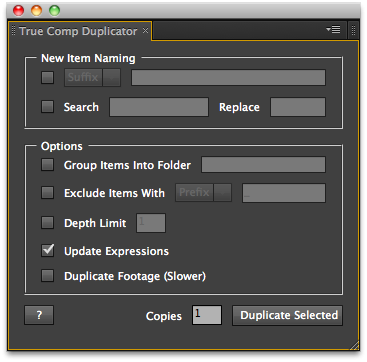
- Added suffix or search and replace new comp name.
- Maintain hierarchy and arrange into new folder option.
- Non-english AE support.
- Blessed for CS5.
- True Comp Duplicator UI 1
- True Comp Duplicator UI 2
Version History:
- 2.2 Fixed bug when running script from Scripts menu – 02/2011
- 2.1 Fixed folder hierarchy when using add into new folder option and CS3 comp name limit bug – 08/2010
- 2.0 Added UI, Â search and replace new comp name, maintian hierarchy and arrange into new folder option, non-english AE support, blessed for CS5 – 05/2010
- 1.0 initial release – 04/2010
The definitive collection of scripts and plugins for Adobe After Effects


I can’t thank you enough! I just finished a project that took around 360 hours took complete and it would have taken probably twice as long if I hadn’t had this. Seriously, great script!
Cheers,
Rob
Great script, use it 50 times a day. Two requests:
1. ignore case in whatever you are replacing
2. add an option to increment the comp based on a custom scheme
Only things missing!
Thanks man
This saved me loooooot of time!
This script has saved my life so many times, thank you!
I think the only extra thing it could use would be a third renaming option that would increment a sequence number, similar to how the incremental save function works in AE.
Hi,
is it possible to integrate the function to duplicate expressions within the comp aswell?
So that every expression in the duplicated Comp refers to the Duplicate and not the Original destination.
That would be a dream come true.
you excuse, you can also think that I am careless, but I don’t understand whether to do to unload this script from this page
Hi,
My main comp comprise “1 comp that contains images and text boxes”.
If I duplicate the main comp, the “1 comp” will be duplicated. What about the images and text boxes?
Seem to be having an issue with this script – its worked fine in the past, but now I’m finding when I run it, it duplicates the comp and any pre-comps, but none of the footage? I’ve tried it on 2 machines now and I get the same results – everything is duplicated except for the footage. Am I going crazy?
True Comp Duplicator only duplicates comps not footage. If you need comps created with different footage assets you might want to take a look at CompsFromSpreadsheet http://aescripts.com/compsfromspreadsheet/
This is a great script, but unfortunately, it’s not working properly for me
I’m running CS4 in OSX 10.5.8
If I create the exact heirarchy:
Mexico (folder)
–Main Comp (folder)
—-Mexico (comp)
–Pre-Comps (folder)
—-Mexico Text Precomp
and then follow the steps to create a brazil version, i get the following result:
Duplicated Comps (folder)
–Brazil (folder)
—-Pre-Comps (folder)
——-Brazil Text (comp)
–Brazil Main (comp)
As you can see, my Main Comp folder has disappeared and the Brazil Main (Comp) has been moved to the top layer. More complicated folder structures can get really messed up. Any idea why this is happening?
thanks.
Hey ! a big THANK YOU for this, a great lifesaver, and thanks for sharing this ! I don’t understand why adobe didn’t think about that before… anyway, Thank you
Ilyes
I just installed this script and used it – worked great. All the precomps were copied to the new folder.
However, the other folders containing footage were not copied. I’d like to see the script copy everything associated with the comp.
For instance, I wanted to replace some footage in the new comp, but it was still looking at the footage in the old comp’s folder. I still had to copy that folder of footage and option replace to the new comp before I command H replaced the footage in the folder.
Otherwise, great script!
Dave
This script is more than awesome!
You’re the BEST! Thank you very, very much!
hi,
is it possible to download the v.1 of this script? It’s exactly what i need but i don’t want a UI. is there any way to get it or does anyone have a copy they could email me? cheers
All working great, but have a project that I am working on that needs the referenced footage to also be duped.
I have a number of 3D renders being used by a number of different comps. I can’t just replace the footage because I don’t want all the comps to change. Is there a way for the scriipt to also duplicated the footage?
Thanks
Russ
Hi,
the script looks absolutely great, but I miss one or two things:
1. A feature to duplicate the comp with its nested comps only, not the footage itself.
2. The possibilty to specify the depth you wan’t to duplicate (f.ex: main comp with 2 levels of nested comps)
Using this script with AECS4 on OSX10.6.5.
It seems only to be possible to duplicate one comp after another?
Would it be possible to modify the script to batch process several selcted comps in the project window?
I had high hopes with this script, but it does not work when you use AE Expressions. This should be noted somewhere on this page, or else more people like me spend their money and get no working solution.
It does work with expressions. What problem are you experiencing?
Was this issue resolved? I happen to have the same problem I believe where top level expressions are duplicated and work fine independent of the original but anything deeper then that they still reference the original comp.
I’m assuming this is because the expression is referencing comp(“name of comp”).etc… I thought maybe I could just tell the lower comps to reference up like “..” in html(this would allow me to duplicate fine). But after a bit or searching through google and ae forums I haven’t found a way to do that or a solution to my problem.
I’m not sure if I’m missing something in my setup or if there is a certain way to do this?
Well I just bought the script but I must be doing something wrong. I installed the script to the “scripts” folder and not to “scriptUI” since I dont have permisions to the specific folder. And so I can access the script through the File/Scripts Menu but it does not do anything. Should I ask the admin to place it to the ScriptUI folder? Should it work like every other script with a UI, directly from the File/Scripts menu?
The best way to use the script is to place it in the ScriptUI folder. Then you can access it through Window/True Compe Duplicator.jsx.
never mind. It works witg CS5.
Hi Brennan,
i bought a few month ago this script for CS4. Now i’m working with CS5.
Can you give me an update to CS5?
By the way it’s fantastic.
Cheers Giacusi
This is terrific
Awesome Awesome! You guys just saves me hours of work thanx
thanks for the UI install tutorial link… very helpful and it works now!
Thank you sooo much for this! One of the most useful scripts I’ve ever tried!!
NICE work! This is a life saver. Thanks for the hard work!
Link to UI install tutorial:
http://www.youtube.com/watch?v=EIm0Sa6noOk&feature=player_embedded
Nevermind! I found the info on how to install scripts that have UI Panels. Works now.
Hi,
This looks like a great script- just what I need right now- but I can’t get it to work. I’m running a new iMac i7 and I’ve tried this script on CS3 and CS5, but I need it to work in CS5. I was originally trying it on a real project with lots of stuff in it, but I also tried it in a new project with just a couple of comps. Basically when I run the script it does absolutely nothing. From the demo video it looks like a UI is supposed to pop up for me to work with, but I don’t get this and nothing happens.
Any help you can offer would be greatly appreciated!
Thanks,
Nate
Can you make the Find & Replace non-case sensitive? Wild Cards would be nice too.
hi,
yesterday i bought this script (true comp duplicator) and
since i had it installed, my after effects and finder keeps crashing while i work.
i’m not saying it is because of the script, but it’s a very coincidence…
what do you suggest?
by the way, it’s very usefull, so i hope i don’t have to remove it.
any help?
regards,
jan
hello,
i just downloaded your duplicator. i use apple AE4 – but the script doesn´t duplicate. perhaps i do something wrong?
1. i tried to activate the compostion in the project-window and clicked the “duplicate-script”
2. i tried to highlight the composition-window itself and then clicked the “duplicate-script”
both methods did´t guide me to the result wished.
what else can i do, that your 15$ help me really for a faster workflow?
thanks – stephan
We worked directly with Stephan to get the script working for him. It turned out he was not using the new replace feature correctly. Once he understood how it worked he was able to use the script successfully.
Just updated to CS5…
Script keeps on saying:
ERROR: No comp selected
Please select a comp in the project panel
Of course, I really have selected a comp in the project panel
Is it possible to fix this? Could be spanish language a problem?
Thanks,
Jose
Have yet to really use CS5, but I just fired it up and tried running the script. It ran without any problems for me. Has it worked in previous versions for you?
Are you having the problem with a single project, or any project you try to use the script on?
I’m not sure if it’s a spanish problem or not, could you send me a project file to test out?
I just need some way to replicate the problem on my end, so I can fix it.
-Brennan
Stay tuned. The next version will work with international versions of AE plus other cool features.
v2.0 is posted. This version works with non-English AE systems plus other great new features including CS5 compatibility. Check it out.
Hi Brennan,
unfortunately this script does nothing really with my comps.
First: it only copied my comp and made two new solids in the same folder inside the “old hierarchy”, regardless the graphic files.
Second: It still does not create a new folder and packing the duplicates into it.
I cannot write scripts otherwise i could have changed the script by myself.
Any Ideas?
Thank you!
What version of After Effects are you using?
I haven’t had any problems so far. Could you send me a link to the project file you are using so I can figure it out? I don’t need any media files.
The script currently does not currently support duplicating the folder structure in the project panel. However, I plan on releasing a new version with this and a couple of other features soon.
-Brennan
Hi Brennan,
tested now in CS3 and CS4 both on Mac OS x and Windows XP.
TCD still dublicates only the selected comp.
how i’m able to contact you and send you some test-project via FTP or other File exchange?
Thank you.
I’m sure like many of you, once you get a look made for a sequence, you have to make many many variations of the same comp. But duplicating all your pre-comps… and your pre-pre-comps…and your pre-pre-precomps and option-dragging those to the new comps is a total pain.
Today I had nearly 100 video clips that all needed to be keyed and treated with a hologram look. This script easily cut a whole day out of setup.
Even though I already bought this script, can I donate MORE money??
Thank goodness!!! You’re the best, thank so very much!
Great work! Very useful. And I agree with Kenneth and Thomas, it’d be great if it was placed in a new folder, or if the folder hierarchy was duplicated as well.
A true Lifesaver!!!!
Agree to Kenneth Bonde. Packing all the duplicated elements into a new folder by keeping the folder structure and hirachy woulde be awesome. Maybe a little UI to have the ability to enter a name for the New folder and/or Comp.
Thank you so much!
T.
Outstanding! Will be a huge time saver.
Thumbs up Brennan.
I have been waiting for this script for so long. If there will be a vers.2 I would suggest putting all the news comps into a folder.