
LUT Mixer
-
Compatibility After Effects Please check exact version compatibility under the "COMPATIBILITY" tab below
-
Compatibility Photoshop Please check exact version compatibility under the "COMPATIBILITY" tab below
-
Compatibility Premiere Please check exact version compatibility under the "COMPATIBILITY" tab below
-
Compatibility Final Cut Pro Please check exact version compatibility under the "COMPATIBILITY" tab below
 Adding to cart...
LUT Mixer is a plugin and can be used as an effect in all supported host programs.
Working with LUTs (Look Up Tables) is popular and nowadays many programs support LUTs. In most programs, LUTs can only be applied one after the other. Since most LUTs are optimised to be applied to fresh image material, it commonly happens that any LUT applied after the first one will not deliver the desired results anymore since it is not applied to a neutral image but to one already altered by the first LUT.
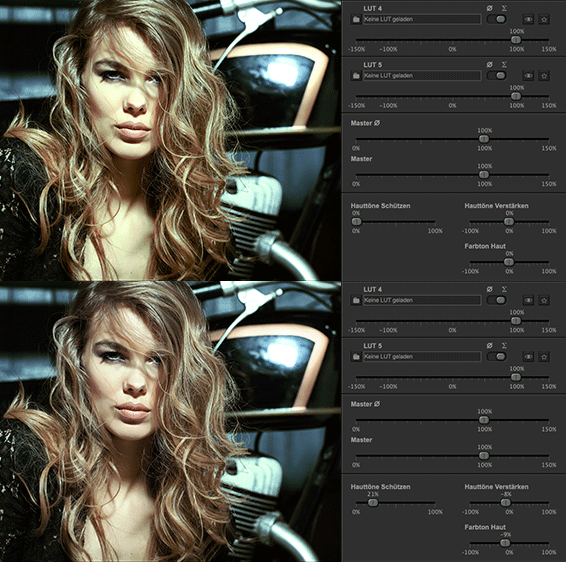
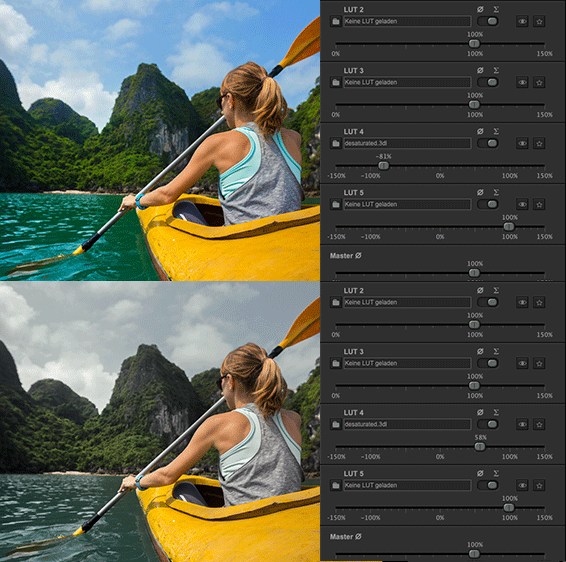
All LUTs can be increased up to a maximum intensity of 150%, so LUTs can be applied more intensely than they actually are. In addition 2 of the 5 possible LUTs can be applied negatively. Therefore a LUT which warms up the image can also be used to cool down the look or an individual saturation LUT can also be used to desaturate the image. Skin tones have an important role in color grading, therefore we have dedicated a section to the skin tones to protect them from the tint of the LUTs and to adjust them separately if necessary.
Parallel summing or calculating the averageFor every loaded LUT a selection switch can be used to determine whether it will be summed or applied as an average. All LUTs with their selection switch set to the sum icon will be added up. Color shifts towards the same direction will add up while differing LUTs shifting the same color in opposite directions will mutually weaken that color.
Averaging-option protects against overdrivingIf several similar LUTs are loaded, summing them can result in over-intensive colors. The option "averaging" makes sure that you don't have to adjust all LUTs if you adjust the intensity of one single LUT. When in averaging-mode, the intensity of all LUTs is not adjusted in absolutes. Their ratio is being calculated and then normalized to 100%. Therefore the cumulative intensity within the averaging group plays no role anymore.
Since this mode also normalizes very low values to 100% the averaging-group has a separate master control.
LUT Mixer - Revolutionizing working with LUTsThe result of all LUTs set to "averaging" will, in the end, be added to the LUTs which are set to "sum" and the end-result can be adjusted via the master control.
- Protection of skin tones from the influence of LUTs
- Subsequently restoring and adjusting skin tones
- Increase LUTs up to a maximum level of 150%
- Applying LUTs negatively instead of only positively
- Intuitive mixing of LUTs
- Simple adjustment of professional looks
- Standardized average calculation automatically adjusts the total intensity
- Suitable for LUT-systems (separate LUTs for colorings and contrasts)
| After Effects | 2023, 2022, 2021, 2020, CC 2019, CC 2018, CC 2017, CC 2015.3, CC 2015, CC 2014, CC, CS6 |
|---|---|
| Final Cut Pro | X |
| Photoshop | 2023, 2022, 2021, 2020, CC 2019, CC 2018, CC 2017, CC 2015.5, CC 2015, CC 2014, CC, CS6 |
| Premiere | 2023, 2022, 2021, 2020, CC 2019, CC 2018, CC 2017, CC 2015.3, CC 2015, CC 2014, CC, CS6 |
2.7.0 (Current version) - Nov 2, 2022
•LUT export
•Before/after comparison
•One button reset
•Closing without applying
•Retina scaling for Windows
•M1 Support
2.5.0 - Jul 21, 2020
•Bug fix in After Effects 17.x or newer (black canvas)
•Bug fixed that noise in 16 bit images was amplified in the Photoshop Plugin preview
•Controls are now displayed correctly when a scrollbar is visible on small displays
•No running after when moving the controls very fast
2.1.3 - Oct 28, 2019
-
- Compatibility Davinci Resolve
ColorTwist for Davinci Resolve (DCTL)
Add to CartColorTwist is a powerful bundle of professionally developed Look Development DCTLs
Nx ColorWarp – Control / Shift Hues to any other hues with amazing precision!
Nx Saturation – Control saturation of any hue/color with extreme precision and control.
Nx Luma – Control the luminance or brightness of any specific hue/color.
Nx Density – Add density to any or all the colors for a filmic / cinematic look. -
- Compatibility After Effects
Color Shift
Add to CartGive your videos some new colors. Remap hue, lightness, intensity, and more to a color gradient.
-
- Compatibility Nuke
smartLook for Nuke
smartLook offers multiple features to enhance look development inside Nuke. It offers the snapshot browser to take snapshots of your work, flag and comment snapshots and work collaboratively on look versions for your comps. Furthermore, it lets you save, edit, import and export looks for each node as well as import and export toolsets.Add to Cart -

- Compatibility After Effects
- Compatibility Premiere
ft-Filmic Contrast Bundle
Add to CartBundle of 3 plugins to ease the Filmic Color Grading process: ft-Filmic Contrast Pro, ft-Technicolor and ft-Auto White Balance.
-

- Compatibility After Effects
Skin Retouch
Easy beauty retouching - smooth the skin but preserve the fine details of the skin texture.Add to Cart -
- Compatibility After Effects
Fixel Contrastica 2 AE
Add to CartFixel Contrastica 2 AE is a plugin that features novel algorithm to enhance and boost local & global contrast in video frames and images.
-
- Compatibility After Effects
- Compatibility Premiere
- Compatibility Final Cut Pro
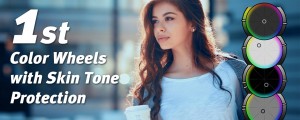
Warping Wheels 3
Add to CartColor Wheels with skin tone protection and dedicated wheel controls for skin, sky, greenery and film contrast. With the Look Generator you find always a good starting point for your look. New: Apple Silicon support, cross-host presets toolbar, new controls and much more!
Buy all 3 platforms for $179 (40% Discount). Discount added in shopping cart.
$0.00 -
- Compatibility After Effects
- Compatibility Photoshop
- Compatibility Premiere
- Compatibility Final Cut Pro
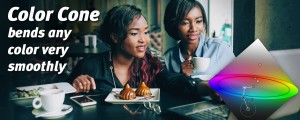
Color Cone
Add to CartColor Cone is an entirely new concept for color correction as well as the creation of looks.
$179.00