
Un-PreCompose
-
Compatibility After Effects Please check exact version compatibility under the "COMPATIBILITY" tab below
 Adding to cart...
 A better way to reorganize
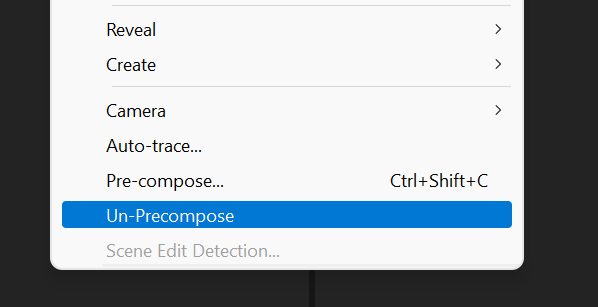
With just a couple clicks, Un-Precompose will release all layers of a pre-comp into the parent composition without affecting position and keyframes1
What is Un-Precompose?
Un-precompose is simply the reverse of the built-in After Effects functionality "Pre-compose".
Pre-compose allows you to move all of your selected layers into a new composition, leaving only the composition layer in the original timeline.
Un-precompose allows you to pull all of those layers out of the pre-comp and into your root composition and does its best to do so without affecting the appearance of your content. This includes copying over effects to each of the extracted layers as well as maintaining keyframes and expressions that were previously applied.
More options for extracting layers.
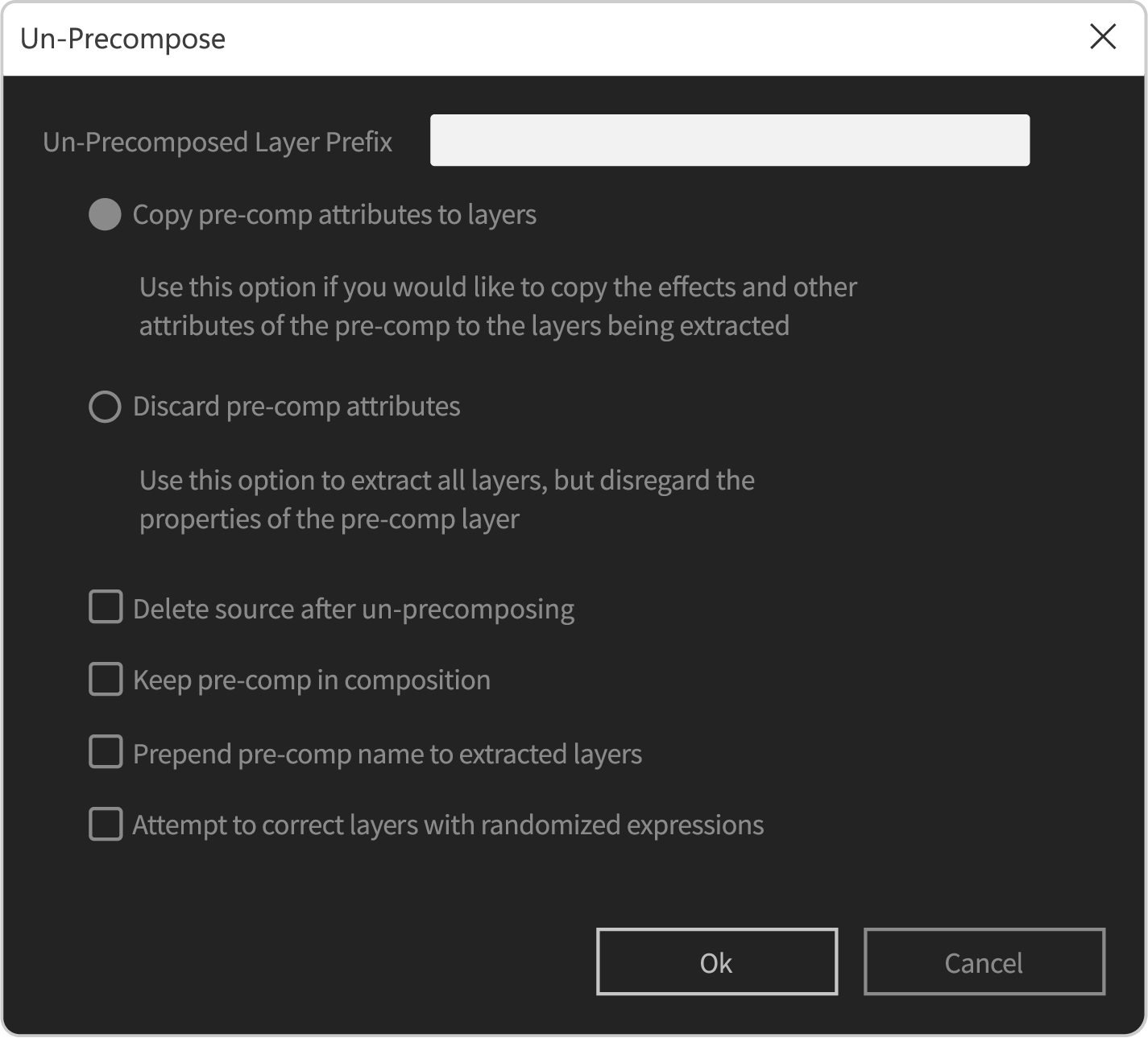
The latest version of Un-Precompose brings new capabilities when extracting layers from your pre-comps
- Un-Precompose multiple pre-comps in a single run to allow you to work more efficiently
- Optionally attempt to correct placement of layers containing randomized expressions
- Prepend extracted layers with the name of the pre-comp for easier organization
Finally updated for the latest versions of After Effects.
Un-Precompose was originally released in 2011 and had remained basically unchanged since its initial release. With version 1.1.0, Un-Precompose has been updated with additional features and, more importantly, support for the latest versions of After Effects and newer operating systems.
Even with these updates, Un-Precompose remains a free / pay-what-you-want tool. Please be sure to test the plugin first before deciding to pay for it, if you choose to do so.
Notes
1. Un-Precompose does as much as possible to maintain the positioning and appearance of the extracted layers, however there are several cases where the extraction will cause a change. Some examples of this would be if your precomp and main comp each have a camera for a 3D scene, if there are expressions on your layers with randomization not controlled by the random seed, effects that generate 3d effects ro particle simulations, etc.
Please keep in mind that Un-Precompose is a pay-what-you-want plug-in. Download it for free and verify that it works for your use case before deciding to pay for it.
| After Effects | 2025, 2024, 2023, 2022, 2021, 2020, CC 2019, CC 2018 |
|---|
1.1.5 (Current version) - Jun 28, 2023
1.1.4 - Jun 15, 2023
1.1.3 - Nov 9, 2022
1.1.2 - Nov 5, 2022
1.1.1 - Nov 4, 2022
1.1.0 - Nov 1, 2022
- Apple Silicon Support
- Un-Precompose multiple precomps in a single run
- Optionally attempt to correct placement of layers containing randomized expresssions
- Prepend extracted layers with the name of the pre-comp
1.04 - Apr 27, 2011
-

- Compatibility After Effects
MaskTracker+
Move layers, make corner pins, stabilize clips and create stabilized precomps with the AE mask tracker.Add to Cart -

- Compatibility After Effects
Roll it!
Painless and super fun way to roll any shape or mask in After Effects.Add to Cart -

- Compatibility After Effects
TinkerType
Break up animations, and have full control. All in just one text layer.Add to Cart -

- Compatibility After Effects
Displacer Pro
Add to CartThe humble AE displacement map with more features + juiced up on the GPU. And it's free.
-

- Compatibility After Effects
Keysmith
Manipulate keyframes and property channels precisely in a compact UI.Add to Cart -

- Compatibility After Effects
KeyFast
Add to CartYour Motion Design Copilot!
Auto eased keyframes, 1-click animations, and more.
Try it free!