
Immigration
-
Compatibility After Effects Please check exact version compatibility under the "COMPATIBILITY" tab below
 Adding to cart...
We recently completed a project involving thousands of files from multi-pass rendering making up many image sequences. The finder struggled to list the directory contents, even after several minutes, however Immigration sailed through the files and immediately became an essential part of our workflow saving lots of time and streamlining the process. I can't imagine working with After Effects and image sequences without it. Tim Clapham - fxphd & LUXX
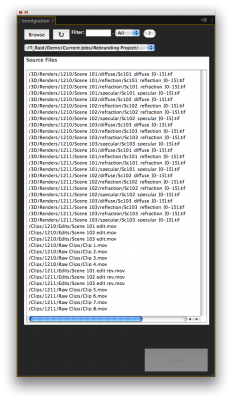
Immigration turns the pain usually associated with importing and batch replacing files in After Effects a joy. While browsing for import, it shows file sequences as one line item instead of a long list of files. Immigration uses a custom algorithm to scan the file system at speeds dramatically faster than even the OS can. In our testing a server folder with 30,000 files that takes over 5 minutes to open in the finder opens in 12 seconds in Immigration (and that includes file-sequence detection!). If you frequently find yourself waiting for the OS to open folders then you will love Immigration.
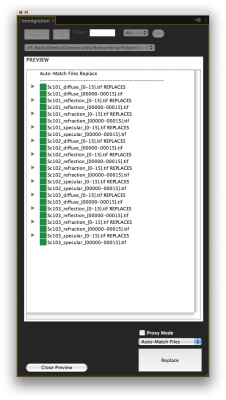
You can then select more than one file or sequence and either import them all at once or batch replace files already in your project. You can easily assign a frame rate to all imported files at once. Immigrations' Auto-Match Replace algorithm will automatically match files with similar names so you don't have to. It shows you a preview so you can make sure the matches are what you want. It color codes the match depending on how close it is. This is convenient if you name your revised files with a new version number or date.
If your files are already neatly organized in folders, Immigration will duplicate and maintain the folder hierarchy within the After Effects project. You can customize Immigration to only search for certain file extensions, and file age. So for example you can tell Immigration to only display .exr files that are less than an hour old. You can also tell it to include or ignore folder by name so if you would like it to ignore a folder in your hierarchy (an archives folder for example) you can do that easily.
Usage Instructions
Immigration makes batch importing and replacing footage items easy! Simply press Browse or, if available, select a previously used folder.
IMPORTANT: Sequences must have leading zeroes to be identified correctly and cannot have any illegal characters in the path or file name. If you must work with un-padded file sequences or if there are files with the same name but different extension (for example: File1.jpg and File1.tif) then turn on the "Pre-sort files" option below (Please note that this will make searching slower so only use this option if necessary).
To Import or Batch Import:
Make sure that there are no items selected in the project panel (or press the Switch to Import Mode button), then select the items you wish to import in Immigration and press Import. If any of the selected items to import are file sequences they will be conformed to the frame rate set in the panel. If you have a folder selected in the project panel before choosing your items to import, the items will be imported into that folder. If 'Maintain hierarchy' is checked, Immigration will recreate the folder hierarchy of the selected file(s) in the project panel. If the hierarchy already exists in the project it will be maintained using the existing folders. If using the Import into Folder feature, the selected project folder will be considered the root of the hierarchy. This feature works by searching folder names so make sure you don't have any duplicate folder names in your project.
To Replace or Batch Replace:
Select items to be replaced in the project panel first. Then select the files in Immigration. Once the same number of items are selected, the Replace button will become active. Auto-Match Files will attempt to match the same or similar name items. Manual Match Files (Top->Bottom) requires that the items be selected in Top->Bottom order in both the project panel and the Immigration window and they will be replaced in that order. Pressing the Preview File Matches button will give you a preview of how the items will be matched when they are replaced or added as a proxy. While in Preview mode you can change the match mode to preview how the files will be matched. If the Replace button is not active and you have the same number of items selected, try hitting the Refresh Item Count button. Pressing the Switch to Import Mode button will de-select all the items in the project panel and switch to Import mode.
Proxy Mode:
When proxy mode is on a proxy will be added if an item does not have a proxy or if the item already has a proxy, the proxy will be replaced. If adding a sequence as a proxy, the frame rate will be conformed to the frame rate set in the panel.
Filter:
Text entered in the Filter: text box will select any items that match. This feature supports regular expressions (see cheatsheet below). The filter pulldown allows you to filter a specific extension, setting the Filter to All will show all allowable extensions. You can modify the allowable extensions by editing the script file in a text editor and modifying the VALID EXTENSIONS section.
Frame Rate and Frame Range:
You can select one or more sequences to import at once. Set the frame rate for the sequences (all selected sequences will be assigned the same frame rate on import) then click Import and they will be imported. If you only have one sequence selected you can specify a subrange to import where it says Range
Folder filter:
If you would like certain folders to be excluded from the search, set Folder filter below to Exclude and enter the name of the folder you would like to exclude. This field is case-sensitive. If you would like to exclude more than one word separate them with a comma like this: red, blue. Be aware that spaces are considered so don't use any spaces unless you intend for them to be included in the name match. The Include feature will search recursively but only return files for folders whose names match, so make sure to include the name of the folder that includes the files you want. For example, if the hierarchy is \jobs\3d\diffuse and you want the files in the diffuse folder, you would search for diffuse. Searching for 3d would not include the diffuse folder. As with exclude you can add more than one word separated by comma so 3d, diffuse will return all the files in the 3d folder as well as the diffuse folder. You can also Exclude or Include files based on how old they are by entering the amount of days. You can enter fractional numbers to match less than a day.
ADVANCED SETTINGS:
You can override which extensions you want Immigration to work with by editing the user preferences file that is created after the first time you run Immigration. You can find this file in the same directory where the script is installed. Be cautious when editing this file as any formatting errors will prevent it from being read in properly. To restore the file to its default value, simply delete the file (but not the Folder) and it will be re-created the next time you launch Immigration. If you have to deal with file sequences that are not zero-padded or files with the same name but different extensions in the same folder: File01.jpg and File01.psd. You can turn on the pre-sort preference in the external preferences file that will identify these sequences properly but will be slower to search, especially in folders with thousands of files.


| After Effects | 2023, 2022, 2021, 2020, CC 2019, CC 2018, CC 2017, CC 2015.3, CC 2015, CC 2014, CC, CS6 |
|---|
1.5 (Current version) - Mar 4, 2020
- Now handles missing frame sequences properly (only works on import not replace due to scripting api limitations)
- Fixes UI color issues, dark background, etc.
1.41 - May 2, 2011
- 1.4 Made CS5.5 Compatible, changed r3d to be movie extension (non-sequence) 05/11
- 1.3 Added new "Pre-sort files" option to support unpadded file sequences 11/10
- 1.22 Fixed window resizing issue when switching to import mode 09/10
- 1.21 Fixed font color in CS5 status display 09/10
- 1.2 Fixed bug when replacing layers that are referenced by expressions 08/10
- 1.1 Made CS5 compatible, instructions collapsed state is now saved 04/10
- 1.036 Minor display window fixes 03/10
- 1.035 Internal update
- 1.034 Internal update
- 1.033 Added http://license.aescripts.com info 09/09
- 1.032 Fixed small licensing issue 08/09
- 1.031 Fixed Hours/Days display in browser window when using file age 08/09
- 1.02 Fixed Windows Help Window Centering issue (Windows Only)
- 1.01 Fixed Help Window Buttons (Windows Only)
- 1.0 Initial Release Aug 2009
-

- Compatibility After Effects
BorderPatrol
Add to CartResize your shape layers in After Effects with ease while maintaining stroke widths and rounded corners. Works with parametric and bezier path shapes.
-

- Compatibility After Effects
Layer Slayer
Add to CartPerfectly sync layers across the layer stack with a single click.
$40.00 -

- Compatibility After Effects
Layer Force
Add to CartPremiere Auto Paste New Feature in v1.1.Instantly generate modern transitions and slideshows based on 19 styles. Sync animations with audio and text voiceovers. Run it fully automatic or setup as you like.
-

- Compatibility After Effects
TypeMonkey3D
Add to CartConvert your TypeMonkey build to stunning 3D in seconds. Tons of preset environments and textures to choose from. TypeMonkey & AE2024 required.
-

- Compatibility After Effects
Templater Pro Subscription Recurring
Templater Pro extends Templater Rig by offering desktop automation, allowing you to render or replicate batches of versioned compositions using your data source. Yearly Recurring as well as 1, 3, 6, or 12 month licenses are also available.Add to Cart$225.00 As low as: $135.00 -

- Compatibility After Effects
Tiny Tools
13 small (but awesome) tools in one toolbar to help your daily struggles!Add to Cart
-

- Compatibility After Effects
Throttle-n-Purge
Allows quick access to switch between 8, 16 and 32 bits per channel as well as turning the multiprocessing preference on and off. Has the option of showing or hiding the Purge button to suit your preference.Add to Cart$9.99 -
- Compatibility After Effects
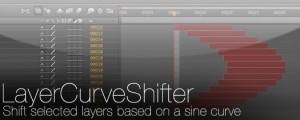
LayerCurveShifter
Shift selected layers based on a sine curveAdd to Cart$4.99 -

- Compatibility After Effects
Add Parented Null to Selected Layers
Creates a parented null for each of the selected layers. The new null can have a custom name defined in the User Variables section and also has the option of including the name of the layer that is parented to it.Add to Cart$4.99 -
- Compatibility After Effects
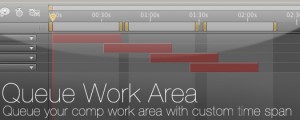
Queue Work Area
Queue your comp with the work area set as a custom duration. This way you can set several work areas to one queue and render them all at once.Add to Cart$14.99 -
- Compatibility After Effects
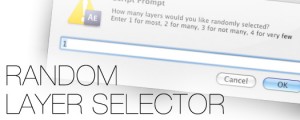
Random Layer Selector
Randomly selects layers. There's 4 options for how many layers are selected randomly: You can randomly select most of the layers, many of the layers, not many and finally you can have it randomly select very few of the layers.Add to Cart$4.99 -

- Compatibility After Effects
Fit2Frame
Fits selected layers proportionally to fill the Comp frame by giving you the choice of either cropping or letterboxing.Add to Cart$9.99