
qp Version Snapshot
-
Compatibility After Effects Please check exact version compatibility under the "COMPATIBILITY" tab below
 Adding to cart...
 This product has been discontinued.
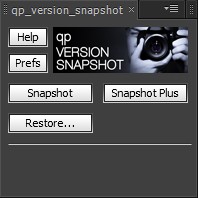
If you use "Increment and Save" you'll be familiar with keeping backups of your After Effects projects either for peace-of-mind, or to keep different stages of the project in their own files.
qp Version Snapshot uses this principle but adds extra functionality including:
- Make as many backup snapshots as you like but continue working with your "live project" without ever-increasing version numbers
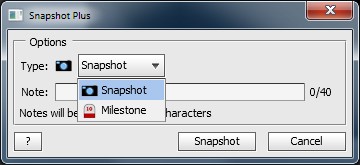
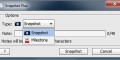
- Categorize snapshots as regular or milestones
- Add descriptive notes
- Optional "Info Card" comp created in your AE project with snapshot information for quick reference (CS4+)
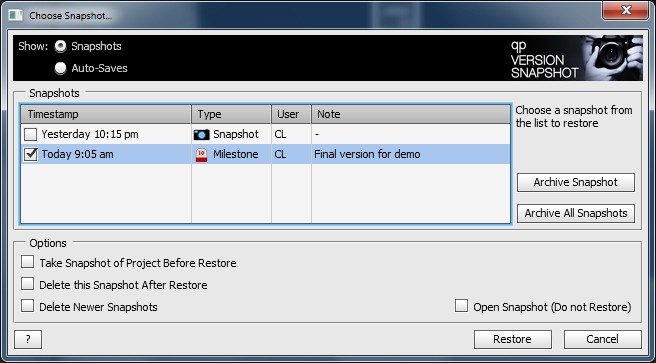
- Restore snapshots into your live project - no cluttering up of your Recent File List!
- Archive/Delete snapshots you no longer require from within the UI
- Browse and restore auto-saves too!
- NEW! Increment and Save button, which gives easy access to the built-in increment and save function
A "version snapshot" is just a timestamped copy of your After Effects project (similar to the way AE makes auto-save files) stored in a subfolder within your project folder. Think of a snapshot as a minor version update of your AE project, with Increment and Save reserved for major version updates, for example after rendering a movie for approval.
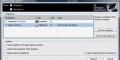
It is possible to archive old or unwanted snapshots from the restore dialog (this is the default behavior, which can be changed to permanently delete in the preferences). Archived snapshots can be copied back into the snapshot folder using Windows Explorer or Finder if you change your mind later.
Compatibility Notice
This script works with all versions of After Effects from CS3 upwards, however I recommend using it with CS4 and above; due to differences in the scripting language introduced in CS4 the Info Card will not work in CS3, and the restore dialog displays information slightly differently.
| After Effects | CC, CS6, CS5.5, CS5, CS4, CS3 |
|---|
1.1 (Current version) - Jun 23, 2013
1.0 - Initial release - Aug 2012
-

- Compatibility After Effects
versionUp
Easily cycle between every version of your footage.Add to Cart -

- Compatibility After Effects
Neat Freak
Add to CartSet After Effects UI elements project-wide. Great for sharing projects or Template authors!
$14.99 -

- Compatibility After Effects
Utility Buddy
This is a useful tool that helps you find and update your fonts, expressions and effects inside your project.Add to Cart -

- Compatibility After Effects
COB_Latest Version
Easily and quickly determine whether or not an After Effects file is the most up-to-date compared to its auto-saved versions.Add to Cart$9.99 -
- Compatibility After Effects
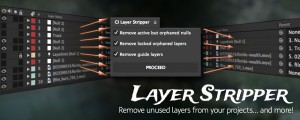
CI Layer Stripper
Removes invisible and unnecessary layers from your project.Add to Cart -

- Compatibility After Effects
Aep to Mogrt Pro
Add to CartBatch-add properties to the Essential Graphics Panel in one click. Export multiple compositions to Motion Graphics Template (.mogrt), add keywords, image and video previews to MOGRT files
-

- Compatibility After Effects
qp Grade Assistant 2
Add to CartThe next generation of scopes and monitoring for grading in After Effects.
$99.00 -

- Compatibility After Effects
qp_ChromaSubsample
Add to CartSimulates chroma subsampling in order to make CG slightly less than perfect. This plugin has been designed to simulate the chroma subsampling process to help better integrate perfect CG renders into video backplates.
Please note that this plugin is not compatible with CS6 or above
$29.99 -

- Compatibility After Effects
qp Nuclear LUT
Add to CartApply log-to-lin LUTs to your log-encoded footage in After Effects, just like in Nuke!
$14.99