
Copy Paste Markers 2
-
Compatibility After Effects Please check exact version compatibility under the "COMPATIBILITY" tab below
 Adding to cart...
 Copy Paste Markers
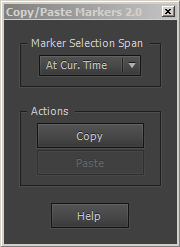
Allows you to copy one or more markers and paste them on any other layer.
Show me how it works
Features
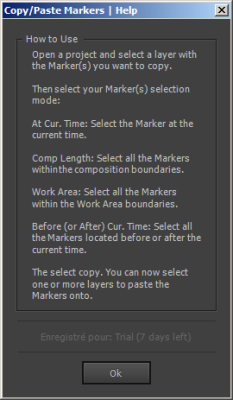
- Copy Marker at current time
- Copy all Markers (comp Length)
- Copy all Markers in the work area (not avail. in demo version)
- Copy all Markers in before or after current time (not avail. in demo version)
Best of all: You support a cool project!
Designed to help me direct my indie animated feature length movie! By purchasing it, you help me finance it, and allows me to stay indie. I promise, I won't sellout to Facebook or any company offering me big bucks. It's just about you, me and the awesome AE community!You can learn more about my 100% AE made action-packed comedy movie here: tvc.cm
| After Effects | CC 2019, CC 2018, CC 2017, CC 2015.3, CC 2015, CC 2014, CC, CS6 |
|---|
2.0.1 (Current version) - Aug 31, 2019
2.0 - Apr 15, 2014
- 1.0 Initial Release - Sept 2010
-

-

- Compatibility After Effects
Rapid Reel Composer
Add to CartQuickly generate social media reels, short videos, or tutorials with just a few clicks. Forget about manually trimming or splitting long footage. Instead, place markers by pressing the asterisk (*) key where you want to split the footage, and this tool will divide the selected layer into multiple short clips. Use the In-Out button to specify the in and out points of your clips. Alternatively, you can use the 'Lazy' button for automatic cuts with your desired clip length.
-

- Compatibility After Effects
TimeMarker
Add to CartA smarter way to add custom markers to comps and layers in After Effects. Adjust the color, add a comment, set a duration, and protect a range of keyframes from being time-stretched.
-

- Compatibility Premiere
- Compatibility Media Encoder
RenderSegments
Render/Export segments from markers, Export Various Sections At Once, Render marker regions to clips in Premiere Pro!Add to Cart -

- Compatibility After Effects
CopyMask2Layer 2
When you copy a mask from one layer to another, it often changes its position. With CopyMask2Layer, you can copy masks while keeping their position perfectly – even if the layers are moving and the mask path is keyframed.Add to Cart$9.99 As low as: $7.98 -

- Compatibility After Effects
Render Frame at Markers
Add to CartWill send to the render queue any frames that are marked by layer markers that are within the comp work area. This would be equivalent to going to a point in time in your comp and selecting "Save Frame As->File"
$14.99
-
- Compatibility After Effects
Story Boarding
Import any screenplay right into After Effects. Use it as a context tool while working on your scene, or to create an animated storyboard, previz, animatic, and much more depending on your project pipeline. Fast & efficient, it will boost your creativity, and your pre-production pipeline. #devforacause 25% of the proceedings will go to the Child's Play Charity http://www.childsplaycharity.org/Add to Cart$59.99 As low as: $39.99 -
- Compatibility After Effects
sParticular
sParticular is a script that helps you with 3D integration when using Trapcode Particular.Add to Cart$14.99 -

- Compatibility After Effects
XML Gibson
XML Gibson is a script that allows you to export your composition to XML files.Add to Cart$19.99