
Match Position
-
Compatibility After Effects Please check exact version compatibility under the "COMPATIBILITY" tab below
-
Compatibility Cinema 4d Please check exact version compatibility under the "COMPATIBILITY" tab below
 Adding to cart...
Speed up your scene setup workflow.
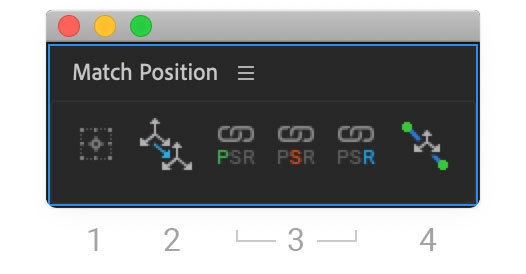
1. Create Nulls at selected layers with one click. Nulls are set to 2D or 3D based on the selection. ALT-click to automatically parent to the selection. SHIFT+ALT-click to make it a parent of the selection.
2. Match position and orientation between layers, regardless of parent structure. Select two layers and click. The first layer will convert to the target layer's 3D space and snap to its position and orientation. Super helpful when rigging characters and building 3D environments. ALT-click to automatically parent.
3. Link 2D screenspace values to 3D position coordinates. Invaluable for:
- Infographic labels and icons that need to maintain consistent sizes in relation to 3D layers and 3D Camera movements
- 2D effects coordinates that need to track 3D layer coordinates (Beam, Lens Flare, Radio Waves, Knoll Light Factory, etc...)
- Any setup that requires 2D layers to see 3D coordinates
- BONUS: After Effects does not allow a One-Node Camera to link to a focus object. Match Position lets you set this up. Select a One-Node Camera and any 3D layer, click the "Link Position" button, and your camera's Focus Distance will automatically follow the 3D layer.
4. Distribute layers. Select at least three layers, and the middle selections will be distributed between the first and last. For more granular control, select only three layers and ALT+click to enter a distance percentage for the middle selection (e.g. Set middle layer at 25% of the distance between first and last). A super easy way to distribute parallaxing layers with a sense of control over distances that can otherwise feel arbitrary. Also works with Cameras, Lights and between 2D layer selections.

See how Match Position helps you make the most of your existing motion tools and workflows.
Download also includes Match Position for Cinema 4D!
Check out the overview during the Summer of Sales Livestream (starts at 22:26):
FAQ:
Wait, doesn't the new After Effects (Beta) snap 3D objects to each others' anchor points?
Yes, but in a scene with more than a few shapes it's very hard to control. It's also difficult to pinpoint exactly what object is being targetted when they are at a distance or have many overlapping layers in the Active Camera view. Match Position let's you target layers selected from either the Active Camera view or the Timeline with complete control over where things land.
Can't I just SHIFT+Pickwhip a layer to another and snap it to the target's position?
Yes, but it comes with some drawbacks.When you SHIFT+Pickwhip, you automatically parent to the target layer. This can create other problems:
- If you didn't want to parent, then you have to manually unparent, which can slow you down when placing lots of elements in your scene.
- In the parenting process, you also inherit the target layer's scale properties, which isn't always what you're looking for.
- If your source layer was already parented to something else, you lose your existing parent just to match the target layer's position.
- If you're already parented to the layer you want to match, you can't match your parent's position without unparenting and SHIFT+pickwhipping again, which could wreck some setups.
Match Position will always faithfully match the target while retaining control over existing parents. (Plus you can still parent to the target by holding ALT.)
My position matches but the rotation is slightly off.
If your source or target layers are a child of a parent that is scaled non-uniformly, it may appear that your orientations don't match (due to the non-uniform scaling either your source or target has inherited). However, Match Position is finding the exact orientaion vector. Parenting in After Effects does not always behave the same as "grouping" in other 3D software. To solve the visual discrepancy, make sure that the parent of either your source or target layers are uniformly scaled.
| After Effects | 2023, 2022, 2021, 2020, CC 2019, CC 2018, CC 2017, CC 2015.3, CC 2015, CC 2014, CC |
|---|---|
| Cinema 4D | S26, R25, S24, R23, S22, R21, R20, R19 |
1.1 (Current version) - Aug 6, 2022
- MATCH POSITION: Press "X, "Y", or "Z" to only match the position of one axis (applies only to 3D layers)
- DISTRIBUTE: Press "X, "Y", or "Z" to only distribute the position of one axis (applies only to 3D layers)
UPDATED:
- MATCH POSITION: Now works across multiple selections, using the last selection as the target.
- MATCH POSITION: Now works on Camera and Light "Point of Interest", if the property is selected.
- MATCH POSITION: Last selection (source layer) is deselected after the match operation is complete, leaving only the target layer(s) selected to further act upon
- Fixed bug where SHIFT+ALT was not registering
1.0 - Nov 26, 2020
1.0 - Nov 6, 2020
-
- Compatibility After Effects
Power Sphere
Add to CartA 3D Sphere plugin with power controls! Elliptic distortion, unfolding, rich shading, self shadowing, reflections, DOF and comp lights and camera.
-

- Compatibility After Effects
Parenter
Add to CartQuickly reposition layers without affecting their animation!
-
- Compatibility After Effects
Fit2Frame
Fits selected layers proportionally to fill the Comp frame by giving you the choice of either cropping or letterboxing.Add to Cart$9.99 -

- Compatibility After Effects
Camera Instancer
Camera Instancer will create a camera that instances the active camera from another composition. You can then cut and paste this camera into any other composition. The modifications that you make to the active camera in the first composition will be duplicated in the second composition. Even if you change the active camera!Add to Cart -
- Compatibility After Effects
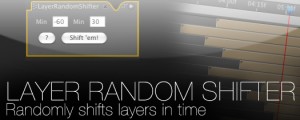
Layer Random Shifter
Randomly shifts the selected layers in time within user defined range.Add to Cart$9.99 -
- Compatibility After Effects
3D Layer Distributor
Distributes layers in 3D space within set ranges (you can set the ranges by editing the user variables at the top the script).Add to Cart
-

- Compatibility Cinema 4d
Key Visibility for Cinema 4D
Add to CartEasily set InPoints, OutPoints and fades on any C4D object.
$6.00 -

- Compatibility After Effects
Marker Remap
Add to CartRetime compositions using split layer markers + Marker manager
$35.00