
Overlap
-
Compatibility After Effects Please check exact version compatibility under the "COMPATIBILITY" tab below
 Adding to cart...
 THIS PRODUCT HAS BEEN DISCONTINUED
Create dynamic overlapping action and follow-through for almost any property in your layers or shapes. Think about the functionality you wish the Repeater in Shape Layers had or, if you've used Cinema 4D, how cool it would be to have MoGraph Cloner features in After Effects...now you can!
Customize Your Animation
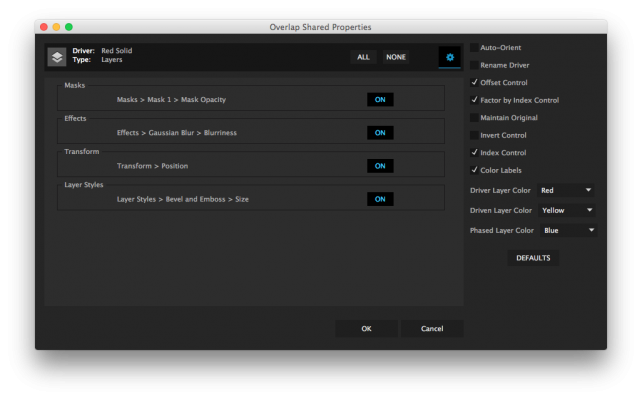
Overlap also gives you lots of ways to customize your animation. You are in command of which controls get added to your scene, making sure it's not bogged down by features you don't need. Controls include
- Auto-Orient your Driver and Driven layers/shapes
- Rename Driver - identify your Driver more easily.
- Offset Control - separate your Driven layers/shapes from the Driver
- Factor by Index - distributing property adjustments in your Driven layers/shapes
- Maintain Original - keep your layers/shapes where they are and just add the Driver's animation
- Invert Control - Get the Driven layers/shapes to do the opposite of the Driver
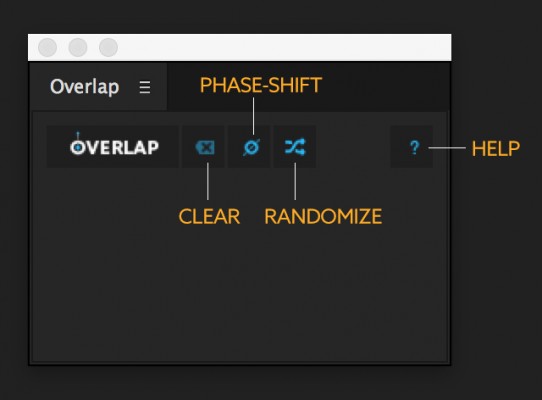
- Phase Shift - loop the Driver animation and phase-shift the Driven layer/shape (great for character arm swings!)
- Randomize - randomize the order in which the Overlap happens
- Index Control - reorder the order your Overlap at any time
- Color Labels - make it easier to identify your Driver & Driven layers/shapes
Instructions
To use it, simply:
- Set a keyframe on the layer you want to drive the whole animation
- Click on Overlap
- Choose your options
- Click OK.
More tutorials and videos under the VIDEOS tab above
| After Effects | 2024, 2023, 2022, 2021, 2020, CC 2019, CC 2018, CC 2017, CC 2015.3, CC 2015, CC 2014 |
|---|
1.0.5 (Current version) - Nov 21, 2019
1.0.4 - Aug 31, 2019
-Added floating license support
1.0.3 - Feb 14, 2016
1.0.2 - Mar 26, 2015
1.0.1 - Apr 17, 2015
Transitions.aep now compatible with After Effects CS5.5
1.0 - Apr 12, 2015
-
- Compatibility After Effects
MotionMonkey
Add to CartThe easiest way to animate your layered art. One layer or one hundred at a time. Great for all levels - from novice to expert.
-

- Compatibility After Effects
MographAE
Add to CartA powerful toolkit to help create complex animations quickly, with three cloners and five effectors.
-
- Compatibility After Effects
- Compatibility Premiere
LetsMotion Bundle
Add to CartSave 25% on LetsMotion Bundle, featuring bestsellers and our latest & greatest: Subtitle Pro, Stock Search Pro, and Particle Pro
-
- Compatibility After Effects
PATTOON 2 Texture & Displace
Add to CartPATTOON 2 Cyber SALE in November 2023 SAVE BIG Check out the new features. We put in some work so you can create even more stunning visuals more easily. See for yourself what the new and improved features can do.
- Glitch
- Displace Engine (improved)
- Flicker (improved)
- Turbulence (reworked)
- Displace Pixelshape(new)
- Displace Emission (new)
- Dissolve (new)
- Distortion (new)
Mix & match to create even more versatile effects. We can't wait to see what you can do with it.
Texture mapping in Adobe After Effects is finally made easy with PATTOON. Get direct layer access to your textures from Creative Cloud Libraries, Photoshop and more plus a bunch of extra features, textures and presets for all your designing needs.
50% upgrade discount price available. More information below
-
- Compatibility After Effects
Joysticks 'n Sliders
Add to CartThe industry standard pose-based rigging system for After Effects with limitless applications.
-

- Compatibility After Effects
Akuto - Animated Typeface
Add to CartAkuto is a captivating humanist typeface that merges playfulness with geometric precision. With a delightful dance of frame-by-frame motion, Akuto will bring a dynamic touch to your design projects. Order 4 or more Animography Typefaces and save an additional 25%