
PFTrack 2d Data Importer
-
Compatibility After Effects Please check exact version compatibility under the "COMPATIBILITY" tab below
 Adding to cart...
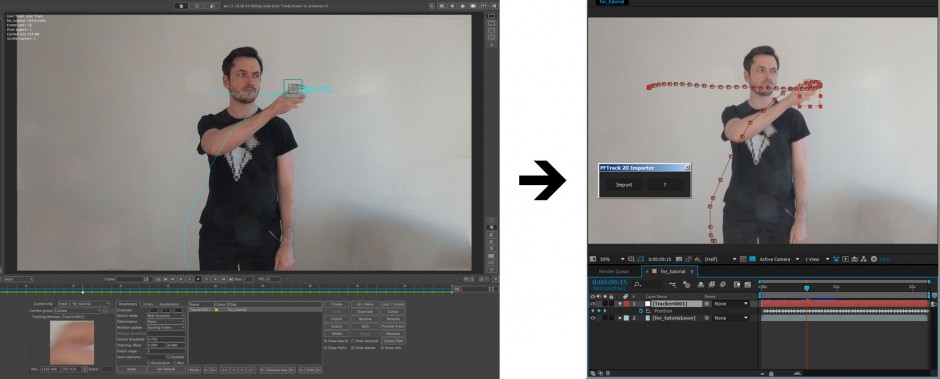
Need to import 2D tracking data from PFTrack text file and don’t know what to do with it?
which contains something like:
# "Name"
# clipNumber
# frameCount
# frame, xpos, ypos, similarity
"Tracker0001"
1
55
1 727.084106 16.648388 0.876433
2 718.584106 15.492138 0.926309
3 710.799683 41.288540 0.970435
4 707.592163 81.398315 1.000000
5 706.529663 179.273315 0.921553
and you don't know how to use it in After Effects?
Or you just love to track everything in PFTrack, and need to use the 2d tracking data in After Effects?
PFTrack 2d Data Importer can help you.
Simple UI
Way to use
1. Import tracked footage
2. Create composition with EXACTLY same parameters as in tracked footage.
3. Check: Width, Height, Frame Rate, Start Timecode and Duration.
4. Click Import on script panel and select text file with 2d tracking data.
5. Wait until import process completed (press ESC if you want to cancel import). Please be patient, sometimes import takes long time, according to amount of tracked data
Imported Nulls will have same names as in PFTrack
Details
Script understands text files with tracking data in PFTrack format:
# "Name"
# clipNumber
# frameCount
# frame, xpos, ypos, similarity
Disclaimer
PFTrack is a registered trademarks of The Pixel Farm Ltd.
STRUTTURA nor PFTrack_Importer has no affilation with thePixel Farm Ltd.
| After Effects | CC 2019, CC 2018, CC 2017, CC 2015.3, CC 2015, CC 2014, CC, CS6 |
|---|
1.0 (Current version) - Jan 25, 2017
-

- Compatibility After Effects
- Compatibility Premiere
Pro IO
Add to CartImporting & Exporting: Automated. Pro IO for After Effects and Premiere Pro is a one-stop solution for getting media in and out of your application with ease.
-

- Compatibility Premiere
Text Replacer for Premiere Pro
Add to CartImport and export text in Premiere Pro from your After Effects templates!
-

- Compatibility After Effects
- Compatibility Premiere
LetsMotion Bundle
Add to CartSave 25% on LetsMotion Bundle, featuring bestsellers and our latest & greatest: Subtitle Pro, Stock Search Pro, and Particle Pro
-

- Compatibility After Effects
voodoo
Add to CartAnimate pins easier. Period. Solution for the puppeteering woes of the digital age: The Seamless Puppet Tool puts the "fun" in function, as it effortlessly unlocks creative freedom with its refreshingly unpretentious pin tracking and conjuring controller abilities. Prepare to be enchanted!
-

- Compatibility After Effects
Templater Bot Subscription Recurring
Templater Bot extends Templater Rig by offering full server automation, allowing you to build applications that version, render, and distribute custom video on demand. Yearly Recurring as well as 1, 3, 6, or 12 month licenses are also available.Add to Cart$450.00 As low as: $270.00 -

- Compatibility After Effects
- Compatibility Photoshop
imgPaster
Copy and paste clipboard images into After Effects & Photoshop.Add to Cart
-
- Compatibility After Effects
Ps Text Converter for After Effects
Make Photoshop text layers editable in After Effects, with correct scale and correctly transferred animation and masks.Add to Cart$9.99