
PowerSearch 3
-
Compatibility Premiere Please check exact version compatibility under the "COMPATIBILITY" tab below
 Adding to cart...
Find everything, anywhere. A search engine for Premiere Pro. PowerSearch is a powerful search tool that integrates directly with Adobe Premiere Pro and opens as a panel. This intelligent new search capability enables editors to quickly scour an entire project to locate specific clips, sequences, markers and captions based on those keyword searches, enabling streamlined video editing. It works like Google for your Premiere Project!
Key new features in PowerSearch 3.0:
- Ability to Index SRTs: Users can now search all captions simultaneously, versus other options such as Adobe Text Panel which only allows users to search one SRT at a time;
- Support for Adobe Sensei transcripts: By importing SRTs into Premiere or Transcriptive Rough Cutter Adobe Sensei transcripts can be searched.
- Search Improvements: Ability to search with quotes for more accurate results;
- Support for Premiere Productions: Index individual projects in Premiere Productions and easily switch between them;
- Project switching: New buttons on both screens are now accessible to load the index for an active project;
- Increased indexing and searching speed;
- Instant Loading: Users can now load the database without the need to re-index. This eliminates the need to re-index the same project with a different name.
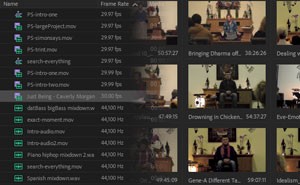
Know what your talent said, but not where? Easily search every clip and sequence in your Premiere project.
PowerSearch is a search engine for Premiere Pro. It scours clips, sequences, markers and SRT caption files in your project, giving you search results just like Google or Bing. Instead of linking to a website, PowerSearch links to the exact time in your video where the search term was spoken.
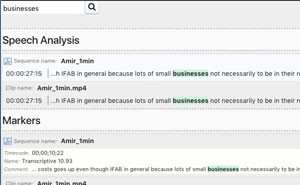
Search for keywords in transcripts, clips, sequences and caption files
While searching transcripts is the obvious use, you can use PowerSearch to search clips, sequences, markers and SRT files as well. It's an improvement to Premiere's Search function that will change your video editing workflow.
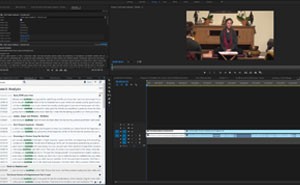
Fully integrated with Premeire Pro and most transcription services
Being integrated with Premiere, means PowerSearch search results will jump you to the exact time in your clip or sequence. Being integrated with other transcription services means regardless whether you’re using Transcriptive Rough Cutter, Adobe Speech-To-Text, SimonSays, Trint, SpeedScriber… when you import their results into Premiere we can search it.
| Premiere | 2022, 2021, 2020, CC 2019, CC 2018, CC 2017 |
|---|
PowerSearch macOS
3.0 (Current version) - Dec 8, 2021
- Support for Adobe Sensei transcripts: By importing SRTs into Premiere or Transcriptive Rough Cutter Adobe Sensei transcripts can be searched.
- Search Improvements: Ability to search with quotes for more accurate results;
- Support for Premiere Productions: Index individual projects in Premiere Productions and easily switch between them;
- Project switching: New buttons on both screens are now accessible to load the index for an active project;
- Increased indexing and searching speed;
- Instant Loading: Users can now load the database without the need to re-index. This eliminates the need to re-index the same project with a different name.
3.0 - Dec 8, 2021
- Support for Adobe Sensei transcripts: By importing SRTs into Premiere or Transcriptive Rough Cutter Adobe Sensei transcripts can be searched.
- Search Improvements: Ability to search with quotes for more accurate results;
- Support for Premiere Productions: Index individual projects in Premiere Productions and easily switch between them;
- Project switching: New buttons on both screens are now accessible to load the index for an active project;
- Increased indexing and searching speed;
- Instant Loading: Users can now load the database without the need to re-index. This eliminates the need to re-index the same project with a different name.
1.0 - Nov 1, 2018
PowerSearch Windows
3.0 (Current version) - Dec 8, 2021
- Support for Adobe Sensei transcripts: By importing SRTs into Premiere or Transcriptive Rough Cutter Adobe Sensei transcripts can be searched.
- Search Improvements: Ability to search with quotes for more accurate results;
- Support for Premiere Productions: Index individual projects in Premiere Productions and easily switch between them;
- Project switching: New buttons on both screens are now accessible to load the index for an active project;
- Increased indexing and searching speed;
- Instant Loading: Users can now load the database without the need to re-index. This eliminates the need to re-index the same project with a different name.
-

- Compatibility After Effects
- Compatibility Premiere
Pixel Melt
Add to CartPixel Melt simulates independent stretching and displacement of pixels. Applicable for various image distortions, including melting simulation or scanlines separation with modulation ability.
-

- Compatibility After Effects
- Compatibility Premiere
ft-Filmic Contrast Bundle
Add to CartBundle of 3 plugins to ease the Filmic Color Grading process: ft-Filmic Contrast Pro, ft-Technicolor and ft-Auto White Balance.
-

- Compatibility After Effects
- Compatibility Photoshop
- Compatibility Premiere
- Compatibility Illustrator
Stock Search Pro
Add to CartSearch and download unlimited free stock assets directly from any Creative Cloud application.
-

- Compatibility After Effects
Copy Paste Markers 2
Add to CartAllows you to copy one or more markers and paste them on any other layer. After Effects does not allow copy/pasting markers in their UI, so this tool is here to help.
-

- Compatibility After Effects
pt_EffectSearch 3
Add to CartSearch for effects used in your AE project. Find missing effects or where effects have been used, turn them on/off, delete them, or link them together to create cloned effect instances.
-

- Compatibility After Effects
- Compatibility Premiere
Hacksaw
Add to CartDisplacement plugin for Adobe After Effects and Premiere Pro. Transform your footage with randomly generated displacement patterns.
-

Data Storyteller
Add to CartData Storyteller is a data visualization plugin set designed to easily turn data into animations.
From: $199.00
-
- Compatibility Premiere
Transcriptive Rough Cutter
Add to CartTranscriptive Rough Cutter goes beyond automated transcriptions! Creating transcript-based rough-cuts in Premiere Pro and online is now easier than ever.
$199.00