
shareIO
-
Compatibility Cinema 4d Please check exact version compatibility under the "COMPATIBILITY" tab below
 Adding to cart...
shareIO - NEW PLUGIN for Cinema4D
Start to collaborate SMART, FAST & EASY ... NOW!
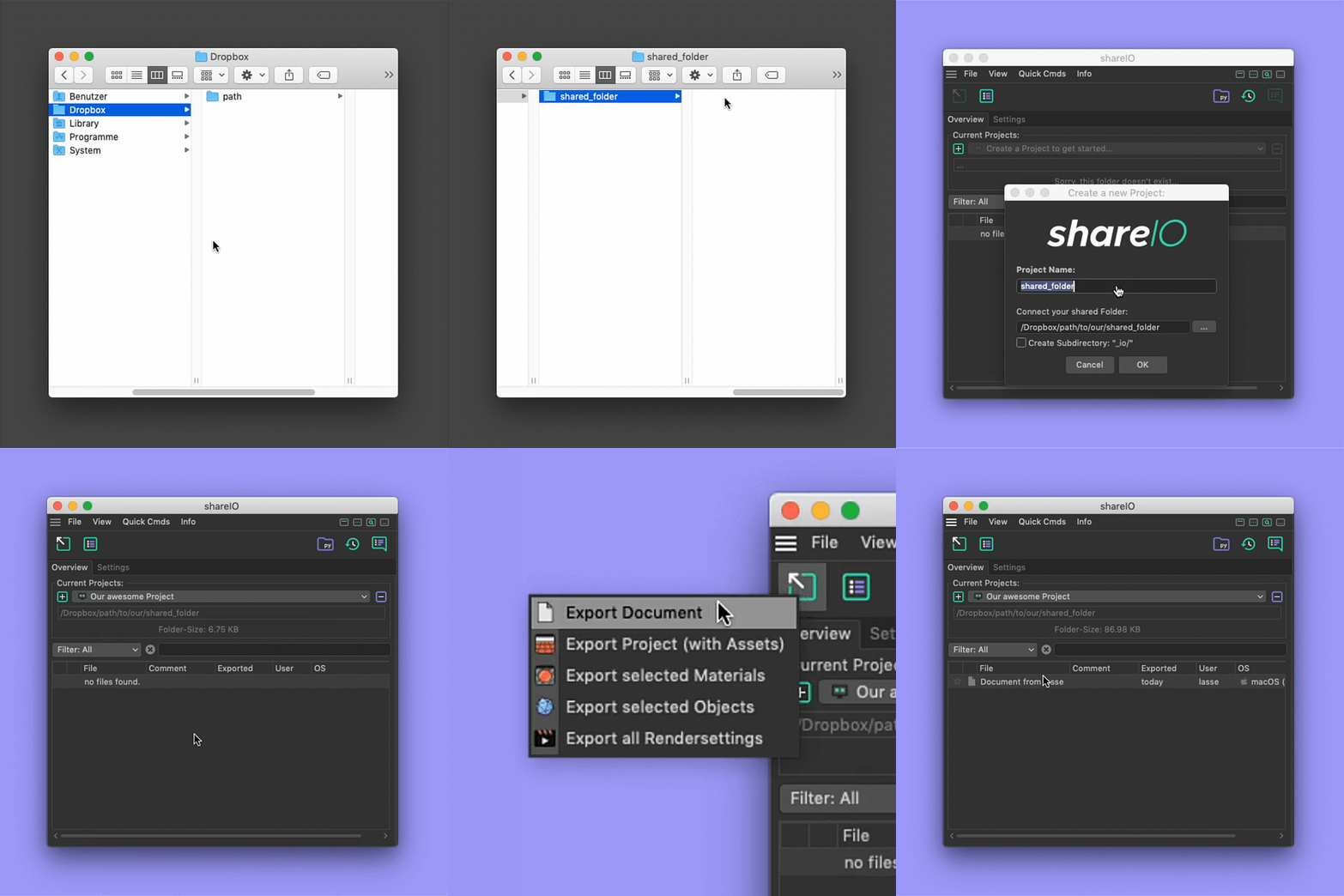
Start by creating a Project!
• Drag and drop your project folder into the Overview
• Name your Project
• Click the checkbox if you want to create a subfolder for shareIODONE!
Now, you can hit Export or start to drag and drop your Items into the Overview.Works with every local network or sharing service (e.g. Dropbox, GoogleDrive, OneDrive etc.)
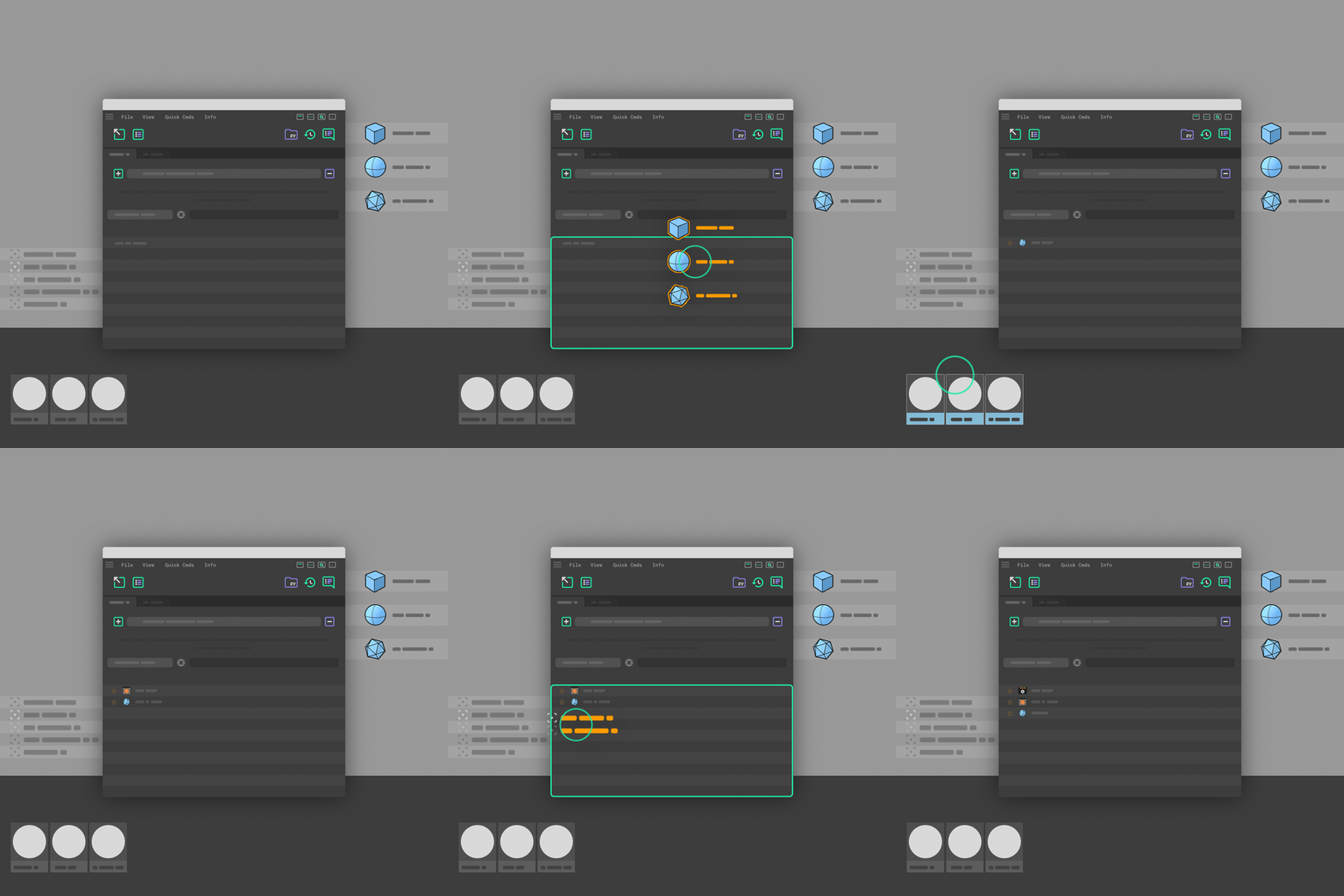
shareIO let's you instantly share:
• Objects
• Materials
• Rendersettings
• Documents
• Projects incl. Assets
...with multiple users.
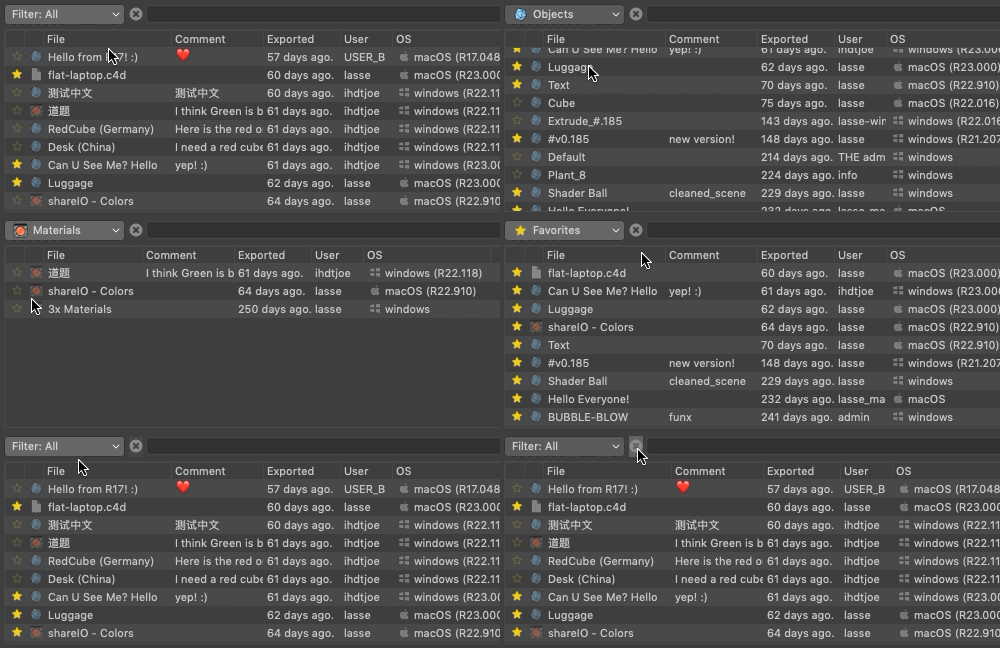
Filter & Search:
It's possible to choose Favorites and Filter/Search the Overview.
Drag and Drop external C4D-Files:
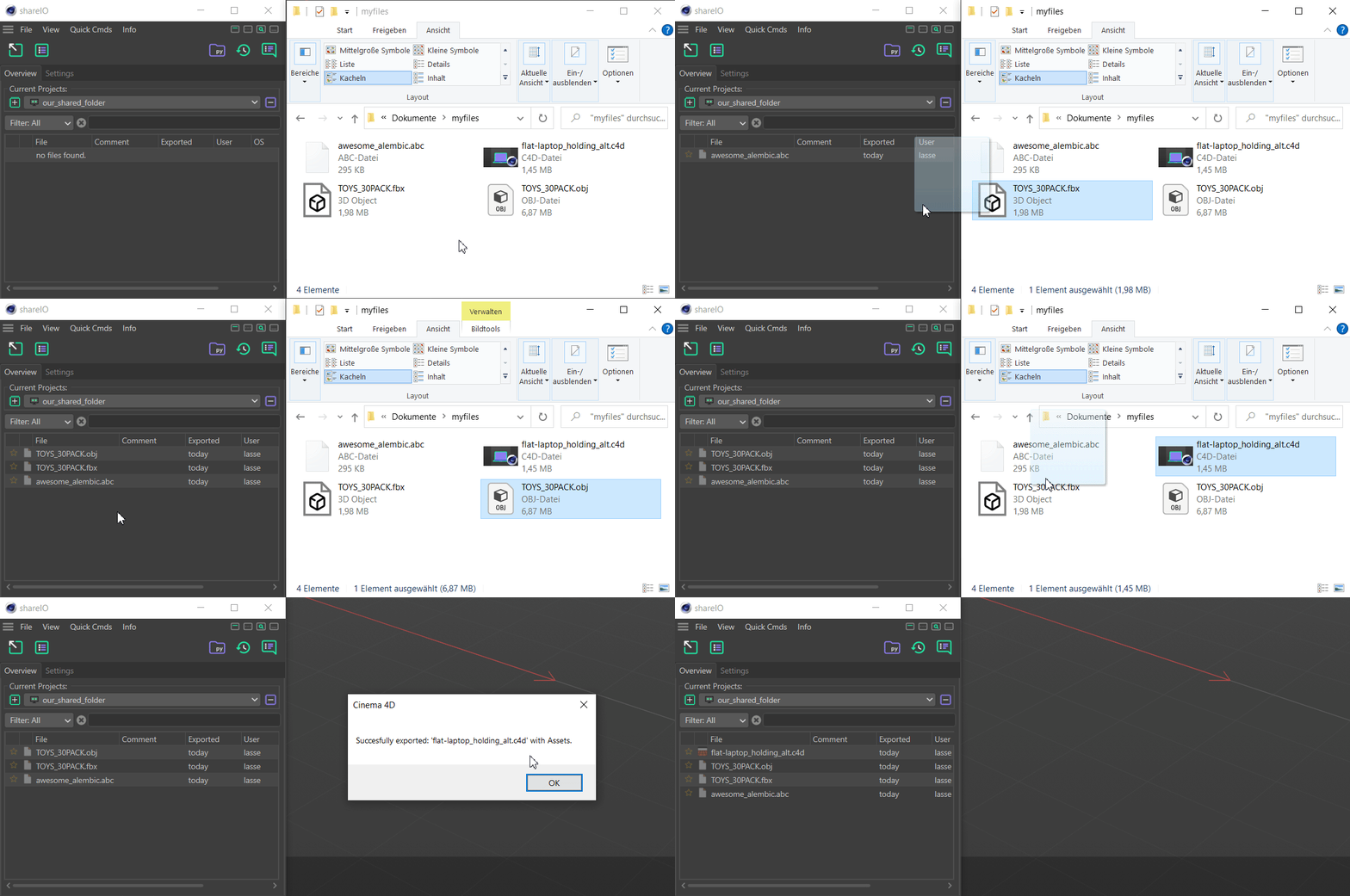
Basically any file that can be imported by C4D can be dragged into your current project... Hold Alt to export Project incl. Assets!!! No more digging through your hard-drive for any textures or assets! :)
Quick Shortcuts!
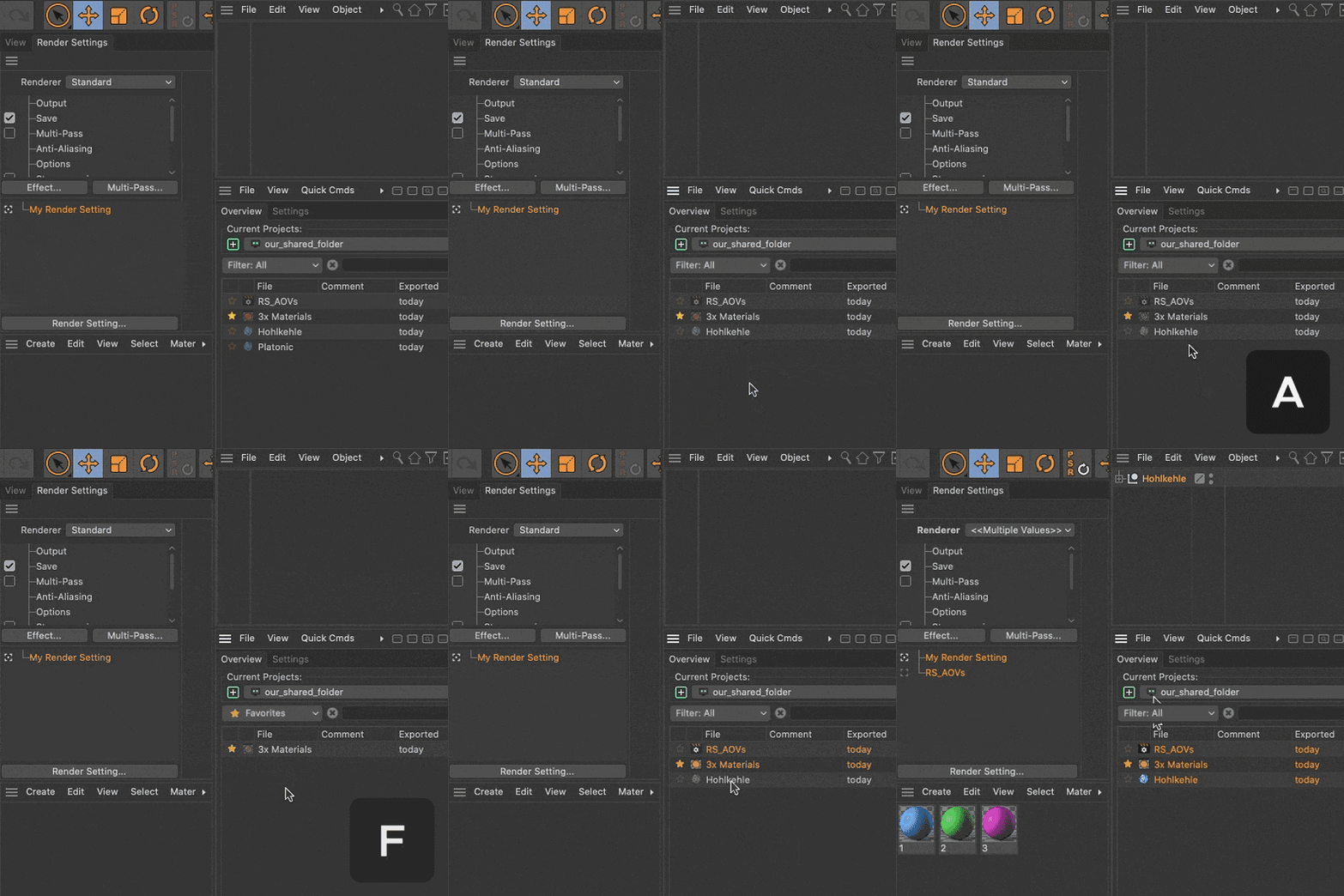
Shortcuts:
Use these simple Keyboard-Shortcuts while hovering over the shareIO Window!
R or F5: Refresh Overview...
A: Toggle Filter: Archive
F: Toggle Filter: Favorites
Q or Double-Click: Merge...
Alt-Click: Load...
+ Awesome Workflow-Tools !!!
(all included.)

Doc-Helper
Commands to quickly organize and clean up your Document.
• Create: - - - Seperator - - -
• Colorize Objects
• Delete invisible Objects
• Delete "Empty" Material-Tags
• Delete all Material-Tags
• Delete Third-Party-Tags
• Delete Layer (incl. Materials/Objects)
• Clean Document
Read more...

Recent-Files
Search for most recent files and import/merge or open in Finder/Explorer.
• Search for most recent files in given folder
• Show specific file extensions only ( e.g. .obj, .fbx, .abc )
• Limit how many files are shown
• Merge directly into document or open in Finder/Explorer.
Read more...
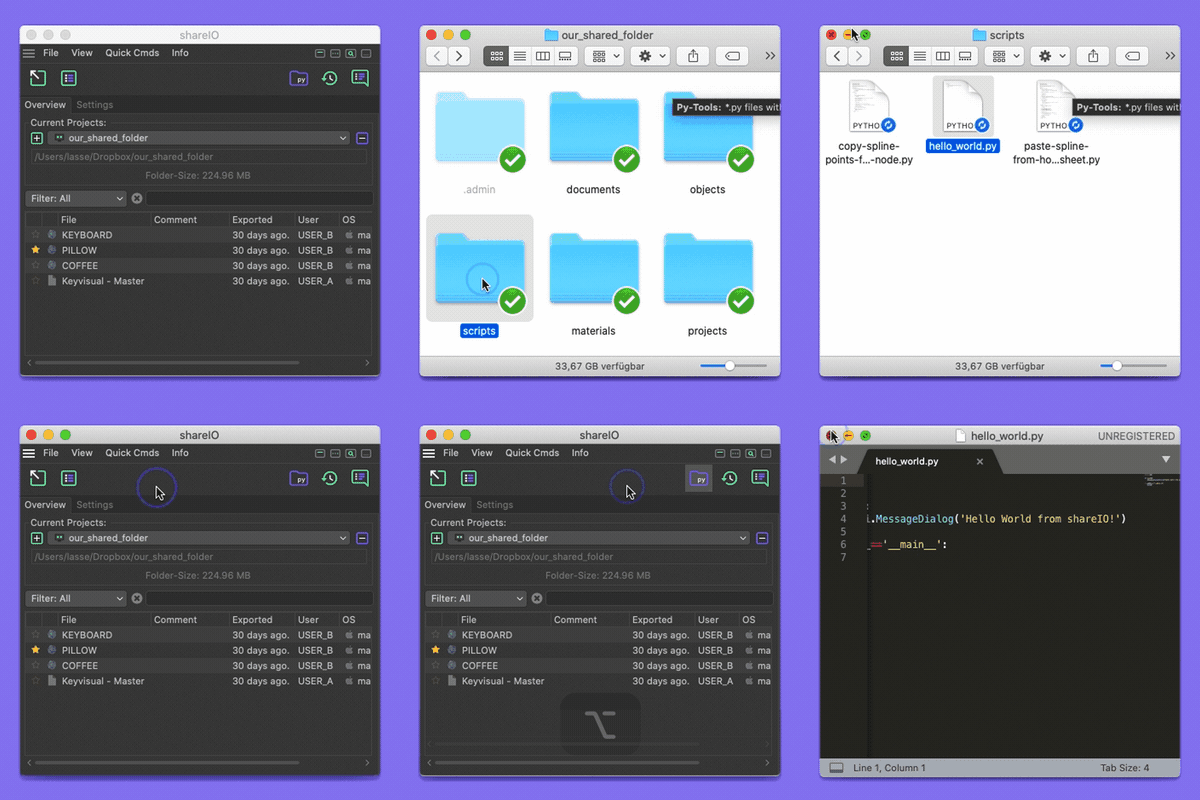
Py-Tools
*.py files within "scripts" folder are instantly available to all users.• Search through "scripts" folder of a project and lists all *.py files • Users are able to run *.py scripts directly • Great for project specific scripts and all sorts of helper scripts!
Ctrl-Click: Open "scripts" folder in Finder/Explorer...
Alt-Click (on *.py): Edit *.py in default Text-Editor...
Read more...

Chatlog
The Chatlog gives you a neat chat interface for each project...• Chat and share shitty Youtube-Links with all users... :) • Send Emoticons ❤️ • Filepaths and HTTP-Links are automatically converted to links and will open the desired location... ( if path exists on your system )
Reactions
Testing a very useful #C4D #cinema4d plugin 'shareIO' by @lasse_lauch - easily share anything anywhere with your colleagues and friends. I recorded a short demonstration video: https://t.co/Z60CfXgYfN
— Quasar (@joe_ihdt) July 30, 2020
14-Day Trial without any limitations...
Support for R16 - R23
Unicode / International Characters supported.
and lots more...
View Documentation...
How to Install...
View FAQ...
| Cinema 4D | 2024, 2023, S26, R25, S24, R23, S22, R21, R20, R19, R18, R17, R16 |
|---|
1.1.2 (Current version) - Aug 5, 2021
1.1.0 - Oct 16, 2020
- [Added] Arrow for Recent-Files Extensions
- [Fixed] Icons in Recent-Files
1.000 - Sep 30, 2020
-

- Compatibility After Effects
Flatten Layers 2
Add to CartGroup and flatten layers without pre-rendering! The selected layers will be flattened to a single layer in the background without any quality loss or rendering. Easily switch between the flattened and unflattened layers
-

- Compatibility After Effects
Layer Storage
Custom groups dramatically changing the way you work in After Effects.Add to Cart -

- Compatibility After Effects
Local Hero
Add to CartLocal Hero saves the day by migrating network assets to your local workstation for improved efficiency.
-

- Compatibility After Effects
- Compatibility Cinema 4d
- Compatibility Maya
- Compatibility Houdini
Network Clipboard 2
Add to CartCopy and Paste Comps, Layers, Nodes and Scenes between different programs across your network. No more saving out reduced projects in order to share with your team!
-

- Compatibility After Effects
Squirrel
Add to CartA hierarchy editor that converts your timeline into an interactive treeview based on layer parenting, much like what you would find in any 3D application.
New Features! A/V switches and Cut, Copy, and Paste buttons!
$35.00 -

- Compatibility After Effects
Prism 2
Add to CartPrism is a tool that grants you greater control over your layer and item labels, leaving your projects much easier to work with and keep sane.
-
- Compatibility After Effects
- Compatibility Cinema 4d
AEC4D PRO
Add to CartNow supporting Redshift. The most advanced C4D -> AE Importer
$39.99