
Simple Mix DCTL
-
Compatibility Davinci Resolve Please check exact version compatibility under the "COMPATIBILITY" tab below
 Adding to cart...
DaVinci Resolve’s native RGB Mixer is a powerful yet underrated tool for Look Development. Just try it out right now on any footage - in the Red Output decrease green to be -0.3 and increase blue to be 0.3. What do you think? Fascinating, huh? This look might not be something you are looking for, so keep going with Red, Green and Blue outputs and be sure to keep the sum of channels equal to 1. It is very time consuming to experiment with them, isn’t it?
And now imagine you would like to mix in shadows more than in highlights, or vise versa, or mix mids more than shadows and highlights, or mix more saturated colors more than less saturated, and so on. You will need tons of nodes and qualifiers. Or you just could use only one node with one tool...
Simple Mix DCTL
Keep the sum of input channels equals to 1.0 for each output channel
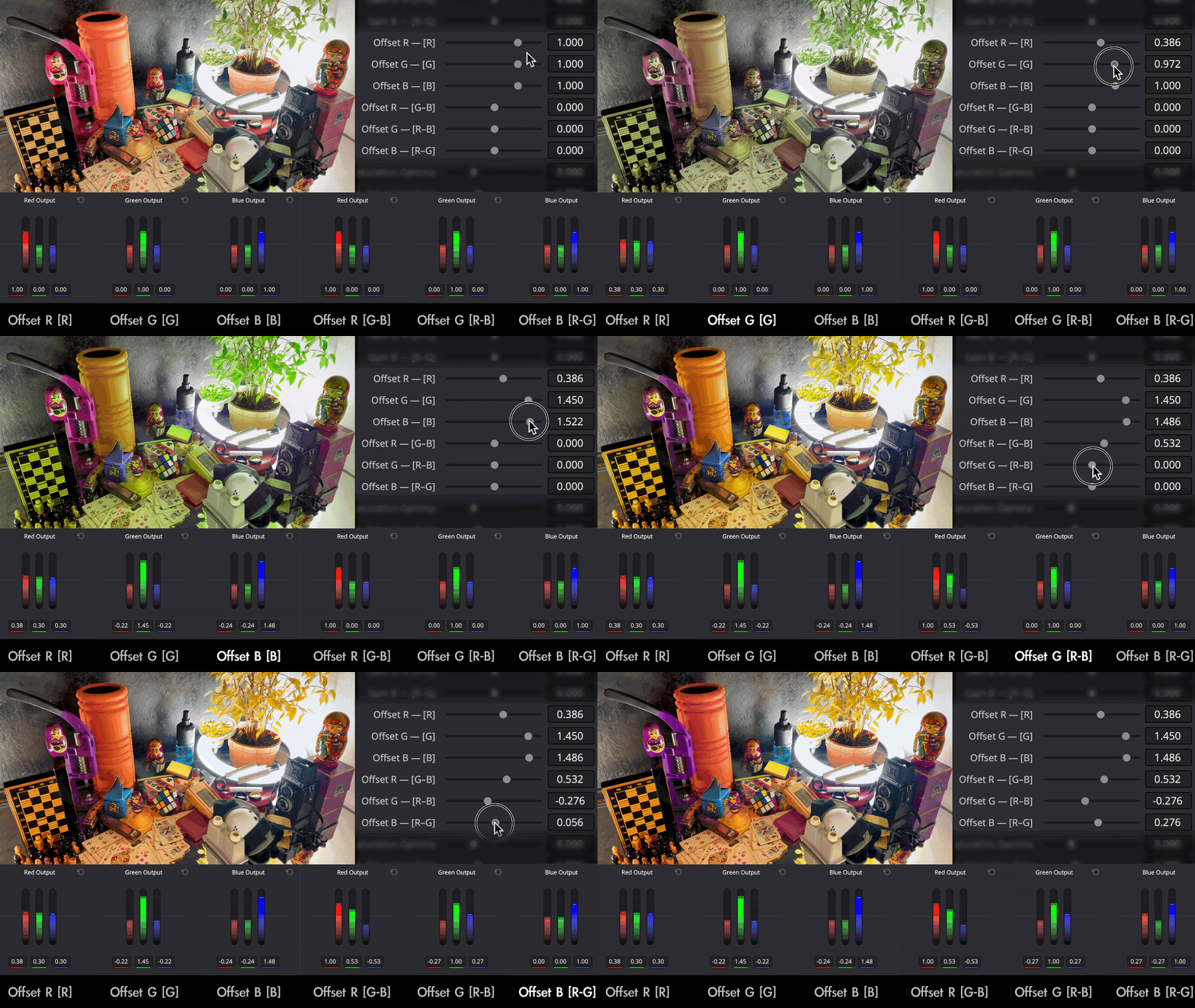
It will change and speed up your color grading and look development process - less time on technical things, more time on art, more inspiration, better result.
The math behind it:
- using sliders 'Lift/Gamma/Gain/Offset R - [R]', you work with Red Output. When you decrease, R channel decreasing, channels G and B increasing equally, so R + G + B = 1.0. The same logic exists for other channel outputs.
- using sliders 'Lift/Gamma/Gain/Offset R - [G-B]', you work with Red Output. When you decrease, R channel is static, but channel G decreasing and B increasing equally, so R + G + B = 1.0. The same logic exists for other channel outputs.
Mix depending on pixels' Luminosity
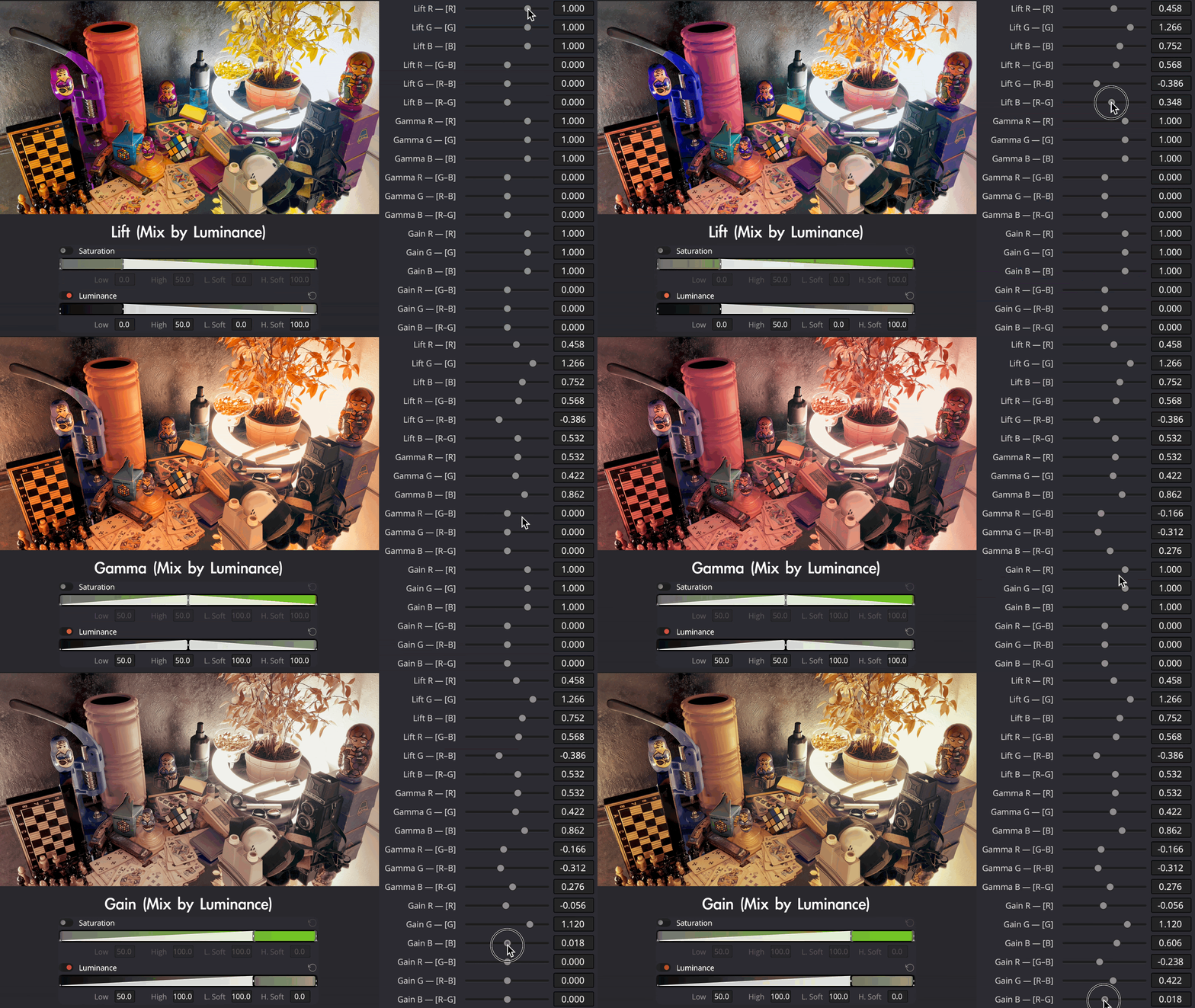
In Primary Color Wheels, Lift affects shadows more than highlights, Gamma affects mids, Gain affects highlights more than shadows. So in Simple Mix, Lift mixes in shadows more than in highlights, Gamma mixes in mids, Gain mixes in highlights more than in shadows. Offset mixes equally.
Mix depending on pixels' Saturation
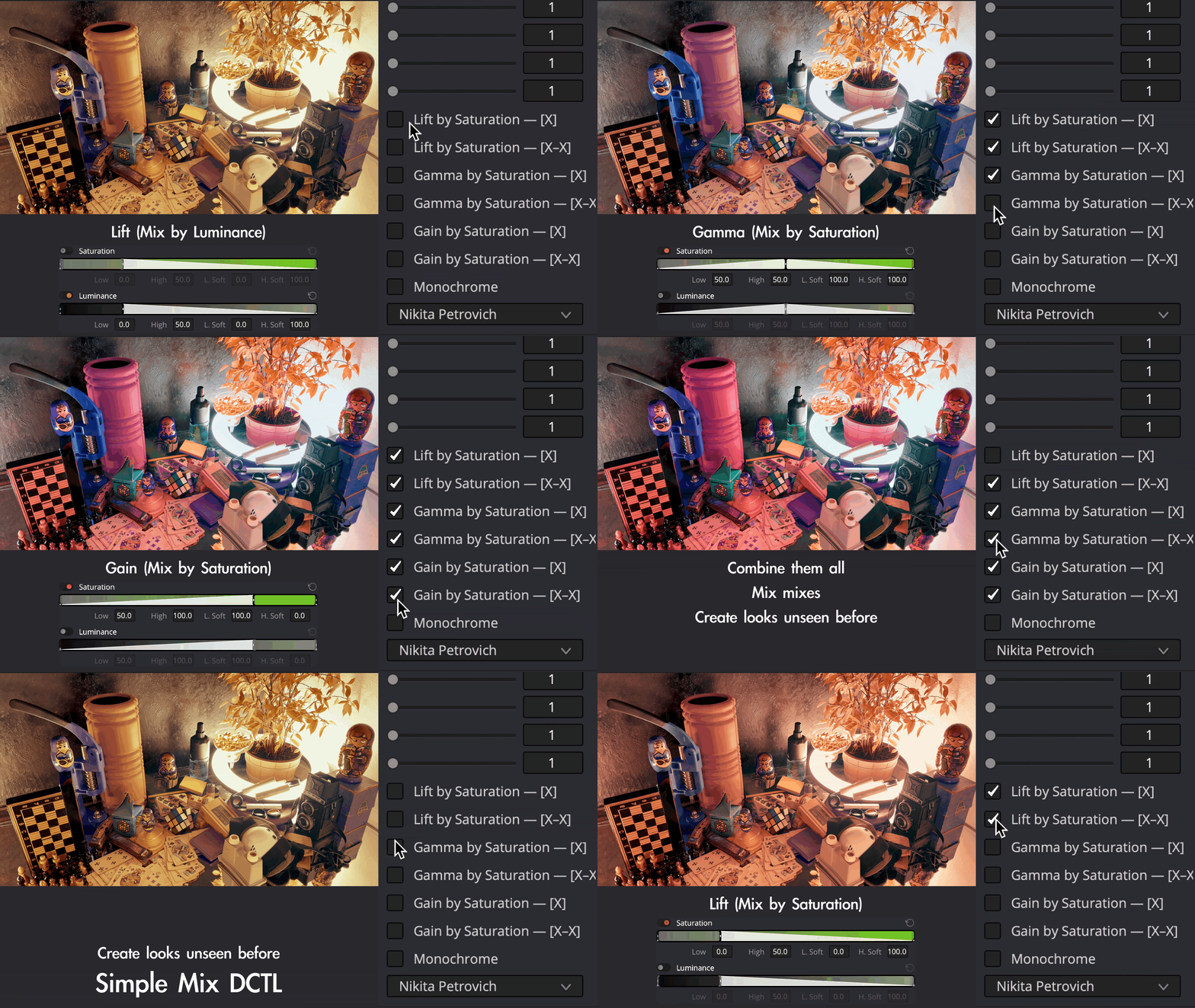
Just like with mixing by luminosity, Lift by Saturation mixes less saturated colors more, Gamma by Saturation mixes average saturated colors more, Gain by Saturation mixes more saturated colors more. You can combine different 'mixes' to achieve unique results.
Filmic saturation
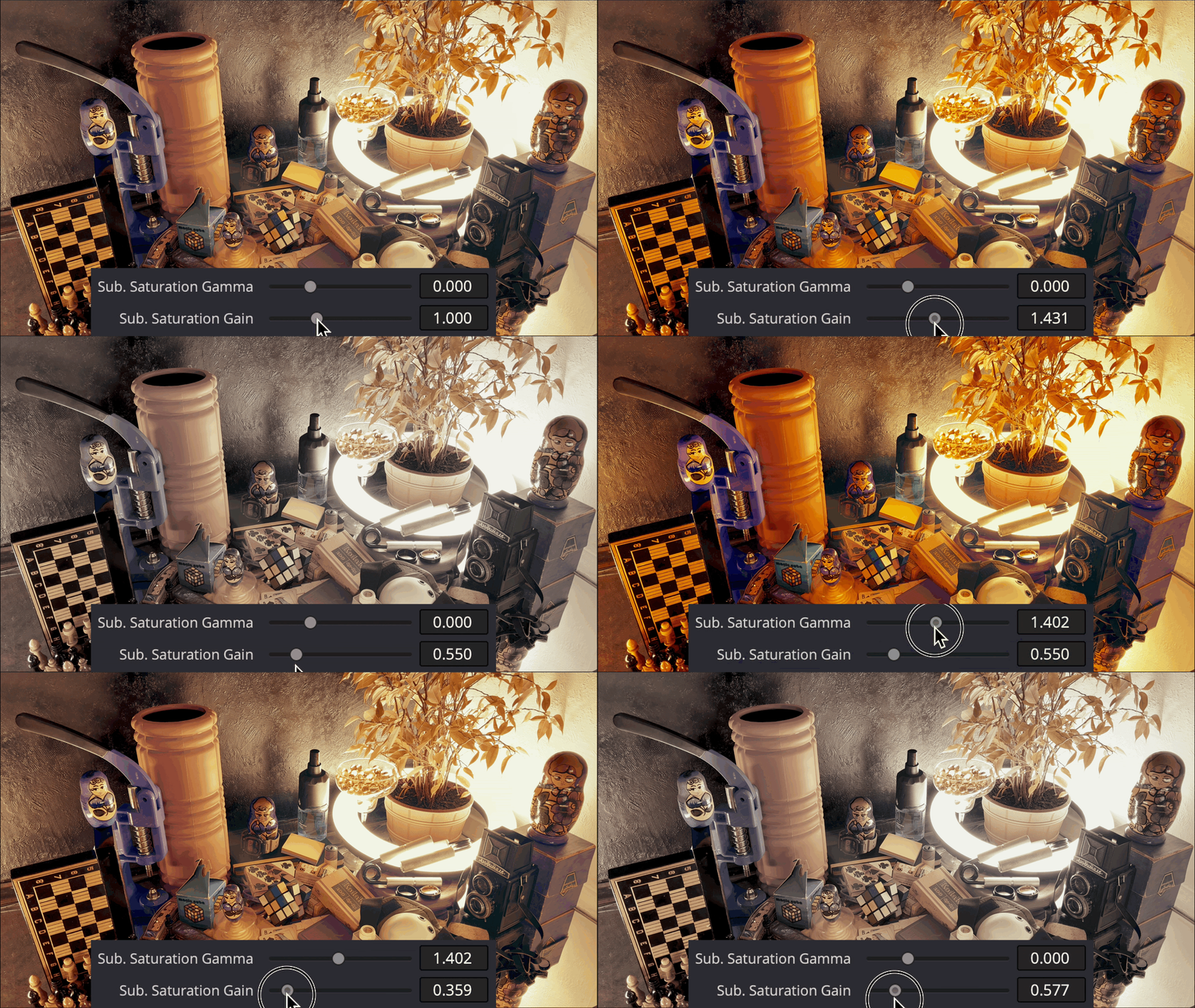
Adjust two types of subtractive saturation. 'Sub. Saturation Gain' is almost the same as if we adjust Gain Primary Wheel on the node in HSV color space - saturates more saturated colors in a subtractive way. 'Sub. Saturation Gamma' is the same, but for average saturated colors. You can adjust saturation before mixing and after mixing. I described the subtractive saturation behaviour in the video above.
Schematic visualisation of the order of applying changes inside the DCTL
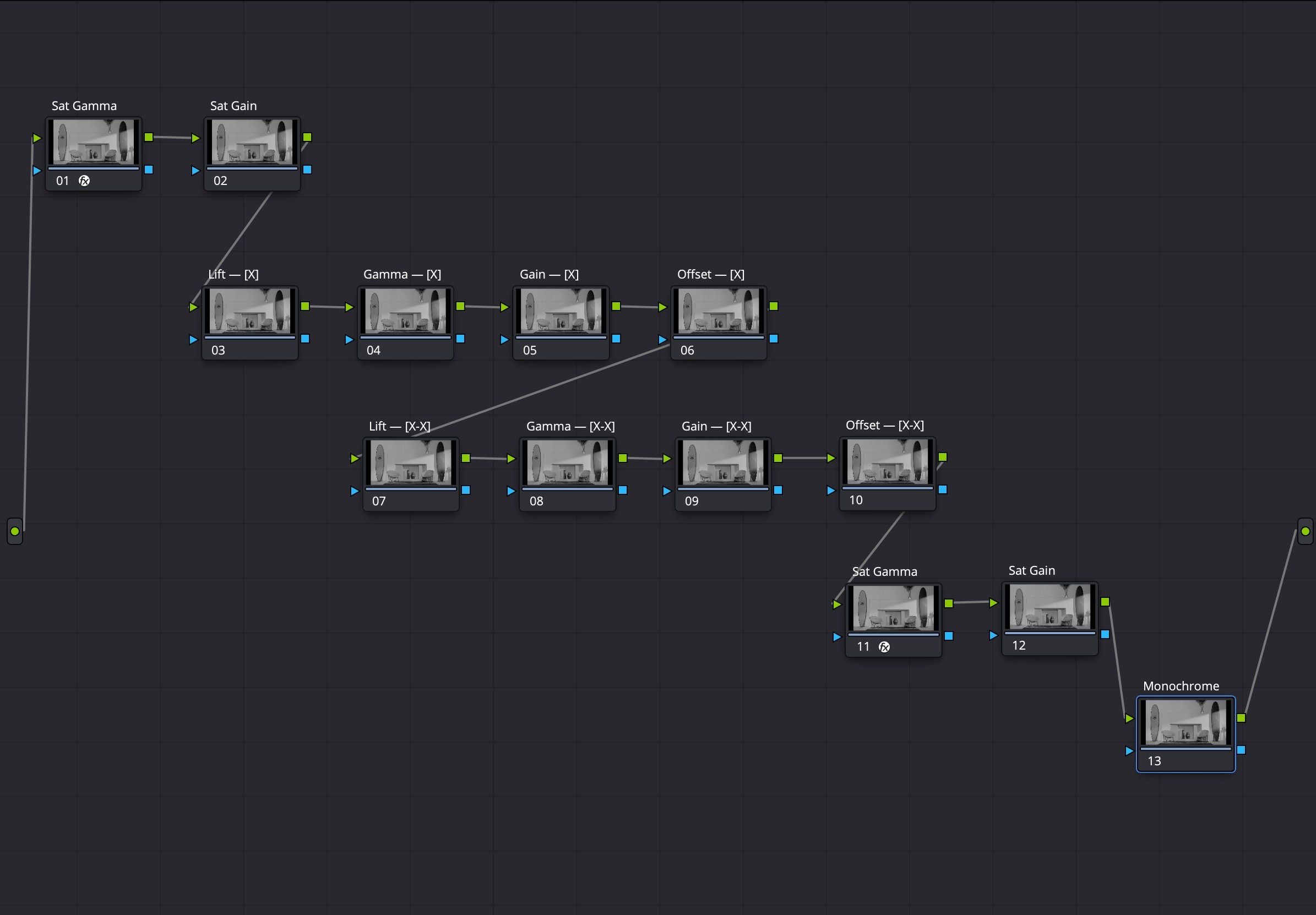
Check out the video above to fully understand what is going on under the hood of the tool.
Try out the free demo version.
PLEASE NOTE: DCTLs work only in the Studio version of DaVinci Resolve
| Davinci Resolve | 19, 18, 17, 16 |
|---|
0.3.1 (Current version) - Aug 1, 2024
0.3.0 - Jun 28, 2024
Updated sliders work as blending - adjust the power of adjustments related to the slider.
0.2.0 - May 19, 2024
-
- Compatibility After Effects
- Compatibility Premiere
Separate RGB
Add to CartMove, rotate, scale, blur, blend, fade and distort the RGB channels independently.
$39.99 As low as: $31.99 -

- Compatibility After Effects
Color Shift
Add to CartGive your videos some new colors. Remap hue, intensity, and more to a color gradient to create a whole new color palette.
-
- Compatibility After Effects
Map Ramp
Add to CartNew in v1.1.0.1, Map Ramp creates a gradual blend between multiple colors by using a gray-scale source image to map gradient. IMPORTANT - the internal data was changed, click an "Update" button before use in already existing project. See video tutorial for details.
Linear mode have two different variations, extra transforms added.
-

- Compatibility After Effects
AE Shapes Blender
Add to CartNow blend shapes easily in After Effects with many great features. Control the spine path the way you want them to blend and offset the paths easily. Create and animate beautiful loops.
-
- Compatibility Davinci Resolve
Pixel Sorter for Resolve
Add to CartPixel Sorter was the first tool to bring the pixel sorting glitch effect available for motion designers and video editors within After Effects and Premiere Pro. Experimenting with Pixel Sorting just became so much easier! Since its launch, AEPS had a huge success in Broadcast TV, Live performances, VJs, Music Videos, Video Games, Photography and even Apparel! Version 3 brings a lot of new useful features.
Pixel Sorter is also available for After Effects & Premiere Pro and Nuke as a separate license.
-
- Compatibility After Effects
- Compatibility Premiere
- Compatibility Nuke
- Compatibility Davinci Resolve
Transition Master 2 Pro
Add to CartNative Transition Plugin for DaVinci Resolve, Adobe Premiere Pro and After Effects. Create, export and sell your own transitions or choose from a large transition presets library. It has never been that easy to create stunning native drag and drop transitions this quickly.
New in Transition Master 2: Image Driven Transitions
-

- Compatibility Davinci Resolve
Surgeon DCTL
Upgrade your scopes in DaVinci Resolve. Simple tool for analyzing image.Add to Cart$9.99 -

- Compatibility Davinci Resolve
FX Oscillograph DCTL
Effect a la Modulation in DaVinci Resolve. Use easily on Edit, Color, and Fusion page.Add to Cart$24.99 -
- Compatibility Davinci Resolve
FX Remix DCTL
Glitch effects in DaVinci Resolve. Animate even without keyframes. DCTL has 4 modes: Pixel Fall (Pixel Sorting), Double Exposure, Pixel Offset, Pixel MixAdd to Cart$24.99 -
- Compatibility Davinci Resolve
Stone DCTL
Stone - to make... S-tone. Sliders based curves for DaVinci Resolve.Add to Cart$9.99 -

- Compatibility Davinci Resolve
Styler Durden DCTL
Millions of adjustable looks inside a single tool for DaVinci Resolve, which you can use within every color space: DaVinci Wide Gamut, ACES, Arri LogC4, RED Log3G10, Sony S-Log3, etc., etc., etc.Add to CartAll looks created with only 2 tools: Simple Mix DCTL and Stone DCTL
$39.99 -
- Compatibility Davinci Resolve
FX Texturator-800 DCTL
Create over 2000 grayscale pixel textures to combine with your footage and achieve creative goals within DaVinci Resolve.Add to Cart$9.99