
Stone DCTL
-
Compatibility Davinci Resolve Please check exact version compatibility under the "COMPATIBILITY" tab below
 Adding to cart...
Curves is a commonly used tool, but when you want to adjust them just a bit, most times it goes much further than you wanted. Or when you want to take the curve from one color space and paste it in another color space, you cannot do it because the mid gray point is different. Stone DCTL will solve it all.
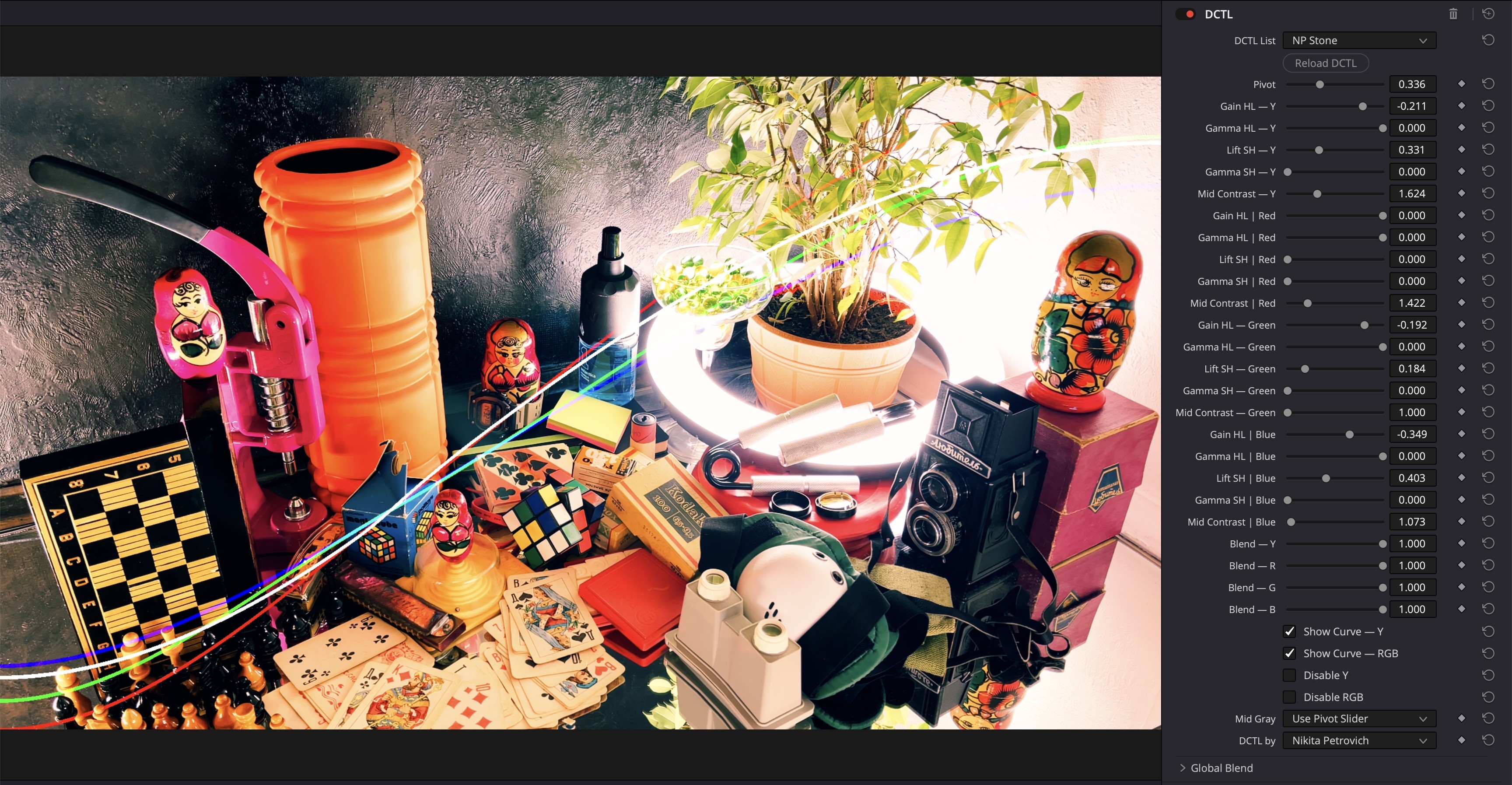
Features:
- adjust the middle gray point, keeping the shape of curves
- adjust RGB channels separately
- adjust the Luminance curve
- adjust the power of each curve with 'Blend' sliders
- presets for middle gray point
- smooth shape
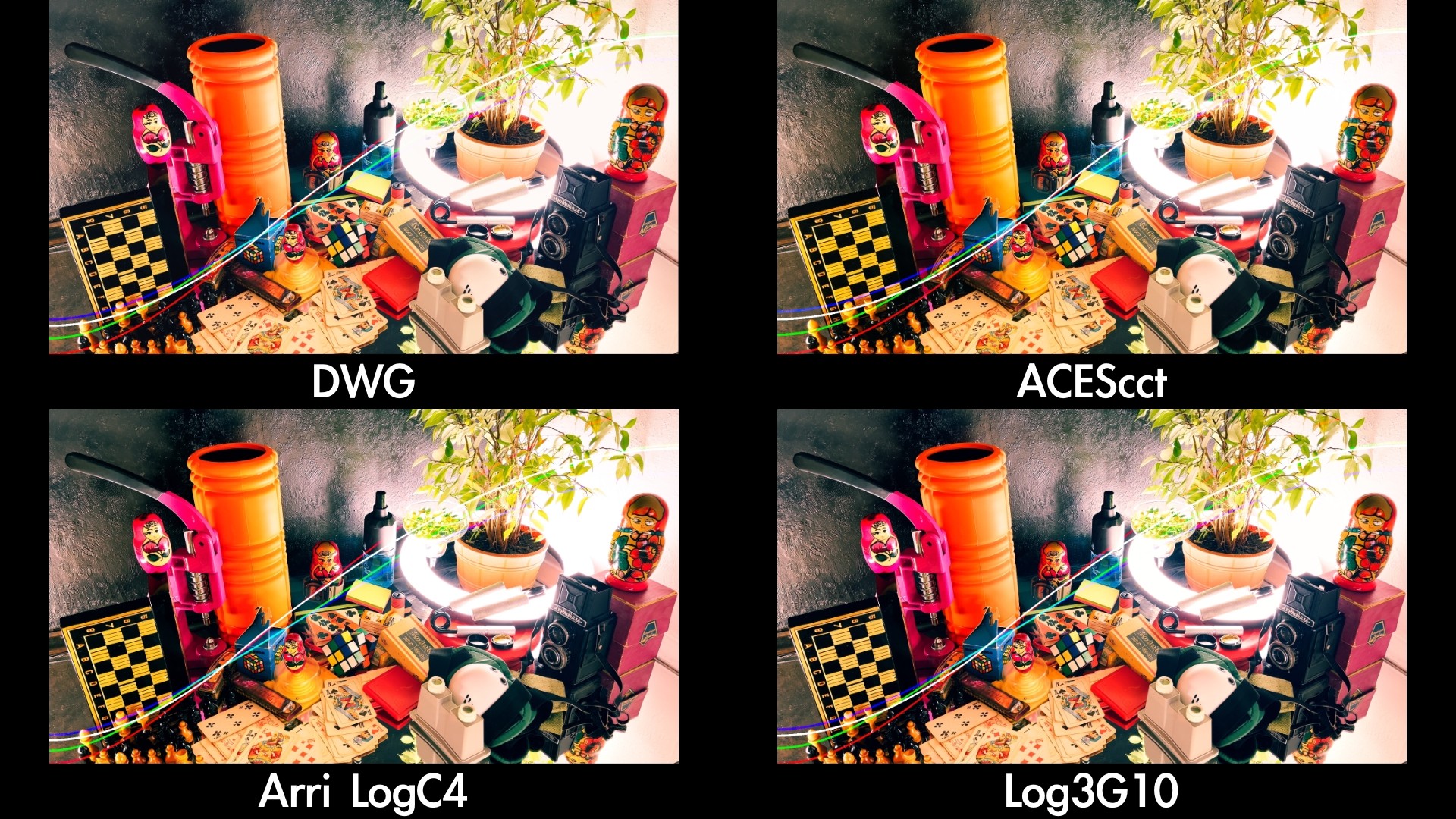
Copy from one color space to another color space
You'll just need to change the pivot point or choose your color space from the Mid Gray presets. The shape of curves will remain the same. The result will be almost identical, as shown in the example below with DaVinci Wide Gamut, ACEScct, Arri LogC4 and RED's Log3G10. But keep in mind, output colors may vary a bit because of the color science of different color spaces.
DCTL applies RGB adjustments first, as if we adjust separate channels on the first node. And then it applies Y adjustments, as if we adjust the linked curve on the second node.
When we apply the DCTL, it uses the same curve twice. If you don’t want to apply the contrast twice and you don’t need to work with channels separately, you can use the checkbox 'Disable RGB'.
PLEASE NOTE: DCTLs work only in the Studio version of DaVinci Resolve
| Davinci Resolve | 19, 18, 17, 16 |
|---|
0.1.1 (Current version) - Aug 1, 2024
0.1.0 - May 19, 2024
-

- Compatibility Davinci Resolve
Halftone for DaVinci Resolve
Add to Cart25% Off until Nov 15. Professional Monochrome & CMYK Color Halftone DCTL Tools for DaVinci Resolve
-

- Compatibility After Effects
- Compatibility Premiere
AI Color Match
Add to CartProfessional color correction and grading is now accessible for all. Easily color match different shots in Premiere and After Effects.
-

- Compatibility Premiere
Fixel Contrastica 2 PR
Add to CartFixel Contrastica 2 PR is a plugin that features a novel algorithm to enhance and boost local & global contrast in images.
Control & create the perfect contrast between your pixels.
Contrastica enables you to control the contrast all over the tonal range (Shadows & Highlights), reveal hidden details and create an overwhelming total look.
Details, Clarity and Global Contrast done right!Special Fixel Contrastica 2 Bundle (Photoshop + After Effects + Premiere Pro) price.
-

- Compatibility After Effects
Color Shift
Add to CartGive your videos some new colors. Remap hue, intensity, and more to a color gradient to create a whole new color palette.
-

- Compatibility Davinci Resolve
Nx ArtGrade - DCTLs and PowerGrades for DaVinci Resolve
Add to Cart25% Off until Oct 26. DaVinci Resolve toolkit designed to bring creative visions to life through a range of artistic effects. Collection of powerful DCTL tools and PowerGrades, to transform images and videos into stunning works of art.
-
- Compatibility After Effects
- Compatibility Premiere
- Compatibility Nuke
- Compatibility Davinci Resolve
Transition Master 2 Basic
Native Transition Plugin for DaVinci Resolve, Adobe Premiere Pro and After Effects. Create, export and sell your own transitions or choose from a large transition presets library. It has never been that easy to create stunning native drag and drop transitions this quickly. NEW in Transition Master 2: Image Driven TransitionsAdd to Cart
-
- Compatibility Davinci Resolve
FX Texturator-800 DCTL
Create over 2000 grayscale pixel textures to combine with your footage and achieve creative goals within DaVinci Resolve.Add to Cart$9.99 -
- Compatibility Davinci Resolve
FX Remix DCTL
Glitch effects in DaVinci Resolve. Animate even without keyframes. DCTL has 4 modes: Pixel Fall (Pixel Sorting), Double Exposure, Pixel Offset, Pixel MixAdd to Cart$24.99 -

- Compatibility Davinci Resolve
Styler Durden DCTL
Millions of adjustable looks inside a single tool for DaVinci Resolve, which you can use within every color space: DaVinci Wide Gamut, ACES, Arri LogC4, RED Log3G10, Sony S-Log3, etc., etc., etc.Add to CartAll looks created with only 2 tools: Simple Mix DCTL and Stone DCTL
$39.99 -

- Compatibility Davinci Resolve
FX Oscillograph DCTL
Effect a la Modulation in DaVinci Resolve. Use easily on Edit, Color, and Fusion page.Add to Cart$24.99 -

- Compatibility Davinci Resolve
Surgeon DCTL
Upgrade your scopes in DaVinci Resolve. Simple tool for analyzing image.Add to Cart$9.99 -

- Compatibility Davinci Resolve
Compositioneer DCTL
Rulers, Guides, Custom Letterbox for DaVinci Resolve. Export as overlays with alpha to use in professional video production and post-production scenarios.Add to Cart$11.11