
smartRecents for Nuke
-
Compatibility Nuke Please check exact version compatibility under the "COMPATIBILITY" tab below
 Adding to cart...
Description
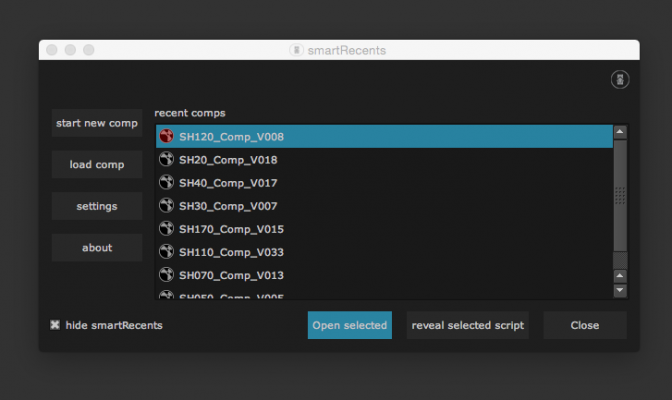
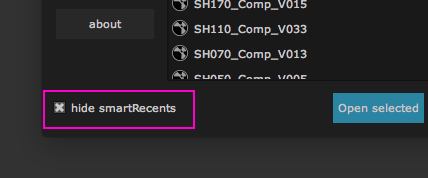
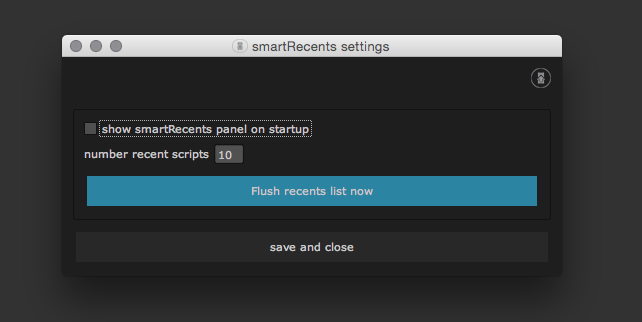
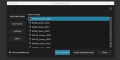
Don't waste any time searching nuke scripts manually in your explorer. All your recent work is immediately accessible. smartRecents offers a window to quickly access your latest nuke scripts. You can also drag and drop a nuke script into your nodegraph as well as revealing a script directly in your explorer. In the settings you can decide how many scripts you want to see in the smartRecents window and if you like to have the smartRecents window pop up whenever you launch NUKE or if you like to see it just when you need it.
Main features
• Script selector for NUKE
• Keep track of all your latest nukescripts
• Simply switch between nukescripts
• Drag and drop a nuke script from the smartRecents window into your nodegraph
• decide how many recent scripts to display
• recent scripts window can be set to automatically show up whenever you launch NUKE
A detailed tutorial video that shows how to install and use smartRecents can be found here:
Which kinds of licenses do you offer?
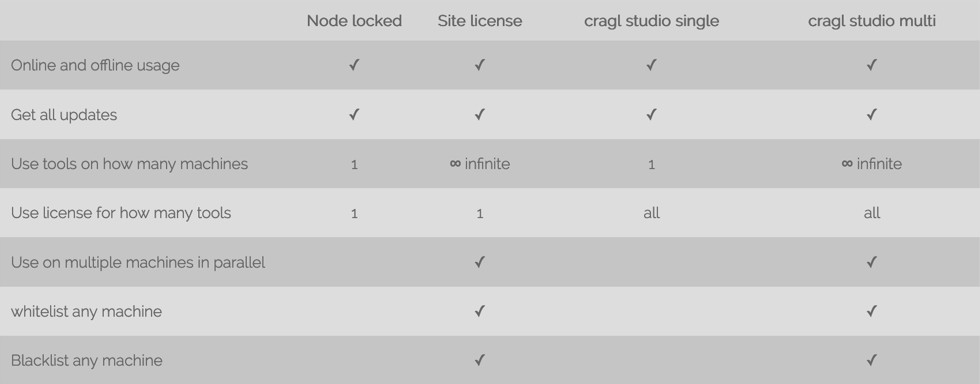
We offer node locked licenses and site licenses for single products as well as annual subscription licenses to use ALL cragl products with one license. All products work online and offline.
Additional
For additional info about smartRecents please refer to https://www.cragl.com/smartRecents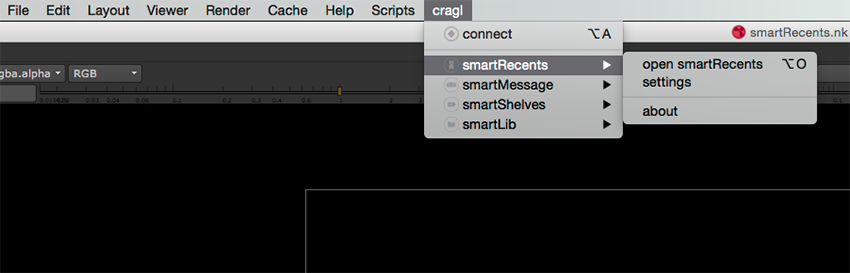
| Nuke/NukeX | 14.0, 13.2, 13.1, 13.0, 12.2, 12.1, 12.0, 11.3, 11.2, 11.1, 11.0, 10.0, 9.0, 8.0 |
|---|
2.14 (Current version) - Jul 11, 2024
2.13 - Jun 2, 2024
• Auto capture thumbnail
• Double click item to launch working file
2.12 - Jul 29, 2023
2.11 - May 20, 2023
• Fix - Reveal in explorer on Windows launches documents folder
2.10 - May 19, 2023
• Add right click menu for items
• Append working file as group
• Take screenshot for thumbnail
2.9 - Feb 26, 2023
• Show only working files that exist on disk
• Add browsing docs, changelog and support actions to help button
2.8 - Dec 18, 2022
2.7 - Jan 17, 2021
2.6 - Jan 15, 2021
• Send email to license author when machine installs license
2.5 - Dec 30, 2020
2.4 - Aug 4, 2020
• Speed up launching in offline mode
2.3 - May 10, 2019
• Create sphinx documentation
2.2 - May 8, 2019
• Generate license by license file, login and install code
• Update internal package structure
2.1 - Apr 13, 2019
• Remember window size
2.0 - Jul 16, 2017
• Major code updates and code improvements
1.0 - Feb 11, 2016
-

- Compatibility After Effects
Quick Menu 3
Add to CartFeaturing 14 new features! Find and apply plugins, effects, presets, scripts, extensions, menu commands, shape layer filters and expressions with lightning speed!
-
- Compatibility After Effects
Tool Launcher
Add to CartRun scripts, menu commands and apply expressions, from a searchable list or custom toolbars. Open script interfaces from anywhere in pre-docked panels.
-
- Compatibility After Effects
- Compatibility Premiere
- Compatibility Nuke
- Compatibility Davinci Resolve
Transition Master 2 Pro
Add to CartNative Transition Plugin for DaVinci Resolve, Adobe Premiere Pro and After Effects. Create, export and sell your own transitions or choose from a large transition presets library. It has never been that easy to create stunning native drag and drop transitions this quickly.
New in Transition Master 2: Image Driven Transitions
-

- Compatibility After Effects
Dojo Scripting Utility
A utility for scripting & expression authors to quickly get the information they need, do various conversions, and much more for Adobe After Effects.Add to Cart -
- Compatibility After Effects
ToDo Lite
A simple to do list that runs as a dockable panel in After Effects.Add to Cart -
- Compatibility After Effects
Match
Add to CartMatch simplifies the handling of expressions and scripting, offering features like path fetching, error handling, on-the-fly expression formatting, easing function copying, and expression baking. It supports all After Effects property types and provides an intuitive and responsive UI.
-
- Compatibility Nuke
smartScripter for Nuke
Add to CartsmartScripter provides functionality to quickly store, retrieve and execute python code, tcl code and Nuke node snippets. These can be stored as commands inside smartScripter and are shareable among artists. As smartScripter lets you quickly jump between different scripts, it can speed up your daily work, even if you are just working on your own.
$0.00 -

- Compatibility Nuke
smartLog for Nuke
Add to CartsmartLog brings automatic time tracking to Nuke, including an adjustable idle detection. It provides several views to quickly see how much time you spend on versions, shots, sequences, and projects. In addition, it offers a day rate calculator and a timer. Time logs can be exported out of smartLog and imported back into smartLog from various formats. You can even inject custom data to send time logs to any other third party application.
$25.00 -
- Compatibility Nuke
smartRender for Nuke
smartRender is a multi-threaded background rendering tool for Nuke. It lets you reduce your rendering times and makes final rendering and preview rendering dramatically faster compared to the standard rendering process. It uses all your hardware resources efficiently to speed up the processing. In addition you can export a detailed render log.Add to Cart$29.00 -
- Compatibility Nuke
smartLook for Nuke
smartLook offers multiple features to enhance look development inside Nuke. It offers the snapshot browser to take snapshots of your work, flag and comment snapshots and work collaboratively on look versions for your comps. Furthermore, it lets you save, edit, import and export looks for each node as well as import and export toolsets.Add to Cart$25.00 -
- Compatibility Nuke
smartCommand for Nuke
Add to CartsmartCommand is a window that bundles all commands from all menus, submenus and custom menus into one central location and offers search functionality. There is no need for browsing menus anymore. Simply search for your commands and execute them. It lets you create custom lists to store all your favorite commands, assign hotkeys on the fly and execute custom python scriptlets.
$9.00 -

- Compatibility Nuke
smartCollect for Nuke
Add to CartsmartCollect is a multi threaded batch archiver for Nuke. It collects all your used sources (not only the read nodes) and makes archiving your shots super quick and simple. smartCollect creates detailed job log reports and is customizable to your needs. It can be run directly inside of Nuke or as a standalone application.
$19.00