
pt_ImportSubtitles
-
Compatibility After Effects Please check exact version compatibility under the "COMPATIBILITY" tab below
 Adding to cart...
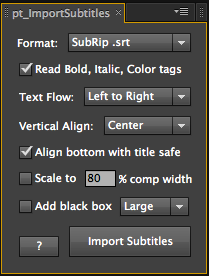
 Useful if you need to embed subtitles onto video for web or tape delivery. Import subtitles into After Effects using Encore Text Script, SubRip SRT or WebVTT formats, render with alpha to import into your editing software, or use directly in Premiere Pro with Dynamic Link.
Also compatible with OpenSesame Server for automated subtitling.
HOW TO USE:
- Create a new composition with the correct format for your output.
- Subtitles are created using the settings in the Character/Paragraph panels, so create a sample text layer first and change the font, size and alignment as required. For example, you may want the text alignment in the Paragraph panel set to "Center Text". You can then delete the text layer.
- Run the script, choose the subtitle format, then click Import Subtitles and select the file to import.
- To change the text size or style after import, select the imported text layer and change the settings in the Character/Paragraph panels as required. Then delete the subtitle layer and use the script to import it again.
- Drag the subtitle layer to the bottom of the comp, using the Title Safe comp guides if necessary.
- Then you have the option to:
- Render the with an alpha channel, import into your editing software and put the subtitles onto your video.
- Import the video into After Effects and place under the subtitle layer, then render the result.
- With Premiere Pro you just need to save your AE project, then you can drag the subtitle comp from AE's project panel directly into Premiere Pro's project panel, and from there, into the edit.
For animated karaoke subtitling check out Karaoke Animator
| After Effects | 2024, 2023, 2022, 2021, 2020, CC 2019, CC 2018, CC 2017, CC 2015.3, CC 2015, CC 2014, CC, CS6, CS5.5, CS5, CS4 |
|---|
1.72 (Current version) - Jan 30, 2022
1.71 - Dec 2, 2019
License update
1.7 - Jul 21, 2019
Fixed issue with incorrect box size on bi-directional text
Improved handling of format variations
Licence update
1.61 - Apr 29, 2018
1.6 - Apr 16, 2018
New absolute vertical Position option
Info about native RTL language support in CC 2017 and later
Warning when comp duration is extended to fit all subtitles
Improved handling of timing errors in the subtitles file
Fixes for issues that could cause font to change
Fix for title safe alignment in CS6 and earlier
Fix for drop-downs on Windows HiDPI displays
Fix for help window not closing on Windows
License update (enables floating license)
1.51 - Feb 2, 2016
1.5 - Dec 16, 2015
Supports TypeMonkey Text Mods for Arabic/Hebrew language support.
Ability to specify text encoding.
Drift correction for drop frame related sync issues.
Options for adding subtitle layer markers.
Settings are retained between launches.
Fixed issues with timecodes greater than 3 hours.
Supports pt_OpenSesame Server for automated subtitle import.
1.41 - Sep 2, 2014
Fixed licensing issue
Fix for subtitle timing errors
Fix for drifting SRT subtitles at certain frame rates
Fix for tab separated Encore subtitles
- 1.4 - Apr 2013
- Add box behind text option.
- Auto-scale to longest subtitle option.
- Auto-align to title safe option.
- Recreates color tags in SRT files.
- Bug fixes.
- 1.3 - Jan 2012
- CS5.5 compatibility.
- Recreates italic and bold style tags in SRT files.
- Bottom alignment option.
- Use vertical or paragraph style text.
- Fixes some timing errors.
- 1.2 Support for the SubRip format, RightToLeft languages and vertical text alignment - Dec 2010
- 1.1 Added CS5 compatibility - May 2010
- 1.0 Initial release - Dec 2009
-
- Compatibility After Effects
Project Notes
Project Notes is a convenient place to store text notes or small code snippets within your After Effects workspace. Notes are saved to an external file that can be easily shared.Add to Cart -

- Compatibility After Effects
Meshed - Animated Typeface
Add to CartMeshed Display is a rational serif typeface featuring a distinctive vertical contrast, with robust vertical stems and delicate horizontal hairlines.Order 4 or more Animography Typefaces and save an additional 25%
-

- Compatibility After Effects
Batch Search-n-Replace Paths
Batch process folders of After Effects project and search and replace file paths. This can come in handy if you are moving a project to a different folder structure like a new server. You can also use it to batch replace files in many projects at once.Add to Cart -

- Compatibility Nuke
smartMedia
Add to CartNow available as affordable Studio Annual Subscription for all cragl tools. smartMedia is a fully customizable multi-threaded media converter, ingestion and delivery tool that runs standalone and inside Nuke. It lets you convert image and video based media from one format into another using Nuke under the hood. Due to using Nuke's node based workflow this means full flexibility to create any output you like - including custom slates and burn-ins. And if you have some programming knowledge you can take over full control and customize it heavily to your needs.
-

- Compatibility After Effects
Moglyph FX 3
Add to CartGenerate and animate glyph clones procedurally, just like in Cinema 4D's Mograph module. You won't believe what you gonna create within one text layer! New "Moglyph-PixelMatrix" font + new shortcuts to change default Formula and Delay Effector animation, and the Random Seed stays now truly identical for Multiple layers that have a Random Effectors in Wiggle mode
-

- Compatibility Premiere
Swift Slides
Add to CartSwift Slides lets you create simple fast slideshows that fit to your selected audio in Premiere Pro!
-
- Compatibility After Effects
pt_OpenSesame
Export projects for spreadsheet editing, template versioning and server automation, create backwards compatible projects for any version back to CS3. OpenSesame truly opens up the After Effects project format.Add to Cart$69.99 -
- Compatibility After Effects
pt_EffectSearch 3
Add to CartSearch for effects used in your AE project. Find missing effects or where effects have been used, turn them on/off, delete them, or link them together to create cloned effect instances.
$39.99 -

- Compatibility After Effects
pt_FrameRestorer 2
Add to CartFrameRestorer uses the power of motion interpolation to fix a range of footage issues, from capture and conversion problems to visual effects clean-up work.
$49.99 -
- Compatibility After Effects
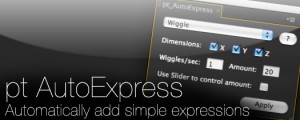
pt_AutoExpress
A simple toolbox that brings the power of expressions to your animation.Add to Cart$9.99 -

- Compatibility After Effects
pt_ShiftLayers
Quickly shift or stagger selected layers in time.Add to Cart$9.99 -

- Compatibility After Effects
pt_SearchAndEditBundle 2
Get three awesome tools for the price of two. pt_EffectSearch 3, pt_ExpressEdit 2 & pt_TextEdit 2Add to Cart$79.99