qp ProxyMan

This product has been discontinued.


qp ProxyMan is a fully featured professional proxy management tool for After Effects. Dramatically speed up your workflow.

Use proxies to work faster; use qp ProxyMan to work smarter.

Availability:

No Longer Available

Description

This product has been discontinued.

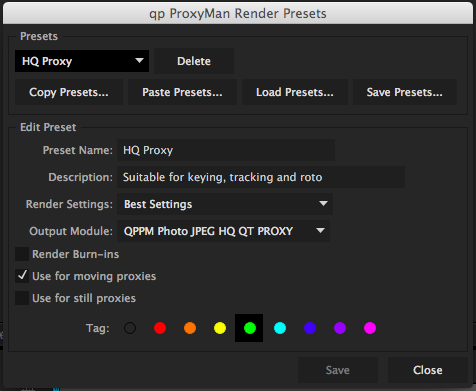
Do you ever use proxies to speed up your workflow in After Effects? If not, you should! Proxies are offline, locally rendered copies of footage, which stand in for your master footage while you work. With 4K and larger footage now becoming the norm, constantly pulling all those pixels off network attached storage can slow things down. A local proxy with the right render settings can make working at these sluggish speeds a thing of the past.

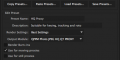
qp ProxyMan takes AE's own proxy feature set and wraps it into one simple, yet powerful tool panel. Now rendering proxies is as simple as importing footage into your project - qp ProxyMan takes care of the rest, even rendering your proxies in the background and setting them silently, while you work.

What's New in Version 1.5

Tutorial

Features

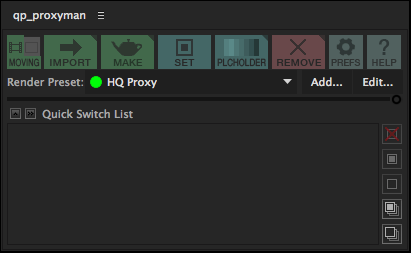
All of qp ProxyMan's features are accessed via the toolbar. Buttons are coloured and organised according to function:

  • Green buttons are used to make proxies - NEW to version 1.5: Either render a proxy or copy the original source
  • Cyan buttons are used to set pre-rendered proxies
  • Red buttons are used to remove proxies
  • Grey buttons are used to access the preferences and help

Import and Proxy
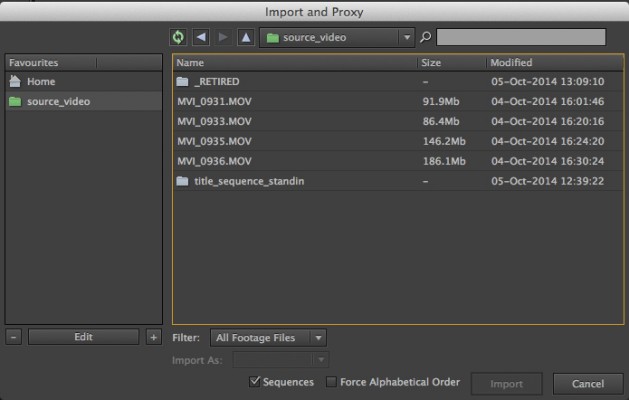
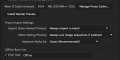
Import one or more pieces of footage into After Effects, and automatically render proxies in the background with the currently selected Proxy Render Preset (Please note - Background rendering is restricted to three tries in the trial version), or copy the original source (not enabled in the trial version).

Replace and Proxy
This feature is available by alt/opt-clicking on the Import and Proxy button. Replace a piece of footage and automatically make its proxy.

Make Proxy
Render proxies, or copy original source for footage already imported into your project, or to dramatically speed up pre-compositions without committing to a final pre-render. Quick Make will make proxies for all footage and/or compositions with a single click.

Set Proxy
Browse the proxy cache to set a proxy for a piece of footage or comp (or browse for the proxy elsewhere).

Placeholder Proxy
Use 'comp' footage (small preview clips from stock footage websites, like Shutterstock) or lower-resolution standins (for example, half-res work-in-progress renders from your CG department) as if they were the full-res item. Quickly change versions, or bring in your full-res footage with the click of a button.

Remove Proxy
Quickly remove proxies from your project, with the option of deleting them from the cache.

Clear All Proxies
Alt/Opt-click the Remove Proxy button to remove (and delete if you want) all proxies from your project in one go. You can also manage the proxy cache from here.

The Proxy Cache
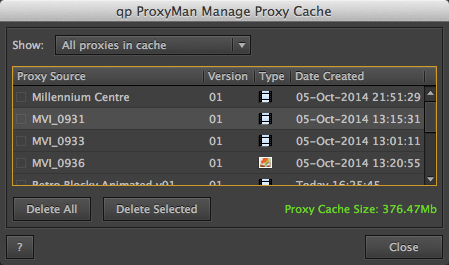
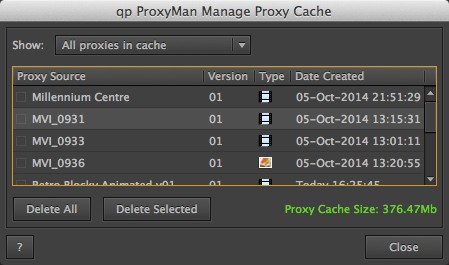
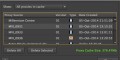
Manage Proxy Cache Dialog
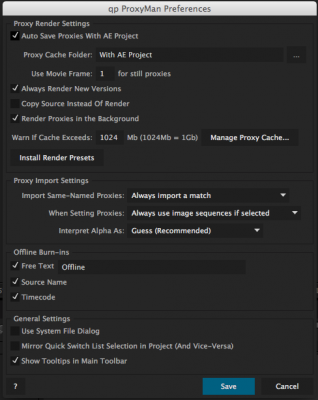
qp ProxyMan uses a folder on your hard drive (preferably a fast, local drive, like an SSD) to store all your rendered proxies. This is known as the "Proxy Cache". Keeping all your proxies in this one place makes managing your proxies a breeze; the Manage Proxy Cache dialog box, accessed from the Preferences dialog, lets you keep track of how large the cache has got, and lets you delete old, unwanted proxies to keep disk usage to a minimum. NEW to version 1.5: you can now set your proxy cache to be located alongside your After Effects project for maximum portability.

Import & Proxy
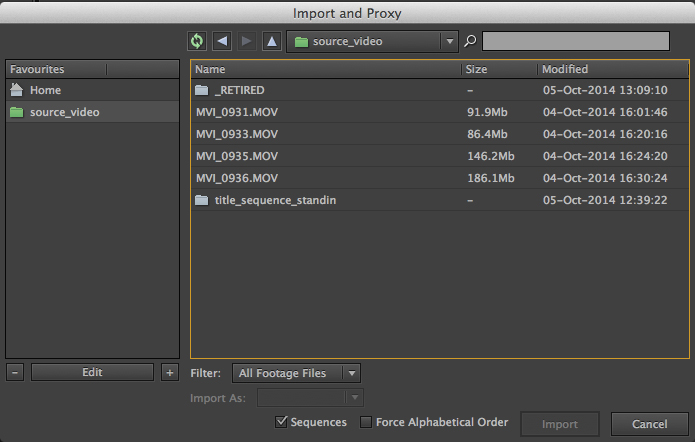
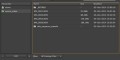
File Import Dialog
qp ProxyMan is built using the Quarterlight Pictures Scripting Framework (QPSF), which includes the brand new file import dialog, with support for image sequences, and the rich help dialog also found in qp Version Snapshot.

Installing qp ProxyMan

qp ProxyMan is a dockable panel, which should be installed in the ScriptUI Panels subfolder of your After Effects Scripts folder, and accessed via the Windowmenu.
Discussions

Want to talk about it?

Head over to r/aescripts to chat with fellow users about this product.

Need Support?

Please open a support ticket to be connected directly with the author of this product

Version History

1.5 -

Sep 25, 2015

- AE CC 2015 compatible

- Auto-locate proxy cache with your AE project

- Copy and Proxy

- Redesigned "Quick Switch List" (previously the Quick Set Panel) with new function buttons

- Quick Make feature

- UI improvements, including progress bar and error reporting

- Try rendering in the background in trial mode (3 goes)

- Bug fixes

1.0.2 -

Dec 29, 2014

Updated to work with After Effects v13.2

1.0.1 -

Dec 23, 2014

Fixes various File Import Dialog bugs, and bugs where non-English named proxies could not be rendered in the background

1.0 -

Oct 26, 2014

First release

Compatibility

After Effects

CC 2015, CC 2014, CC, CS6, CS5.5, CS5

EULA

END USER LICENSE AGREEMENT

This software ("the Software Product") and accompanying documentation is licensed and not sold. This Software Product is protected by copyright laws and treaties, as well as laws and treaties related to other forms of intellectual property. The author owns intellectual property rights in the Software Product. The Licensee's ("you" or "your") license to download, use, copy, or change the Software Product is subject to these rights and to all the terms and conditions of this End User License Agreement ("Agreement").

Acceptance
YOU ACCEPT AND AGREE TO BE BOUND BY THE TERMS OF THIS AGREEMENT BY SELECTING THE "ACCEPT" OPTION AND DOWNLOADING THE SOFTWARE PRODUCT OR BY INSTALLING, USING, OR COPYING THE SOFTWARE PRODUCT. YOU MUST AGREE TO ALL OF THE TERMS OF THIS AGREEMENT BEFORE YOU WILL BE ALLOWED TO DOWNLOAD THE SOFTWARE PRODUCT. IF YOU DO NOT AGREE TO ALL OF THE TERMS OF THIS AGREEMENT, YOU MUST SELECT "DECLINE" AND YOU MUST NOT INSTALL, USE, OR COPY THE SOFTWARE PRODUCT.

License Grant
This Agreement entitles you to install and use one copy of the Software Product. In addition, you may make one archival copy of the Software Product. The archival copy must be on a storage medium other than a hard drive, and may only be used for the reinstallation of the Software Product. This Agreement does not permit the installation or use of multiple copies of the Software Product, or the installation of the Software Product on more than one computer at any given time, on a system that allows shared used of applications, on a multi-user network, or on any configuration or system of computers that allows multiple users. Multiple copy use or installation is only allowed if you obtain an appropriate licensing agreement for each user and each copy of the Software Product.

Restrictions on Transfer
Without first obtaining the express written consent of the author, you may not assign your rights and obligations under this Agreement, or redistribute, encumber, sell, rent, lease, sublicense, or otherwise transfer your rights to the Software Product.

Restrictions on Use
You may not use, copy, or install the Software Product on any system with more than one computer, or permit the use, copying, or installation of the Software Product by more than one user or on more than one computer. If you hold multiple, validly licensed copies, you may not use, copy, or install the Software Product on any system with more than the number of computers permitted by license, or permit the use, copying, or installation by more users, or on more computers than the number permitted by license.

You may not decompile, "reverse-engineer", disassemble, or otherwise attempt to derive the source code for the Software Product.

Restrictions on Alteration
You may not modify the Software Product or create any derivative work of the Software Product or its accompanying documentation. Derivative works include but are not limited to translations. You may not alter any files or libraries in any portion of the Software Product.

Restrictions on Copying
You may not copy any part of the Software Product except to the extent that licensed use inherently demands the creation of a temporary copy stored in computer memory and not permanently affixed on storage medium. You may make one archival copy which must be stored on a medium other than a computer hard drive.

Disclaimer of Warranties and Limitation of Liability
UNLESS OTHERWISE EXPLICITLY AGREED TO IN WRITING BY THE AUTHOR, THE AUTHOR MAKES NO OTHER WARRANTIES, EXPRESS OR IMPLIED, IN FACT OR IN LAW, INCLUDING, BUT NOT LIMITED TO, ANY IMPLIED WARRANTIES OF MERCHANTABILITY OR FITNESS FOR A PARTICULAR PURPOSE OTHER THAN AS SET FORTH IN THIS AGREEMENT OR IN THE LIMITED WARRANTY DOCUMENTS PROVIDED WITH THE SOFTWARE PRODUCT.

The author makes no warranty that the Software Product will meet your requirements or operate under your specific conditions of use. The author makes no warranty that operation of the Software Product will be secure, error free, or free from interruption. YOU MUST DETERMINE WHETHER THE SOFTWARE PRODUCT SUFFICIENTLY MEETS YOUR REQUIREMENTS FOR SECURITY AND UNINTERRUPTABILITY. YOU BEAR SOLE RESPONSIBILITY AND ALL LIABILITY FOR ANY LOSS INCURRED DUE TO FAILURE OF THE SOFTWARE PRODUCT TO MEET YOUR REQUIREMENTS. THE AUTHOR WILL NOT, UNDER ANY CIRCUMSTANCES, BE RESPONSIBLE OR LIABLE FOR THE LOSS OF DATA ON ANY COMPUTER OR INFORMATION STORAGE DEVICE.

UNDER NO CIRCUMSTANCES SHALL THE AUTHOR, ITS DIRECTORS, OFFICERS, EMPLOYEES OR AGENTS BE LIABLE TO YOU OR ANY OTHER PARTY FOR INDIRECT, CONSEQUENTIAL, SPECIAL, INCIDENTAL, PUNITIVE, OR EXEMPLARY DAMAGES OF ANY KIND INCLUDING LOST REVENUES OR PROFITS OR LOSS OF BUSINESS) RESULTING FROM THIS AGREEMENT, OR FROM THE FURNISHING, PERFORMANCE, INSTALLATION, OR USE OF THE SOFTWARE PRODUCT, WHETHER DUE TO A BREACH OF CONTRACT, BREACH OF WARRANTY, OR THE NEGLIGENCE OF THE AUTHOR OR ANY OTHER PARTY, EVEN IF THE AUTHOR IS ADVISED BEFOREHAND OF THE POSSIBILITY OF SUCH DAMAGES. TO THE EXTENT THAT THE APPLICABLE JURISDICTION LIMITS THE AUTHOR'S ABILITY TO DISCLAIM ANY IMPLIED WARRANTIES, THIS DISCLAIMER SHALL BE EFFECTIVE TO THE MAXIMUM EXTENT PERMITTED.

Limitation of Remedies and Damages
Any claim must be made within the applicable warranty period. All warranties cover only defects arising under normal use and do not include malfunctions or failure resulting from misuse, abuse, neglect, alteration, problems with electrical power, acts of nature, unusual temperatures or humidity, improper installation, or damage determined by the author to have been caused by you. All limited warranties on the Software Product are granted only to you and are non-transferable. You agree to indemnify and hold the author harmless from all claims, judgments, liabilities, expenses, or costs arising from your breach of this Agreement and/or acts or omissions.

Governing Law, Jurisdiction and Costs
This Agreement is governed by the laws of New York, without regard to New York's conflict or choice of law provisions.

Severability
If any provision of this Agreement shall be held to be invalid or unenforceable, the remainder of this Agreement shall remain in full force and effect. To the extent any express or implied restrictions are not permitted by applicable laws, these express or implied restrictions shall remain in force and effect to the maximum extent permitted by such applicable laws.

Updated: Oct 21, 2025 1:35 AM