
lipsyncr 2
-
Compatibility After Effects Please check exact version compatibility under the "COMPATIBILITY" tab below
 Adding to cart...

Speed
Time is money, so stop wasting it. Lipsyncr finishes tasks in a matter of seconds that would otherwise cost you dozens of hours. The longer you work with it, the more time it will save you. So let’s better start now!

Control
Every project is different. That’s why with lipsyncr you can control the level of detail of your animation and the amount of illustration effort. The workflow is so flexible that you can combine any number of audio tracks with different mouth compositions.

Usability
Don’t worry about complex viseme mappings and workflows anymore. Lipsyncr features a clean interface that is integrated into the After Effects functionality you are used to work with. Not exactly a ‘one-button solution’, but as close as it gets!
Key Features
- Full-featured English speech analysis
- Combine any number of audio files and mouth compositions
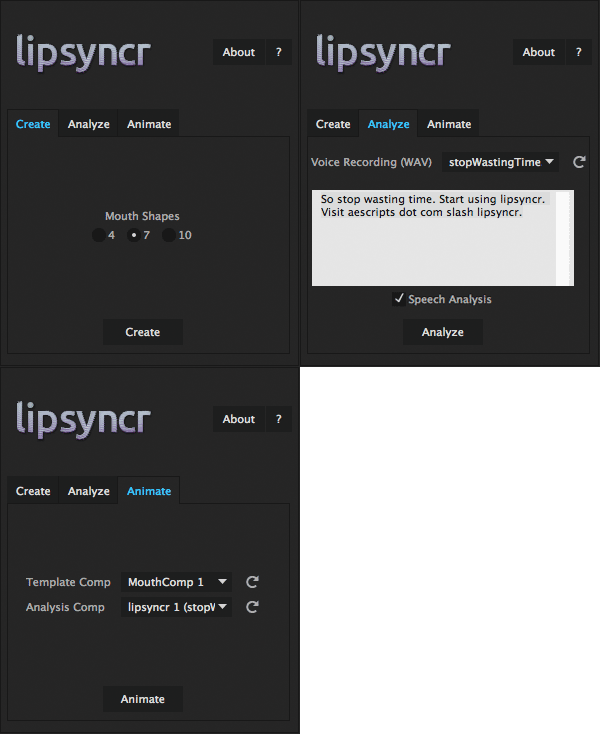
- Three different viseme mappings: 4 illustrations (low quality), 7 illustrations (medium quality), 10 illustrations (high quality)
- Template viseme images including illustration guides
Workflow
- Create a template composition with your desired viseme count and replace the templates with your own images
- Import your spoken track and its transcription and let lipsyncr analyze it
- Let lipsyncr animate the mouth composition to your desired spoken track!
Languages
The current version of the speech analysis engine only works with English language. For all the other languages, the script provides a manual mode. Check the video section on how to use Premiere Pro Speech Analysis instead!
Need support? Check out the FAQs, write a comment, or open a support request!
Cinema 4D
Interested in using lipsyncr inside Cinema 4D? Have a look at the workflow tutorial in the 'Videos' section!
| After Effects | 2023, 2022, 2021, 2020, CC 2019, CC 2018, CC 2017, CC 2015.3, CC 2015, CC 2014, CC, CS6, CS5.5, CS5 |
|---|
2.7 (Current version) - Oct 18, 2019
- Improved special character handling
2.5 - Oct 5, 2019
2.4 - Feb 3, 2018
2.3 - Jan 14, 2018
2.2.3 - Dec 12, 2015
- corrected installation instructions (Windows path)
2.2.2 - May 19, 2015
2.2.1 - May 7, 2015
2.2 - May 4, 2015
- Analysis timeout
2.1 - Apr 21, 2015
- improved silence detection
2.0 - Apr 14, 2015
-
- Compatibility After Effects
- Compatibility Premiere
Subtitle Pro
Add to CartCreate Professional Subtitles Directly in After Effects and Premiere Pro
-
- Compatibility Premiere
Transcriptive Rough Cutter
Add to CartTranscriptive Rough Cutter goes beyond automated transcriptions! Creating transcript-based rough-cuts in Premiere Pro and online is now easier than ever.
$199.00 -

-

- Compatibility After Effects
LottieFiles for Adobe After Effects
Export your After Effects animations instantly as Lottie JSON or dotLottie format for web and mobile apps for easy implementation.Add to Cart -

- Compatibility After Effects
Easy Arrows
The fastest way to auto-orient graphics to a path.Add to Cart$29.95 -

- Compatibility After Effects
Explode Shape Layers 3
Add to CartTake control of your shape layers! Explode & merge for greater precision.

-
- Compatibility After Effects
textsyncr
Automatic speech-to-markers engine, automatically creates layer markers from audio transcription - drive subtitles, the Monkey tools and more.Add to Cart$34.99 -

- Compatibility After Effects
Layer Storage
Custom groups dramatically changing the way you work in After Effects.Add to Cart$34.99