
textsyncr
-
Compatibility After Effects Please check exact version compatibility under the "COMPATIBILITY" tab below
 Adding to cart...
The Monkey Scripts
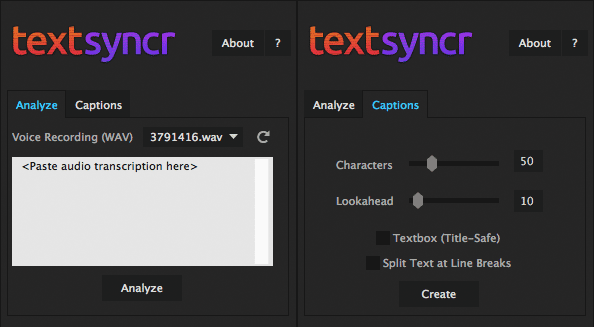
Let a voice recording drive animations from any Monkey script (TextMonkey, LayerMonkey, MotionMonkey). Textsyncr creates layer markers to work seamlessly with the Monkeys. See this example.
Automatic Subtitles
Textsyncr comes with a captions featureset that can be used to create automatic subtitles based on the Layer Markers of any layer.
Label your Video
Conveniently label your video with the aligned transcription to never have to scrub again.
Key Features
- Full-featured speech analysis (English only)
- Aligns transcription to audio as Layer Markers
- Generate and control automatic captions
Workflow
- Import a spoken track and paste its transcription
- Let textsyncr analyze and align the transcription
- The layer markers can be used for different applications
- Generate captions such as subtitles or lyrics with just a few clicks
Languages
The current version of the speech analysis engine only works with English language.
Need support? Check out the FAQs, write a comment, or open a support request!
| After Effects | 2023, 2022, 2021, 2020, CC 2019, CC 2018, CC 2017, CC 2015.3, CC 2015, CC 2014, CC, CS6, CS5.5, CS5 |
|---|
1.6 (Current version) - Oct 18, 2019
- Improved special character handling
1.4 - Oct 5, 2019
1.3 - Jan 14, 2018
1.2 - Feb 9, 2016
1.1.1 - Dec 12, 2015
- corrected installation instructions (Windows path)
1.1 - Dec 3, 2015
1.0 - Jun 10, 2015
-
- Compatibility After Effects
Marker Conductor 3
Add to CartMarker conductor automatically places markers at specified intervals of time or bpm.
-
- Compatibility After Effects
MotionMonkey
Add to CartThe easiest way to animate your layered art. One layer or one hundred at a time. Great for all levels - from novice to expert.
-
- Compatibility After Effects
LayerMonkey
Add to CartCreates and animates unique layouts in seconds. Think TypeMonkey for layers!
-
- Compatibility After Effects
TypeMonkey
Add to CartThe easiest way to create kinetic typography. Automatically generate, layout and animate type based on our unique algorithm. The best-selling Monkey!
-
- Compatibility After Effects
lipsyncr 2
Automatic high quality viseme–based mouth animations. In a matter of seconds.Add to Cart$59.99 As low as: $47.99 -
- Compatibility After Effects
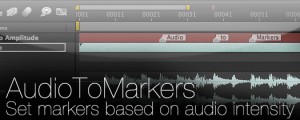
AudioToMarkers
Add to CartAdds markers, splits a layer or adds a new text layer with incrementing numbers based on audio intensity.
-
- Compatibility After Effects
lipsyncr 2
Automatic high quality viseme–based mouth animations. In a matter of seconds.Add to Cart$59.99 As low as: $47.99 -

- Compatibility After Effects
Layer Storage
Custom groups dramatically changing the way you work in After Effects.Add to Cart$34.99