
Ray Dynamic Texture
-
Compatibility After Effects Please check exact version compatibility under the "COMPATIBILITY" tab below
 Adding to cart...
Ray Dynamic Texture:
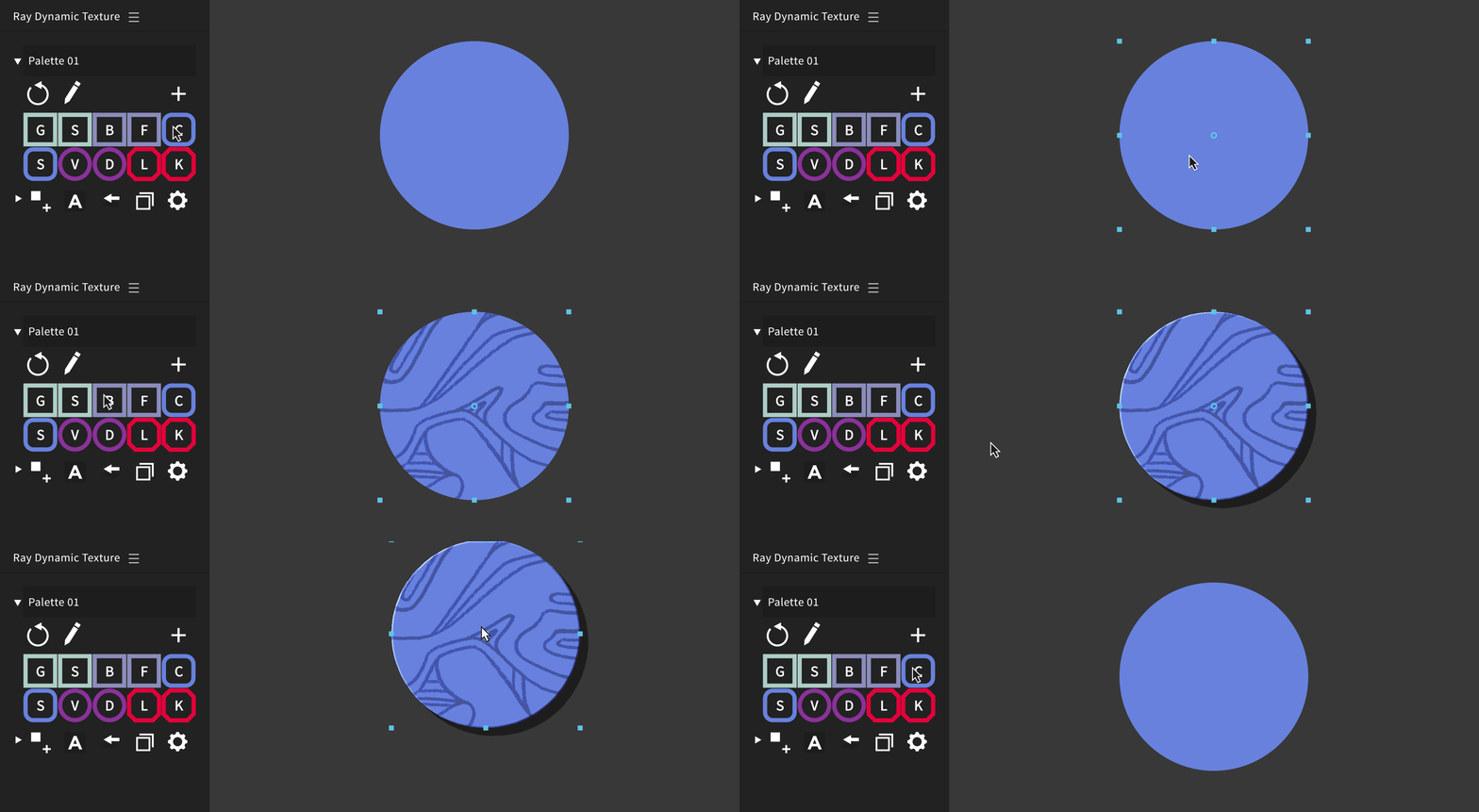
Ray Dynamic Texture is your solution to tedious texture work. This tool conveniently stores textures, including their layer settings, applied effects, keyframes, expressions and layer styles. It’s simplicity is key: After you’ve set it up you can apply it directly as a texture to any selected layer. In addition to this, the tool can store your most used Effects, Shapes and Expressions—all with one click.
Features:
- Store textures in a library “palette” including their layer settings.
- Apply textures to selected layers, Alpha Matte and Luma supported.
- Makes the Set Matte Effect usable to texture with.
- Texture Multiple objects at once.
- Build your own texture palettes.
- Add textures, effects, shapes and expressions from timeline to palette.
- Create Master controller for any property.
- Invert Mattes.
- Create excact clone of any layer.
- Replace textures with one click.
- Compact, responsive user interface
Resources:

Watch Tutorials, download free Texture Palettes and more.
Texture Pack Highlights: Download: Default Texture Assets Download: Blink My Brain - Ariel Costa
Shortcuts: Shift + Click the Texture Swatch to parent the texture to selected layer. Alt + Click the Texture Swatch to replace selected layer for different texture. Alt + Shift + Click the Texture Swatch to remove swatch from palette. Alt + Click on Alpha Mode Button to invert the Track Matte.
Custom values in effects are currently not supported. Some examples of custom values are: Histogram in Levels, Curves Graph, Hue Saturation Channel Range and Particular Size over Life. All other values in the effects are supported. We are working to find a workaround for this limitation.
Just got off a plane and came back to this. So this is what it feels like to wake up in the future. https://t.co/HJEXClHqo2
— Paul Slemmer (@paulslemmer) March 15, 2017
Holy Scripting Batman this is genius. Just like... all @georegulus's other AE ideas. Now I need an illustration based project to use it on! https://t.co/mHpT42HFNP
— Substance (@scottgeersen) March 15, 2017
Get Started - Manual (14 min):

FAQ:
What happens if I send my project to someone who doesn’t have Ray installed?
That's fine, everything will still work. Ray Dynamic Texture just helps you set up your textures using After Effects.
Can I use Ray on existing projects?
For sure! You can start creating a texture palette out of the existing textures, effects, shapes and expressions. Then you can apply those quickly in your project using the buttons.
How do I collaborate with people on the same project using the same textures?
You can share the same texture palette that you are using. Save it in a separate AE project and then share it with the people on your team.
People say:
Holy buckets! https://t.co/QZZ25LfYSc
— Jeffrey Grutter (@GaardhouseVFX) March 16, 2017
1 click to add texture and a toolbar for shapes, effects, or expressions in the project. Awesome! https://t.co/sTMxWh9Mom
— olaolayuan (@zogft) March 16, 2017
If you don't have Ray Dynamic Texture, you can pick up my native After Effects grain tools here: https://t.co/eD0MNndohq
— Kevin Snyder (@freshmograph) May 29, 2017
Genius. This is going to save so much time. https://t.co/N3VmKG73Ns
— Kris Cave (@kriscave) March 15, 2017
I ended up buying both Ray Dynamic Texture and Ray Dynamic Color to bridge the gap in AE. Also Ouroboros 2 is PHENOMENAL (and free)
— Batchelor Dandy, Drinker of Brandy ️ (@CrazyJimP) September 3, 2019
Animators behold: Ray Dynamic Texture, an insanely powerfull script for #AfterEffects by @georegulus https://t.co/IHNqu9wAmh @SchoolOfMotion
— Benjamin Helsper (@Klausebou) July 1, 2017
Ray Dynamic Texture for After Effects https://t.co/KVMK0Km3Uw pic.twitter.com/YOAuQMMGRD
— Mixed Parts (@mixedpartscom) March 16, 2017
I made a texture pack that is all set up for use with Ray Dynamic Texture by @georegulus https://t.co/Ew7GfjyANx #aftereffects
— Chris Greene (@seeinggreene) August 30, 2018
Lately I use @georegulus Ray Dynamic Texture to create a clone layer and control its opacity like the others.
— Philip von Borries (@pvonborries) May 30, 2017
Using Ray Dynamic Texture for creating mattes already worth the cost of the plugin
— Arley Cornell (@arleycornell) June 5, 2017
I bought #raydynamictexture by @georegulus, played with it a little bit and now I can't imagine how I used to work without it, a must have!
— Tomasz Czajka (@tomaszczajka) March 21, 2017
Leveled up my setup recently - now using Boil It + Shade It by @eyedesyn, Ray Dynamic Texture by @georegulus, plus Buttcapper, Rubberhose + the mighty Overlord by @battleaxedotco. Thanks to all these guys for making my job a whole lot easier. pic.twitter.com/hX7wmpnsPt
— Louise Macfadyen (@ljmacfadyen) February 2, 2018
| After Effects | 2023, 2022, 2021, 2020, CC 2019, CC 2018, CC 2017 |
|---|
1.5.8 (Current version) - Nov 21, 2022
- Fixed macOS compatibility issues
1.5.7 - Aug 4, 2020
1.5.6 - Nov 22, 2019
1.5.5 - Dec 7, 2018
1.5.4 - Jun 15, 2018
1.5.3 - Apr 13, 2018
1.5.2 - Mar 8, 2018
1.5.1 - Nov 28, 2017
1.5 - Nov 25, 2017
- Improved refreshing palettes, Ray will aim to remember last palette used.
- Ability to turn ON / OFF error messages in the settings.
- Better default names for palettes.
- Swap button can now swap any two color properties you select in the timeline. (excluding properties with keyframes)
- Clone button integration with Kbar tool.
1.1.1 - Apr 28, 2017
1.1 - Apr 18, 2017
- Fixed Shape Layer positioning
- Fixed multiple layer texturing issue
- Fixed scaled and rotated texture issue
1.0.3 - Mar 3, 2017
1.0.2 - Mar 17, 2017
- Added pref to not rename effects for Duik compatibility
- Added additional code credit
1.0.1 - Mar 15, 2017
1.0 - Mar 11, 2017
-
-

- Compatibility After Effects
MP4 + Alpha Converter
Add to CartConvert videos with alpha channel to MP4/h264, keeping the background transparent, just with one click.
-

- Compatibility After Effects
Coco Color CoWorker
Add to CartYour Handy Color Coworker in After Effects.
-

- Compatibility After Effects
Chubs - Animated Typeface
Add to CartBring your designs to life with the playful charm of Chubs, a typeface that seamlessly merges graffiti throw-up style with bubbly motion. Its playful curves create a vibrant and energetic visual impact without sacrificing legibility.
Order 4 or more Animography Typefaces and save 25%. -

- Compatibility After Effects
Wandeln - Animated Typeface
Add to CartWandeln is a classy yet modern typeface with high contrast and futuristic-looking animations available in both animated and static.
Order 4 or more Animography Typefaces and save 25%. -

- Compatibility After Effects
- Compatibility Photoshop
- Compatibility Premiere
- Compatibility Cinema 4d
- Compatibility Nuke
Set Matte Texture Pack 01
Add to CartHigh-quality moving textures designed for animation.
-
- Compatibility After Effects
Ray Dynamic Color 2
Add to CartThe industry leading Color Palette for After Effects.
$29.99