
Ray Dynamic Color 2
-
Compatibility After Effects Please check exact version compatibility under the "COMPATIBILITY" tab below
 Adding to cart...
 Currently not compatible with the latest 24.4 version of After Effects . Compatible with AE 24.3 and below.
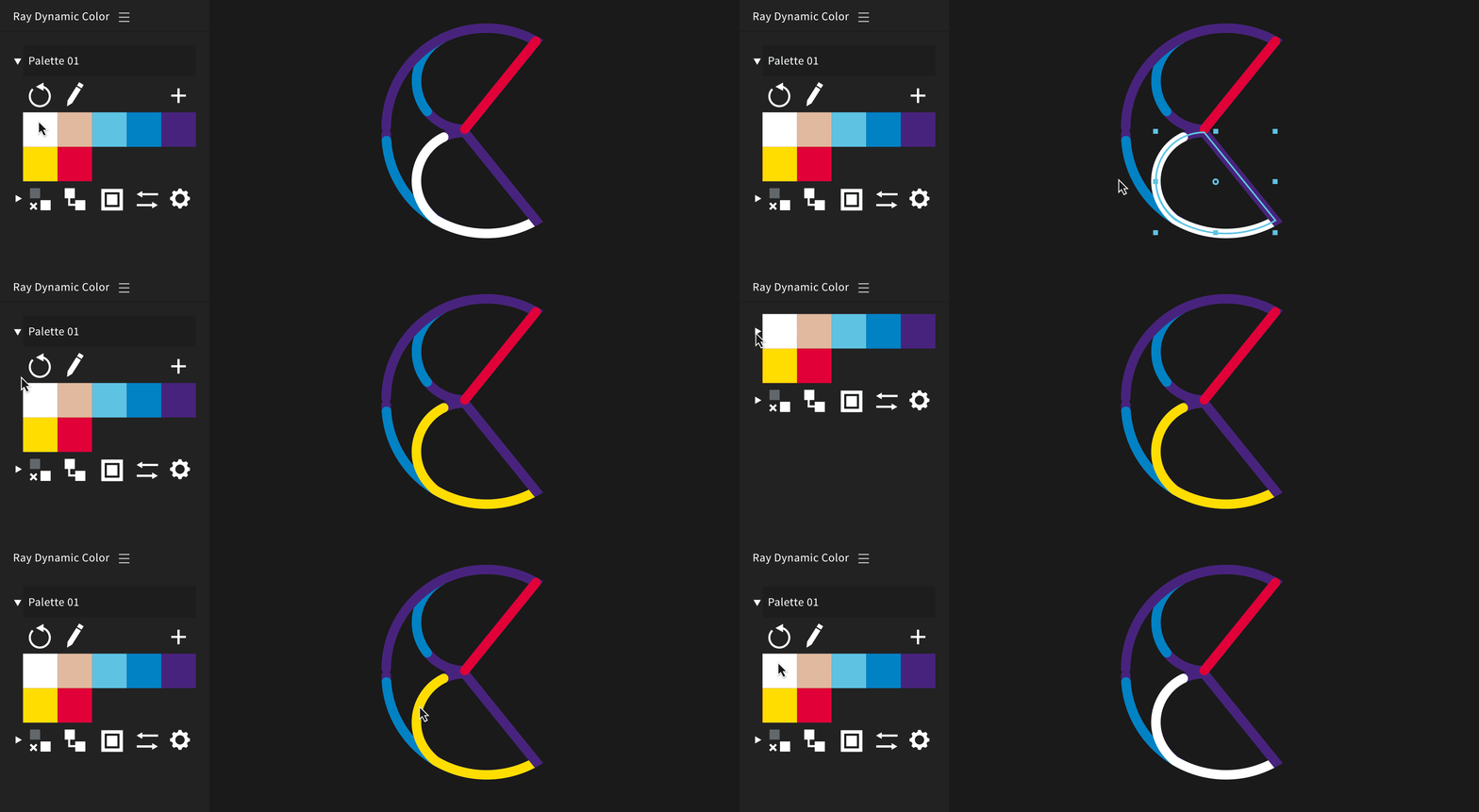
Ray Dynamic Color:
The industry leading Color Palette for After Effects. Currently, all the colors in your After Effect project have a fixed value, even if multiple colors in your scene have the same color value. This makes trying a different color or changing one almost impossible because you have to change each individual color of every element in the project. Ray Dynamic Color not only gives you a color palette to color with, it can also create clever links between the color values in your scene and the color palette. This give us many options to manage colors. Watch the tutorials to learn how.z
Features:
- Color your scene with one click using the color swatches. Learn How
- Extract colors from your scene into a palette. Learn How
- Change colors after they are applied. Learn How
- Color with or without “expression links”. Learn How
- “Link” and “Unlink” colors to and from a palette. Learn How
- Color shape layer strokes and fills individually. Learn How
- Swap the colors of two color properties. Learn How
- Resolve color differences when merging scenes. Learn How
- Options to randomize and cycle colors of a palette. Learn How
- Compact, responsive user interface
- KBar and Overlord integration. Learn How
Resources:

Instalation Guide, Free Tutorials, Color Palettes and other resources.
People say:
Ray Dynamic Colour by @georegulus is worth every penny. http://t.co/FodkvapSWI
— Alex Grigg (@alexxgrigg) March 3, 2015
Ray Dynamic Color, how did I use AE without it? Thanks Sander @georegulus @aescripts
— helloluxx (@helloluxx) August 3, 2016
Get Started - Manual (3 min):

Reviews:
When Sander @georegulus showed me this, I fell in love, this is my personal recommendation USE THIS http://t.co/F4G4qq82zp
— Jorge R. Canedo E. (@jrcanest) December 2, 2014
Using @georegulus' Ray Dynamic Color on our current animated piece to organize colors… definitely worth checking out!http://t.co/9QYSV8bTaW
— Zac Dixon (@zacdixon) December 11, 2014
you guys. #RayDynamicColor from @aescripts is BLOWING MY MIND! it's the simple things that save so much time. love this plug-in.
— Timmy Allen (@timmy_allen) September 15, 2015
@gorociao And @georegulus' ray dynamic color (https://t.co/Owm6lcNrGF) + @adamplouff's rubberhose (https://t.co/vtTRnNmsIO) were lifesavers
— Erica Gorochow (@gorociao) May 3, 2016
@georegulus Just bought Ray Dynamic color :) 1st thing I bought after payday. Thanks man, its gonna save me so much time. Love your work!
— Luke Bolus (@lukasbolus) April 29, 2015
Time-saver.
— Motion Graphics Collective (@Motion_Graphic) October 26, 2015
Ray Dynamic Color by Sander van Dijk. https://t.co/jvgVm7vQ0u https://t.co/BSnN66EdAC
Client came back for color changes a year later. Thank you @georegulus! Ray Dynamic Color continues to kill it for huge time saves!
— Adam Maurer (@acmmaurer) February 8, 2018
Slick new updates to Ray Dynamic Color by @georegulus on @aescripts: http://t.co/5K2946ZzNB The new scan feature is awesome sauce.
— Justin Lawes (@JustinLawes) April 21, 2015
My buddy @georegulus recently released Ray Dynamic Color. His latest script for AE. Here's my thoughts on it. http://t.co/czvoAiBvUv
— Andreas Bjørn Hansen (@andreas_bjoern) December 8, 2014
sweet tool for #AfterEffects - Ray Dynamic Color - http://t.co/MZ617Gnh7p
— Jonathan Berkey (@BerkShop) December 2, 2014
Ray Dynamic Color: Sander van Dijk, who previously brought us Ouroboros, is back again with a wonderful new co... http://t.co/XaGX6Ls4et
— Calvin Thomas (@climb4success) December 2, 2014
Just picked up @georegulus Ray Dynamic Color on @aescripts!
— Matthew Butler (@butierm) December 1, 2014
Another fantastic plugin/script keeping AE afloat. This is much needed! Ray Dynamic Color - @aescripts http://t.co/TPLMUTbgiZ
— Mark Warner (@markWarnerTV) November 29, 2014
FAQ:
What happens if I send my project to someone who doesn’t have Ray installed?
The links created by Ray Dynamic Color are done with clever native After Effects expressions so they will still work even if you open the project on a different machine. You also have the option to remove the expression links with the “Unlink button” to leave no trace of Ray Dynamic Color.
Can I use Ray on existing projects?
For sure! You can start by creating a color palette out of the existing colors by selecting a couple layers and clicking the Plus Button, “here you can learn how” . After that you can apply colors to your scene using the color swatches. The colors you apply will be linked to the color palette with expression links so you can change the colors all at once.
What if I don’t like having expression links in my project?
The expression links are default but optional. You can turn off expression links with the “turn off the expression links” checkbox in the bottom dropdown. With links off Ray Dynamic Color functions as a normal color palette just like in Illustrator. “here you can learn about the two ways you can color”
How do I collaborate with people on the same project using the same colors?
The best way to share colors is to create a new illustrator with file that has all the colors in it, Demonstrated here. Everyone can then import that illustrator file into After Effects and convert it using“Create Shapes from Vector Layer” Then you can select that new shape layer and click on the plus button to create a color palette from it.
If you merge projects together, make sure that every color palette has a unique name. You can also unlink all the colors from every project before you merge them and then link them back to one main color palette to make sure all the color values of every color is the same.
You can learn how to merge projects in this tutorial.
How do I upgrade from Ray Dynamic Color v1?
If you own RDC1 you an upgrade for $14.99. Simply login to the same account and the upgrade price will be automatically displayed. If you need any assistance please open a support ticket and we will be happy to assist you.
| After Effects | 2023, 2022, 2021, 2020, CC 2019, CC 2018, CC 2017 |
|---|
2.5.12 (Current version) - Nov 21, 2022
- Fixed macOS compatibility issues
2.5.11 - Aug 4, 2020
2.5.10 - Feb 4, 2020
2.5.9 - Nov 21, 2019
- Updated license framework
2.5.8 - Mar 28, 2019
2.5.7 - Dec 7, 2018
2.5.6 - May 31, 2018
- Updated licensing
2.5.5 - Apr 13, 2018
2.5.4 - Mar 28, 2018
2.5.3 - Jan 8, 2018
2.5.2 - Dec 19, 2017
- Cycle expression fixes
2.5.1 - Nov 28, 2017
2.5 - Nov 25, 2017
- Improved refreshing palettes, Ray will aim to remember last palette used.
- Ability to turn ON / OFF error messages in the settings.
- Better default names for palettes.
- Swap button can now swap any two color properties you select in the timeline. (excluding properties with keyframes)
- Swap button integration with Kbar tool.
2.0.11 - Apr 14, 2017
2.0.10 - Jul 24, 2016
2.0.9 - Sep 6, 2016
2.0.8 - Sep 6, 2016
2.0.7 - Sep 1, 2016
2.0.6 - Sep 2, 2016
- Fixed disappearing colors issue
2.0.5 - Aug 25, 2016
- Import ASE file: “Shift + Plus Button”
- Export ASE file: “Shift + Alt + Plus Button”
2.0.4 - Aug 22, 2016
2.0.3 - Aug 17, 2016
- Added error handling for renamed or deleted palette comps.
- Added error handling when opening a new AE project.
- Added "Replace Palette" function to Alt-Link button
2.0.2 - Aug 16, 2016
2.0.1 - Aug 15, 2016
2.0 - Aug 15, 2016
- Color without Expression links.
- Link and Unlink colors from a palette.
- Ability to Rename color palettes without breaking expression links
- Add colors to a palette without leaving you comp.
-

- Compatibility After Effects
MOBO_Utils
Add to CartNew tools: Add Path Vertices, GIF Export and Arrow. An evolving set of simple native tools for Adobe After Effects. They do what’s described in their description and nothing else.
-

- Compatibility After Effects
- Compatibility Cinema 4d
CINEWARE proxy
Streamline your live 3D pipeline between Cinema 4D and After Effects CC. Quickly toggle between the live pipeline and rendered proxy files.Add to Cart -

- Compatibility After Effects
Super Liquids
Add to CartSuper Liquids creates a frame by frame style liquids trail animation.
-

-

- Compatibility After Effects
EFX Keying-Alpha Free
Three free plugins from the full EFX Keying/Alpha Plugin Suite. These plugins are useful when keying or creating alpha mattes. Check out the full suite for the rest of the toolbox.Add to Cart -
- Compatibility After Effects
Smart Adapt - Annual Recurring Subscription
Add to CartGet 2 Months Free. Smart Adapt is an After Effects extension that allows you to create hundreds of screen adaptations in a few steps, with the ability to export the list of your screens to use next time.
Please note that this is an annual recurring subscription, it is also available as a monthly subscription
-

- Compatibility After Effects
Ray Dynamic Texture
Add to CartRay Dynamic Texture is your solution to tedious texture work.
$39.99