-
After Effects
- New
React 3
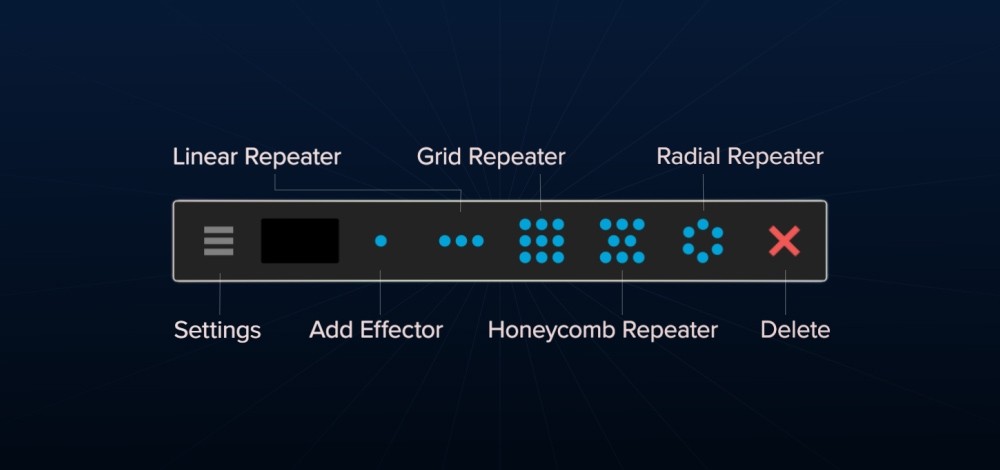
The repeater + effector toolbar.
Like Cinema 4D's cloner system...but for After Effects
NEW:
New repeaters (3D grid and radial, sphere and path)
Influence + inheritance chains (blend repeaters together)
Compatible with OBJs and AE 3D parametric meshes
New modifiers (noise, wave, elastic, snap to and clamp)
Unlock special upgrade price
Please log in to see if you qualify for upgrade pricing (see upgrade notice below).
React3D
The repeater + effector
toolbar for After Effects.
1Select your layers.
2Pick a repeater.
3Add an effector (or more).
4Play with the modifiers.

Pick a repeater...
Four repeater types to quickly build complex layouts.
Choose from grid or radial repeaters (with 3D amount + spacing).
Or the all-new Path and Sphere repeaters.
One tidy toolbar, not a huge panel.
Grid
Includes honeycomb offset and 3D controls

Radial
Start, end, loop and 3D controls

Sphere
NewCreate a ball of layers. Add a rotation effector set to Look At to face layers outward.

Path
NewSelect an existing path or React can quickly create one for you.

INFLUENCE + INHERITANCE
React can now mix between repeaters using Inheritance Chains.
Blend repeaters in and out with their own Influence slider.
Use layer index offsets and elastic to bring the transitions to life.


"React is a wonderful tool."
Richard Beerens - Motion Designer + Director
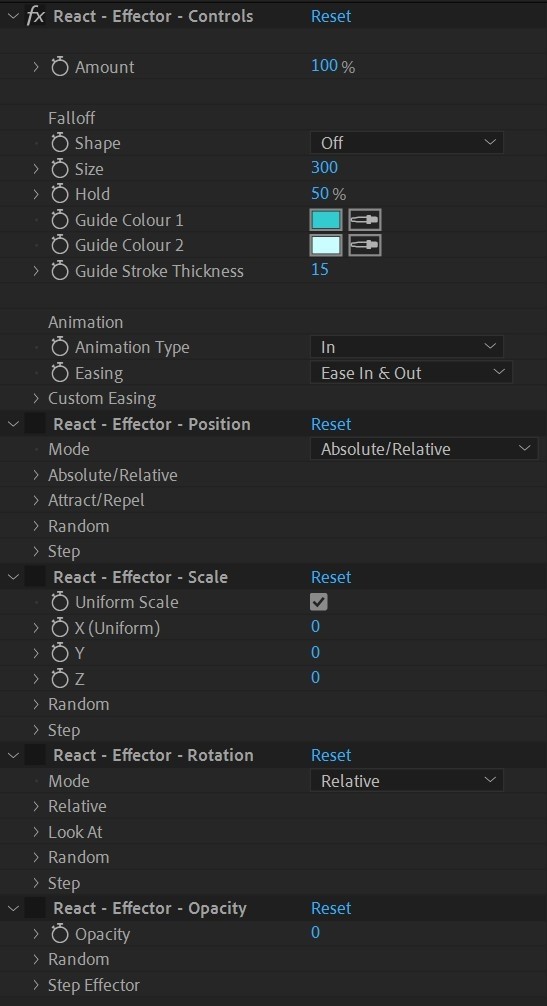
Add an effector
Apply effectors to any property that allows keyframes.
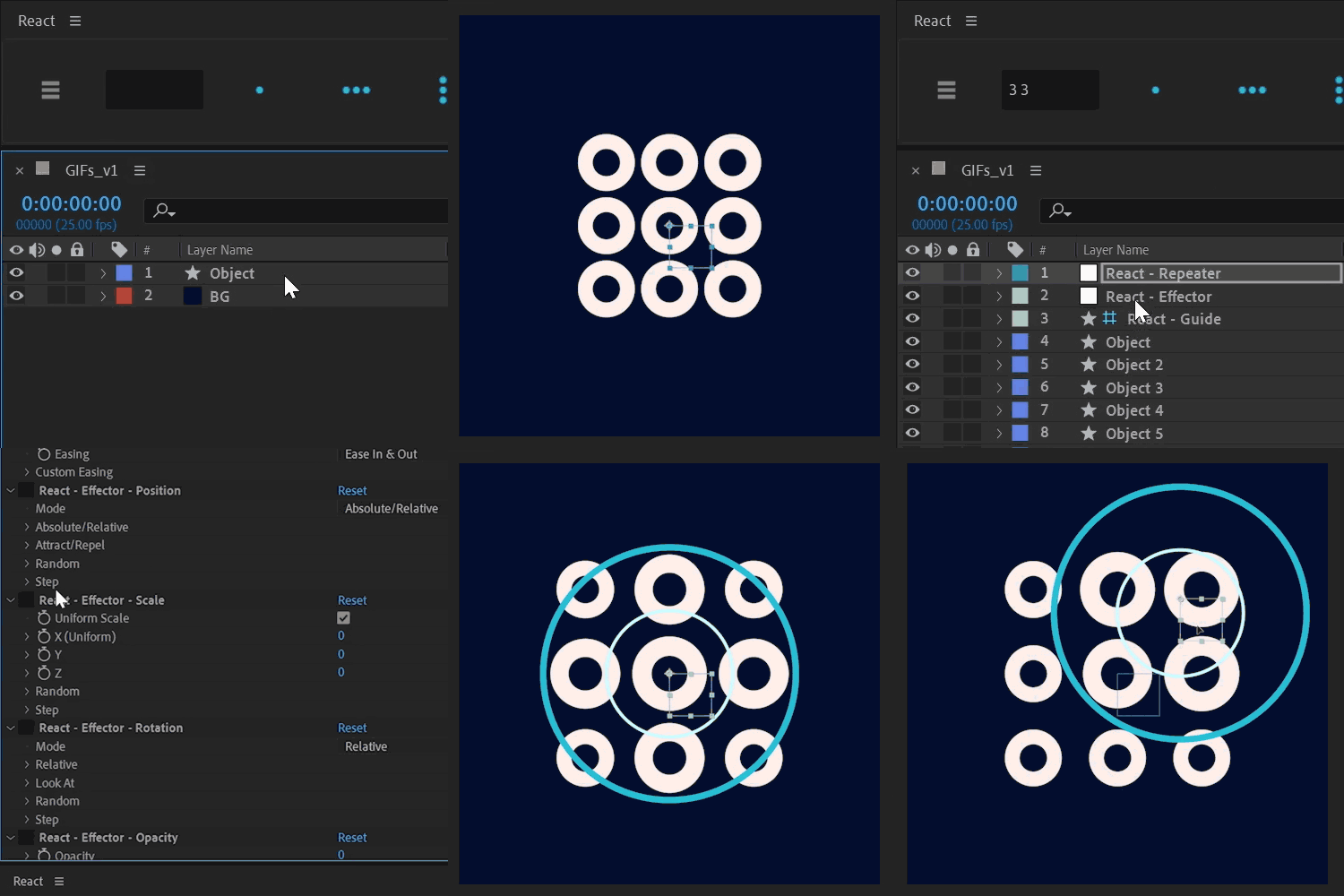
Choose a falloff shape - Circle, Box, Linear.
Stack multiple effectors for complex animations.
Position
Three powerful modes for precise control:
NewAttract/Repel now works in full XYZ space.

Rotation
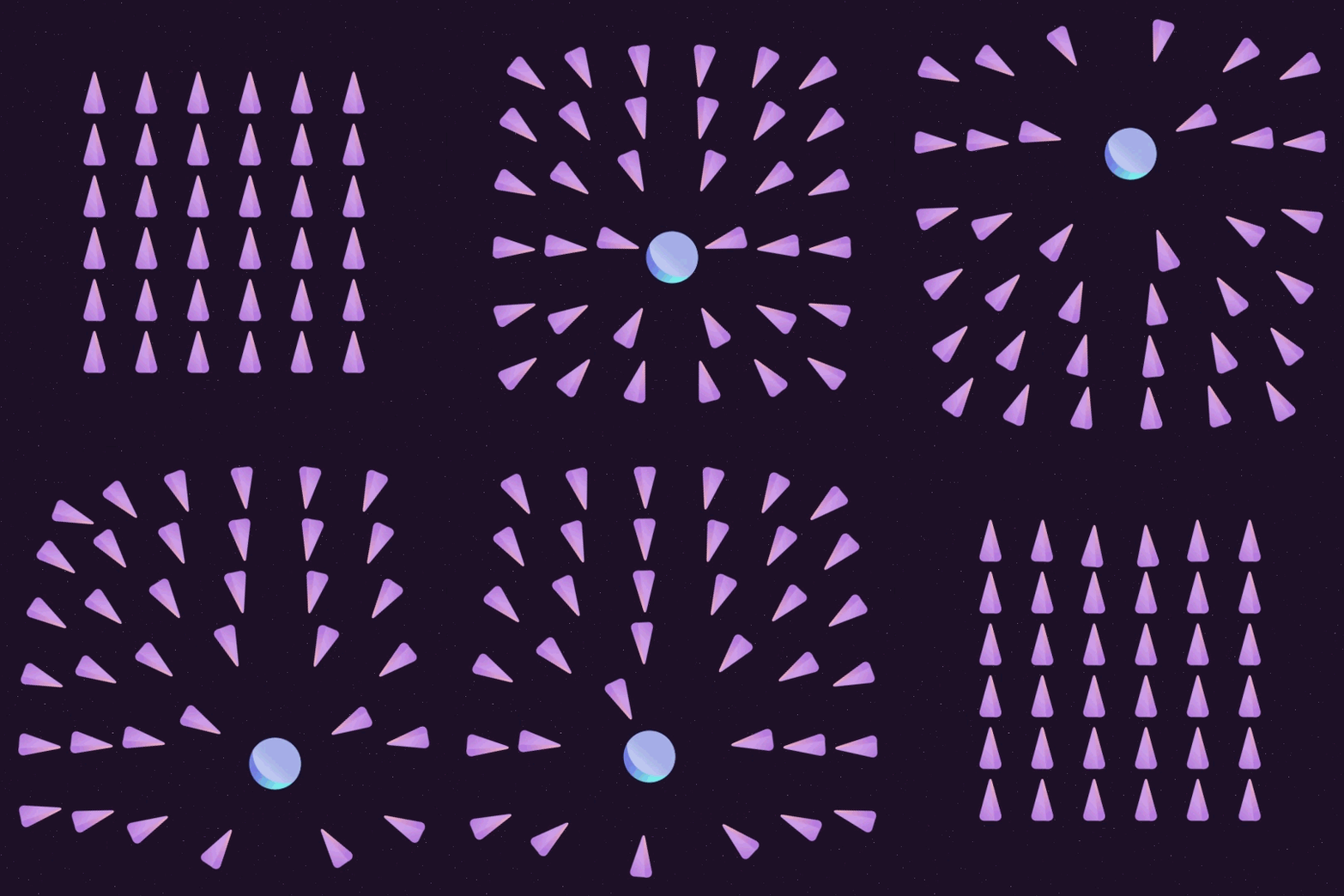
Three rotation modes for dynamic movement:
NewLook At now works in full XYZ space.

Scale
Relative / Absolute control per axis, plus:

Color
Color effector with five modes:

EVERYTHING ELSE
If it can be keyframed, React can control it!
...any keyframeable property.

NEW 3D falloff shapes
Affect all layers, or choose a falloff shape.
Enable 3D on the effector null to switch from 2D to 3D falloff shapes.


"I personally use this tool all the time. It saves me hours of tedious layer duplicating and tweaking key frames."
Andrew Marston - School of Motion
The Tracer
Connect repeated layers with dynamic lines or grids.
The tracer updates with effectors to add a new dimension to your animations.
Choose Grid, Snake or Zig-Zag settings when applied to a Grid Repeater.


Thanks to
for the review
Just a heads-up - React 3 has a ton of new features since this video:
new Sphere and Path repeaters, full 3D support across repeaters and effectors, new modifiers, and lots more.
Smart Modifiers
Noise, Wave, Elastic, Snap To and Clamp.
*(excludes the Color effector, which has its own rules.)
Noise
A powerful upgrade from React 2's Random modifier.
Control amplitude, noise scale, seed, speed and loop length.
Low Noise Scale looks fully random per layer.
High Noise Scale correlates neighbouring layers - perfect for a wind effect.

Wave
A step-up from React 2's Step modifier.
Choose the wave type - Sine, Triangle, Ramp Up, Ramp Down or Square.
Then animate it over time with Wave Speed, Wave Length and Wave Offset.

Elastic
Adds a natural spring whenever the effector value changes.
Adjust Amplitude, Frequency and Decay to dial in the perfect bounce.

Snap To
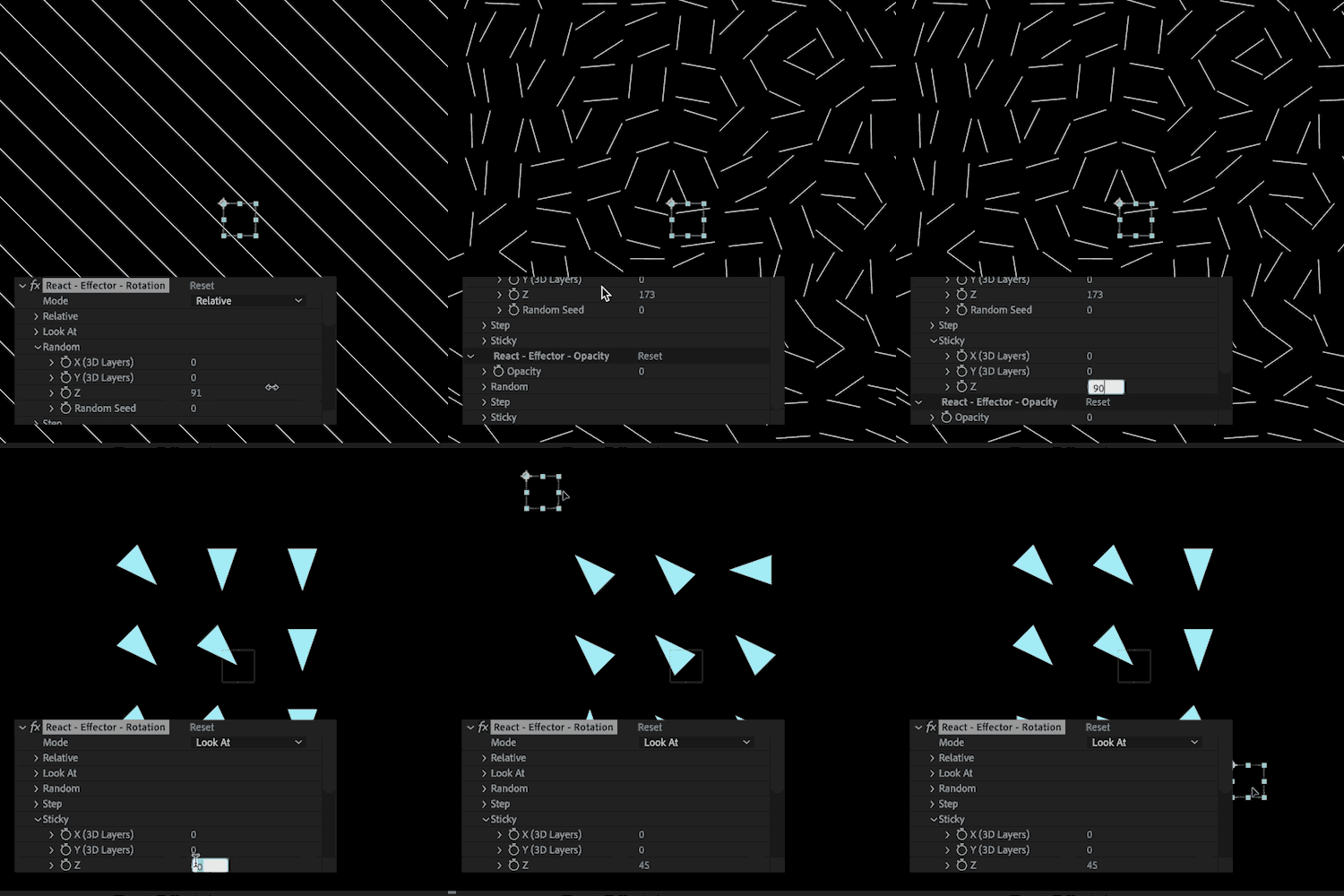
A snappier name for React 2's Sticky modifier.
It snaps/rounds values to the nearest number.
Set it to 45 to create geometric patterns.
Or set it to 1 to snap points on a star.

Clamp
Limits the output to a minimum or maximum value.
Perfect for keeping values within safe bounds, no matter how extreme the other modifiers get.

Thanks to Boone Loves Video for featuring React
And that's not it...
Native 3D layers
React repeats After Effects' new 3D parametric mesh shapes (spheres, cubes, cylinders, and more) and imported OBJ/glTF models - no plugins needed.
Position, rotation, scale and opacity effectors all work the same as on any other layer.

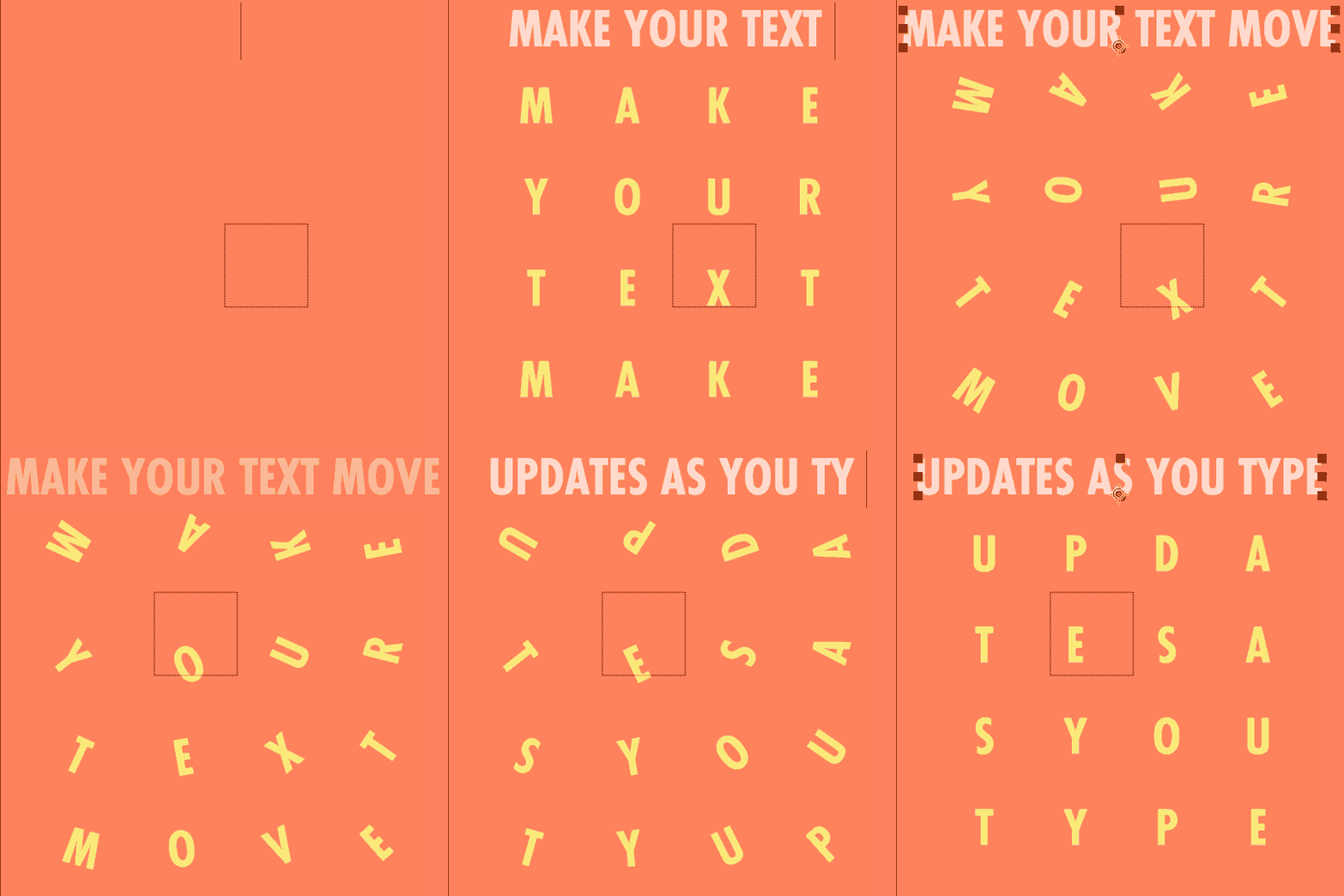
Text layers
Add a repeater to a text layer and split into -
Your repeated layers update as you type
with the dynamic text guide.
Add an effector to create unique animations.

Sorting
Select from Iterate, Blend or Random sorting modes.
Grid repeaters also have row and column sorting.
Simply select the new sorting mode and press the Refresh button.

Stack multiple effectors
More effectors = more fun!
Stack two or more effectors to create
ripple effects or more complex animations.

Smart delete
Delete a single effector from a property without disturbing the others.
Choose no baking, bake the current frame, or bake every frame as keyframes.

Custom easing
Fine-tune your interpolation with React's
custom easing settings.
Or use one of the in-built easing settings -

Now a CEP Panel
Out with the buggy JSX script, in with the flashy CEP panel.
Faster and more frequent updates means React is your go-to toolbar for years to come.

Compact design
Our small, dockable toolbar is compact so it's there when you want to play.
Choose from 4 different layouts, just resize the panel.

Get React 3
The repeater + effector toolbar for After Effects.
Rebuilt from the ground up, and better than ever.
Upgrade Notice
Already own React? Upgrade to React 3 for just $10.
Or upgrade for free if purchased within 90 days.
Simply login with the same account and the upgrade discount will be automatically added in the shopping cart.
- 0:00 What is React 3?
- 0:45 The most important tip…(The help docs)
- 2:00 REPEATERS (and The Grid Repeater)
- 2:34 Sorting modes
- 3:01 The Radial repeater
- 3:52 The Sphere repeater
- 4:30 The Path repeater
- 6:13 Using 3D objects
- 6:56 Creating a repeater with no selection
- 7:12 Changing the amount of layers in a repeater
- 8:10 Influence + Inheritance
- 11:45 Using text layers in a repeater
- 13:08 EFFECTORS
- 14:21 Understanding falloff
- 16:05 3D falloff shapes
- 17:25 The Position Effector
- 20:12 The Noise Modifier
- 22:49 The Wave Modifier
- 24:24 The Elastic Modifier
- 25:53 The Snap To Modifier
- 26:50 The Clamp Modifier
- 27:44 The Rotation Effector
- 30:08 The Scale Effector
- 31:05 Other effector types, including opacity
- 31:55 The Color Effector
- 34:01 THE TRACER BUTTON
- 35:56 THE REFRESH BUTTON
- 37:35 THE DELETE BUTTON
Discussions
Want to talk about it?
Head over to r/aescripts to chat with fellow users about this product.
Need Support?
Please open a support ticket to be connected directly with the author of this product
Version History
3.0.2 -
Sep 29, 2026
- Fixed a bug that prevented saving preferences correctly
- Added 'Refresh GPU' option in dropdown. Sometimes shape layers are 'ghosted' in the comp when using React. Refreshing the GPU fixes this by switching Mercury to software temporarily.
3.0.1 -
Sep 24, 2026
Sphere repeater
Path repeater
3D grid repeater functionality
3D radial repeater functionality
Influence and inheritance (animate between repeaters)
3D falloff shapes (sphere, 3D box, 3D linear)
Compatible with OBJs and AE's 3D meshes
Noise modifier
Wave modifier
Elastic modifier (create Cinema 4D-style spring animations)
Snap To modifier
Clamp modifier
Improved Delete functionality
Brand new CEP panel
+ many more improvements
2.0.3 -
Mar 20, 2026
2.0.2 -
Oct 9, 2025
NEW FOR VERSION 2
- Much faster and more responsive
- Add effectors to almost any property, including color.
- New sorting feature - sort layers to Iterate, Cluster, Random, Row or Column.
- New Tracer feature - create lines and grids between layers.
- All new Effector - not only can the Effector be added to almost any property, we re-built it so multiple effectors can be used on multiple properties. And with the Refresh button, you can update each Effector with new properties.
- Random Evolution - transition smoothly between random values.
2.0.1 -
Dec 12, 2024
React now runs on the old expression as well, except text repeaters and custom easing. Expression error messages direct users to switch to Javascript engine when using these features.
NEW FOR VERSION 2
- Much faster and more responsive
- Add effectors to almost any property, including color.
- New sorting feature - sort layers to Iterate, Cluster, Random, Row or Column.
- New Tracer feature - create lines and grids between layers.
- All new Effector - not only can the Effector be added to almost any property, we re-built it so multiple effectors can be used on multiple properties. And with the Refresh button, you can update each Effector with new properties.
- Random Evolution - transition smoothly between random values.
2.0.0 -
Dec 10, 2024
- Much faster and more responsive
- Add effectors to almost any property, including color.
- New sorting feature - sort layers to Iterate, Cluster, Random, Row or Column.
- New Tracer feature - create lines and grids between layers.
- All new Effector - not only can the Effector be added to almost any property, we re-built it so multiple effectors can be used on multiple properties. And with the Refresh button, you can update each Effector with new properties.
- Random Evolution - transition smoothly between random values.
1.7 -
Nov 20, 2023
- Text Layers
Fixed error when adding effector to text layers
Added guidance on how to affect layers/words within a text layer.
1.5 -
Nov 25, 2022
- Progress Bar
When duplicating or deleting layers, a progress bar has been included.
- Separate Dimensions - Bug Fix
Fixed bug which prevented React working with layers with separate dimensions turned on.
- Improved support and better error messaging for online activation
- Fixed error in alert to open After Effects preferences to allow scripts to access network
1.4 -
Sep 10, 2021
NEW FEATURE - BAKE KEYFRAMES
Select layers and hit delete to bake the keyframes from your animation. This will remove the expressions and speed up your workflow!
1.3 -
Jul 28, 2021
- NEW TEXT FEATURE
Split a text layer into multiple repeats which updates source text and styles automatically, based off a text guide layer
- TEXT BOX IMPROVEMENTS
Separate X and Y values with x, asterisk , dash, comma or space, not just space.
- EXPRESSION ERROR HELP
Expression warning message when empty fields in the React - Object - Layer Selector effect
- NEW AND IMPROVED README FILE
Plus general improvements to instructions
- LAYER NAMING IMPROVEMENTS
React - Effector and React - Repeater nulls are named at source, eliminating need to toggle source/layer name switch in timeline
- BUG FIXES
Fixed bug when effector size was 0
Fixed Attract/Repel bug when effector was in exact position as layer
1.2.1 -
Jun 23, 2021
Fixed bug that meant errors occurred when holding Alt to repeat layers without effector
Version 1.2 -
NEW FEATURE - STICKY MODIFIER!
Use the Sticky Modifier to round values to the nearest number.
SPEED ENHANCEMENTS
React now sets up your repeater much faster and is more efficient when using falloff.
TUTORIAL BUTTON
Quick link for YouTube tutorial on the License Info page.
BUG FIXES
Effector Null works properly when parented.
Layer order bug fixed.
1.2 -
Jun 15, 2021
Use the Sticky Modifier to round values to the nearest number.
SPEED ENHANCEMENTS
React now sets up your repeater much faster and is more efficient when using falloff.
TUTORIAL BUTTON
Quick link for YouTube tutorial on the License Info page.
BUG FIXES
Effector Null works properly when parented.
Layer order bug fixed.
1.0.1 -
May 15, 2021
1.0 -
May 7, 2021
Compatibility
After Effects
2026, 2025, 2024, 2023
EULA
This software ("the Software Product") and accompanying documentation is licensed and not sold. This Software Product is protected by copyright laws and treaties, as well as laws and treaties related to other forms of intellectual property. The author owns intellectual property rights in the Software Product. The Licensee's ("you" or "your") license to download, use, copy, or change the Software Product is subject to these rights and to all the terms and conditions of this End User License Agreement ("Agreement").
Acceptance
YOU ACCEPT AND AGREE TO BE BOUND BY THE TERMS OF THIS AGREEMENT BY SELECTING THE "ACCEPT" OPTION AND DOWNLOADING THE SOFTWARE PRODUCT OR BY INSTALLING, USING, OR COPYING THE SOFTWARE PRODUCT. YOU MUST AGREE TO ALL OF THE TERMS OF THIS AGREEMENT BEFORE YOU WILL BE ALLOWED TO DOWNLOAD THE SOFTWARE PRODUCT. IF YOU DO NOT AGREE TO ALL OF THE TERMS OF THIS AGREEMENT, YOU MUST SELECT "DECLINE" AND YOU MUST NOT INSTALL, USE, OR COPY THE SOFTWARE PRODUCT.
License Grant
This Agreement entitles you to install and use one copy of the Software Product. In addition, you may make one archival copy of the Software Product. The archival copy must be on a storage medium other than a hard drive, and may only be used for the reinstallation of the Software Product. This Agreement does not permit the installation or use of multiple copies of the Software Product, or the installation of the Software Product on more than one computer at any given time, on a system that allows shared used of applications, on a multi-user network, or on any configuration or system of computers that allows multiple users. Multiple copy use or installation is only allowed if you obtain an appropriate licensing agreement for each user and each copy of the Software Product.
Restrictions on Transfer
Without first obtaining the express written consent of the author, you may not assign your rights and obligations under this Agreement, or redistribute, encumber, sell, rent, lease, sublicense, or otherwise transfer your rights to the Software Product.
Restrictions on Use
You may not use, copy, or install the Software Product on any system with more than one computer, or permit the use, copying, or installation of the Software Product by more than one user or on more than one computer. If you hold multiple, validly licensed copies, you may not use, copy, or install the Software Product on any system with more than the number of computers permitted by license, or permit the use, copying, or installation by more users, or on more computers than the number permitted by license.
You may not decompile, "reverse-engineer", disassemble, or otherwise attempt to derive the source code for the Software Product.
Restrictions on Alteration
You may not modify the Software Product or create any derivative work of the Software Product or its accompanying documentation. Derivative works include but are not limited to translations. You may not alter any files or libraries in any portion of the Software Product.
Restrictions on Copying
You may not copy any part of the Software Product except to the extent that licensed use inherently demands the creation of a temporary copy stored in computer memory and not permanently affixed on storage medium. You may make one archival copy which must be stored on a medium other than a computer hard drive.
Disclaimer of Warranties and Limitation of Liability
UNLESS OTHERWISE EXPLICITLY AGREED TO IN WRITING BY THE AUTHOR, THE AUTHOR MAKES NO OTHER WARRANTIES, EXPRESS OR IMPLIED, IN FACT OR IN LAW, INCLUDING, BUT NOT LIMITED TO, ANY IMPLIED WARRANTIES OF MERCHANTABILITY OR FITNESS FOR A PARTICULAR PURPOSE OTHER THAN AS SET FORTH IN THIS AGREEMENT OR IN THE LIMITED WARRANTY DOCUMENTS PROVIDED WITH THE SOFTWARE PRODUCT.
The author makes no warranty that the Software Product will meet your requirements or operate under your specific conditions of use. The author makes no warranty that operation of the Software Product will be secure, error free, or free from interruption. YOU MUST DETERMINE WHETHER THE SOFTWARE PRODUCT SUFFICIENTLY MEETS YOUR REQUIREMENTS FOR SECURITY AND UNINTERRUPTABILITY. YOU BEAR SOLE RESPONSIBILITY AND ALL LIABILITY FOR ANY LOSS INCURRED DUE TO FAILURE OF THE SOFTWARE PRODUCT TO MEET YOUR REQUIREMENTS. THE AUTHOR WILL NOT, UNDER ANY CIRCUMSTANCES, BE RESPONSIBLE OR LIABLE FOR THE LOSS OF DATA ON ANY COMPUTER OR INFORMATION STORAGE DEVICE.
UNDER NO CIRCUMSTANCES SHALL THE AUTHOR, ITS DIRECTORS, OFFICERS, EMPLOYEES OR AGENTS BE LIABLE TO YOU OR ANY OTHER PARTY FOR INDIRECT, CONSEQUENTIAL, SPECIAL, INCIDENTAL, PUNITIVE, OR EXEMPLARY DAMAGES OF ANY KIND INCLUDING LOST REVENUES OR PROFITS OR LOSS OF BUSINESS) RESULTING FROM THIS AGREEMENT, OR FROM THE FURNISHING, PERFORMANCE, INSTALLATION, OR USE OF THE SOFTWARE PRODUCT, WHETHER DUE TO A BREACH OF CONTRACT, BREACH OF WARRANTY, OR THE NEGLIGENCE OF THE AUTHOR OR ANY OTHER PARTY, EVEN IF THE AUTHOR IS ADVISED BEFOREHAND OF THE POSSIBILITY OF SUCH DAMAGES. TO THE EXTENT THAT THE APPLICABLE JURISDICTION LIMITS THE AUTHOR'S ABILITY TO DISCLAIM ANY IMPLIED WARRANTIES, THIS DISCLAIMER SHALL BE EFFECTIVE TO THE MAXIMUM EXTENT PERMITTED.
Limitation of Remedies and Damages
Any claim must be made within the applicable warranty period. All warranties cover only defects arising under normal use and do not include malfunctions or failure resulting from misuse, abuse, neglect, alteration, problems with electrical power, acts of nature, unusual temperatures or humidity, improper installation, or damage determined by the author to have been caused by you. All limited warranties on the Software Product are granted only to you and are non-transferable. You agree to indemnify and hold the author harmless from all claims, judgments, liabilities, expenses, or costs arising from your breach of this Agreement and/or acts or omissions.
Governing Law, Jurisdiction and Costs
This Agreement is governed by the laws of New York, without regard to New York's conflict or choice of law provisions.
Severability
If any provision of this Agreement shall be held to be invalid or unenforceable, the remainder of this Agreement shall remain in full force and effect. To the extent any express or implied restrictions are not permitted by applicable laws, these express or implied restrictions shall remain in force and effect to the maximum extent permitted by such applicable laws.