Rescue Matte Filler

THIS PRODUCT HAS BEEN DISCONTINUED


Automatically fixes common key problems, including edge gaps, color holes, and unwanted mask transparency. Issues caused by bad lighting and green screen setup can be overcome in a few clicks. Smart recovery of color data where footage is pre-keyed or contains noise & fast movement.

Availability:

No Longer Available

Description

THIS PRODUCT HAS BEEN DISCONTINUED

Rescue Matte Filler Adobe After Effects and Premiere plugin


Rescue Matte Filler is a smart plugin for After Effects and Premiere Pro that automatically fixes common keying problems, including edge gaps, color holes, and unwanted transparency. Issues caused by bad lighting and green screen setup can be overcome in a few clicks. Smart recovery of color data where footage is pre-keyed or contains noise & fast movement.

Features

Quickly recover previously unusable mattes from terrible green screen footage

Reflections and badly lit setups can be overcome seamlessly and convincingly in a few clicks

Recover missing edges with the smart filling alogrithm

Automatic anti-aliasing preserving edge detail

Recovery of lost color from already keyed footage

4K compatible

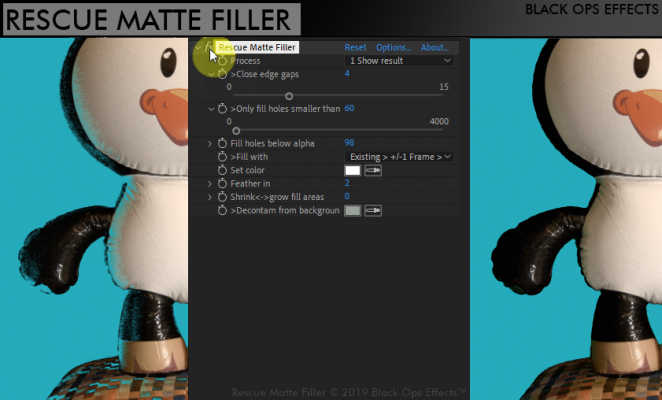
Most footage can be quickly recovered using the 4 main settings shown in the 3 minute tutorial.

Full function overview

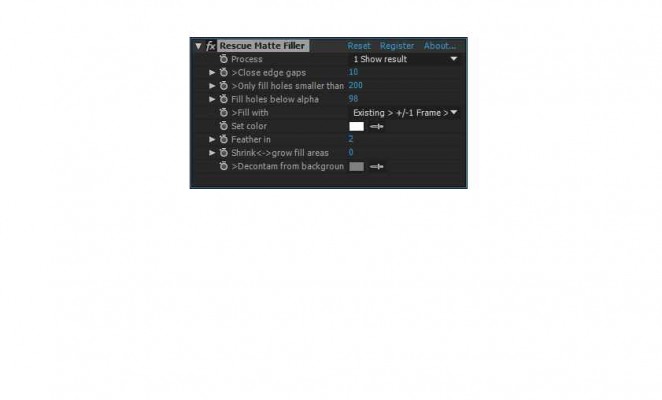
  • Process
    View the summed output (original image + filled areas) or just the filled areas,
    or show just the alpha filled as white.
    Info setting to allow you to see which areas have been patched and the edges of the image detected, and which areas have been detected suitable for patching
  • Close edge gaps
    This is the distance in pixels of the largest edge gap that you need to close. The smaller setting the better so as not to lose other details around the edge of the subject. See the 3 minute tutorial video of an example of a typical edge gap.

  • Only fill holes smaller than
    Also in pixels. The value is the smallest height or width of the areas you want filled. Any areas bigger than this in either direction don’t get filled in.
  • Fill holes below alpha
    As a percentage. This adjusts the point that the utility fills at, so normally around 98% is considered solid. 100% is completely solid, and 0% completely transparent. The utility will smooth and anti-alias the image in edge areas to blend in beyond this value though around the edges. Mainly useful in cases where there is some genuine semi-transparency on the target image (eg a car window)
  • Fill with
    Rescue Matte Filler will try to fill using color from the best available source.
    Usually the color information is still preserved in the frame if you are using a keyer that is in the same composition. However, sometimes the color information may be missing, for instance if your footage is pre-keyed or you just have footage with the alpha channel set already. Additionally, you might want to try different settings on this if you are experiencing jitter in your footage caused by noise affecting your key or other artefacts.
  • Set color
    This sets the color to be used as a last resort in the Fill with setting above.

  • Feather in
    The amount the filled areas are blurred into the solid image areas next to then. NB This does not affect the outer edges of the images, the aliasing algorithm will pick up and aliased edges to remain smooth but still a sharp key.

  • Shrink-grow
    This expands or contracts the filled areas after keying. For example, a value of -5 will shrink the fill areas by 5 pixels, and a value of +5 will grow the filled areas outwards by 5 pixels.

  • Decontaminate from keying background
    This allows you to adjust the overall tint to the patch up filled areas added to the image. This should usually be set somewhere inbetween 50% grey and your background green screen / blue screen color.
Discussions

Want to talk about it?

Head over to r/aescripts to chat with fellow users about this product.

Need Support?

Please open a support ticket to be connected directly with the author of this product

Version History

1.2 -

Jan 31, 2020

Catalina compatibility

1.1 -

Jul 9, 2019

Fixed bug with lifetime license expiry

1.0 -

Jun 28, 2019

Initial Release

Compatibility

After Effects

2021, 2020, CC 2019, CC 2018, CC 2017, CC 2015.3, CC 2015

Media Encoder

2021, 2020, CC 2019, CC 2018, CC 2017

Premiere Pro

2021, 2020, CC 2019, CC 2018, CC 2017, CC 2015.3, CC 2015

EULA

END USER LICENSE AGREEMENT

This software ("the Software Product") and accompanying documentation is licensed and not sold. This Software Product is protected by copyright laws and treaties, as well as laws and treaties related to other forms of intellectual property. The author owns intellectual property rights in the Software Product. The Licensee's ("you" or "your") license to download, use, copy, or change the Software Product is subject to these rights and to all the terms and conditions of this End User License Agreement ("Agreement").

Acceptance
YOU ACCEPT AND AGREE TO BE BOUND BY THE TERMS OF THIS AGREEMENT BY SELECTING THE "ACCEPT" OPTION AND DOWNLOADING THE SOFTWARE PRODUCT OR BY INSTALLING, USING, OR COPYING THE SOFTWARE PRODUCT. YOU MUST AGREE TO ALL OF THE TERMS OF THIS AGREEMENT BEFORE YOU WILL BE ALLOWED TO DOWNLOAD THE SOFTWARE PRODUCT. IF YOU DO NOT AGREE TO ALL OF THE TERMS OF THIS AGREEMENT, YOU MUST SELECT "DECLINE" AND YOU MUST NOT INSTALL, USE, OR COPY THE SOFTWARE PRODUCT.

License Grant
This Agreement entitles you to install and use one copy of the Software Product. In addition, you may make one archival copy of the Software Product. The archival copy must be on a storage medium other than a hard drive, and may only be used for the reinstallation of the Software Product. This Agreement does not permit the installation or use of multiple copies of the Software Product, or the installation of the Software Product on more than one computer at any given time, on a system that allows shared used of applications, on a multi-user network, or on any configuration or system of computers that allows multiple users. Multiple copy use or installation is only allowed if you obtain an appropriate licensing agreement for each user and each copy of the Software Product.

Restrictions on Transfer
Without first obtaining the express written consent of the author, you may not assign your rights and obligations under this Agreement, or redistribute, encumber, sell, rent, lease, sublicense, or otherwise transfer your rights to the Software Product.

Restrictions on Use
You may not use, copy, or install the Software Product on any system with more than one computer, or permit the use, copying, or installation of the Software Product by more than one user or on more than one computer. If you hold multiple, validly licensed copies, you may not use, copy, or install the Software Product on any system with more than the number of computers permitted by license, or permit the use, copying, or installation by more users, or on more computers than the number permitted by license.

You may not decompile, "reverse-engineer", disassemble, or otherwise attempt to derive the source code for the Software Product.

Restrictions on Alteration
You may not modify the Software Product or create any derivative work of the Software Product or its accompanying documentation. Derivative works include but are not limited to translations. You may not alter any files or libraries in any portion of the Software Product.

Restrictions on Copying
You may not copy any part of the Software Product except to the extent that licensed use inherently demands the creation of a temporary copy stored in computer memory and not permanently affixed on storage medium. You may make one archival copy which must be stored on a medium other than a computer hard drive.

Disclaimer of Warranties and Limitation of Liability
UNLESS OTHERWISE EXPLICITLY AGREED TO IN WRITING BY THE AUTHOR, THE AUTHOR MAKES NO OTHER WARRANTIES, EXPRESS OR IMPLIED, IN FACT OR IN LAW, INCLUDING, BUT NOT LIMITED TO, ANY IMPLIED WARRANTIES OF MERCHANTABILITY OR FITNESS FOR A PARTICULAR PURPOSE OTHER THAN AS SET FORTH IN THIS AGREEMENT OR IN THE LIMITED WARRANTY DOCUMENTS PROVIDED WITH THE SOFTWARE PRODUCT.

The author makes no warranty that the Software Product will meet your requirements or operate under your specific conditions of use. The author makes no warranty that operation of the Software Product will be secure, error free, or free from interruption. YOU MUST DETERMINE WHETHER THE SOFTWARE PRODUCT SUFFICIENTLY MEETS YOUR REQUIREMENTS FOR SECURITY AND UNINTERRUPTABILITY. YOU BEAR SOLE RESPONSIBILITY AND ALL LIABILITY FOR ANY LOSS INCURRED DUE TO FAILURE OF THE SOFTWARE PRODUCT TO MEET YOUR REQUIREMENTS. THE AUTHOR WILL NOT, UNDER ANY CIRCUMSTANCES, BE RESPONSIBLE OR LIABLE FOR THE LOSS OF DATA ON ANY COMPUTER OR INFORMATION STORAGE DEVICE.

UNDER NO CIRCUMSTANCES SHALL THE AUTHOR, ITS DIRECTORS, OFFICERS, EMPLOYEES OR AGENTS BE LIABLE TO YOU OR ANY OTHER PARTY FOR INDIRECT, CONSEQUENTIAL, SPECIAL, INCIDENTAL, PUNITIVE, OR EXEMPLARY DAMAGES OF ANY KIND INCLUDING LOST REVENUES OR PROFITS OR LOSS OF BUSINESS) RESULTING FROM THIS AGREEMENT, OR FROM THE FURNISHING, PERFORMANCE, INSTALLATION, OR USE OF THE SOFTWARE PRODUCT, WHETHER DUE TO A BREACH OF CONTRACT, BREACH OF WARRANTY, OR THE NEGLIGENCE OF THE AUTHOR OR ANY OTHER PARTY, EVEN IF THE AUTHOR IS ADVISED BEFOREHAND OF THE POSSIBILITY OF SUCH DAMAGES. TO THE EXTENT THAT THE APPLICABLE JURISDICTION LIMITS THE AUTHOR'S ABILITY TO DISCLAIM ANY IMPLIED WARRANTIES, THIS DISCLAIMER SHALL BE EFFECTIVE TO THE MAXIMUM EXTENT PERMITTED.

Limitation of Remedies and Damages
Any claim must be made within the applicable warranty period. All warranties cover only defects arising under normal use and do not include malfunctions or failure resulting from misuse, abuse, neglect, alteration, problems with electrical power, acts of nature, unusual temperatures or humidity, improper installation, or damage determined by the author to have been caused by you. All limited warranties on the Software Product are granted only to you and are non-transferable. You agree to indemnify and hold the author harmless from all claims, judgments, liabilities, expenses, or costs arising from your breach of this Agreement and/or acts or omissions.

Governing Law, Jurisdiction and Costs
This Agreement is governed by the laws of New York, without regard to New York's conflict or choice of law provisions.

Severability
If any provision of this Agreement shall be held to be invalid or unenforceable, the remainder of this Agreement shall remain in full force and effect. To the extent any express or implied restrictions are not permitted by applicable laws, these express or implied restrictions shall remain in force and effect to the maximum extent permitted by such applicable laws.

Updated: Oct 21, 2025 1:35 AM