
Randomatic 2
-
Compatibility After Effects Please check exact version compatibility under the "COMPATIBILITY" tab below
 Adding to cart...
 Randomatic 2,
all about randomness in After Effects
all about randomness in After Effects
Make your animations more detailed and organic with randomness.
Randomize all 2D, 3D and color properties of After Effects
Choose between static random, animated random or wiggle.
Control the randomized properties with custom made controllers and expressions.
Control the randomized properties with custom made controllers and expressions.
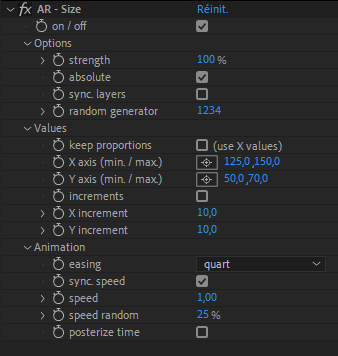
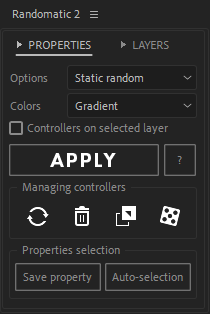
3 different ways to randomize your colors
Numbers are cool but we all love fancy stuff.
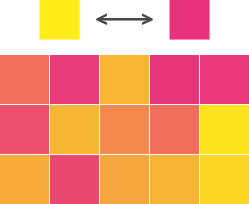
Gradient
Only 2 colors
for a rainbow of possibilities.
for a rainbow of possibilities.
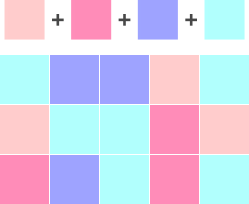
Palette
Up to 10 colors.
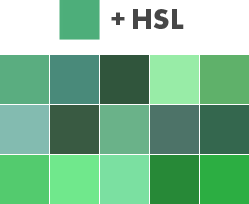
HSL
Hue, Saturation and Luminosity:
One effect to rule them all.
One effect to rule them all.
Manage your Randomatic controllers easily
Don't waste any more time searching and deleting Randomatic expressions by hand.
Let these new options take care of it.
Let these new options take care of it.

Delete
Automatically remove the Randomatic effect and all expressions with a single click.

Replace
Replace your Randomatic effect with another in a few clicks. It preserves keyframes and settings.

Transfer
Transfer your Randomatic controllers to any layer, even in another composition.

Random generator
Randomize all your “Random generator” properties at once.
Bingo!
Bingo!
More easing functions
The easing library just expanded. Control your random animations more precisely.
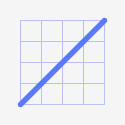
Linear
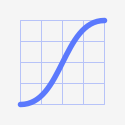
Ease
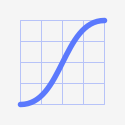
Quad
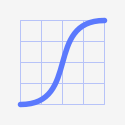
Quart
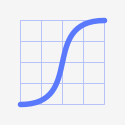
Quint
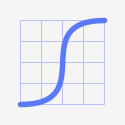
Expo
Randomatic 2 also randomizes layers
Unless you like to randomize dozens of layers by hand?
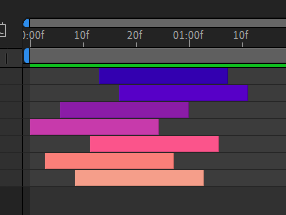
Offset
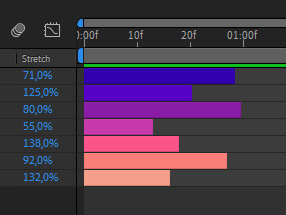
Stretch
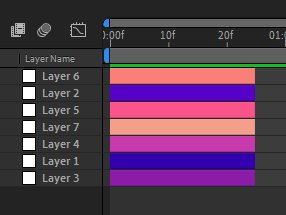
Index
Randomatic 2 tutorial
Master the power of randomness!
Upgrade Notice
If you purchased Randomatic when it was a "Name Your Own Price" product, you will receive a discount equal to half of what you paid. Simply login to the same account and the discount will be automatically applied.
If you have any questions or issue please open a support request.
If you have any questions or issue please open a support request.
| After Effects | 2024, 2023, 2022, 2021, 2020, CC 2019, CC 2018, CC 2017, CC 2015.3, CC 2015, CC 2014, CC, CS6 |
|---|
2.10 (Current version) - Jun 19, 2024
- Correction of a bug that prevented the script from launching correctly for some users.
2.09 - Jun 18, 2024
- Licensing framework update.
2.08 - Sep 27, 2022
- Licensing framework update.
- Improved support and better error messaging for online activation.
- Fixed error in alert to open After Effects preferences to allow scripts to access network.
- Fixed a bug with "Time Remap" properties and the "Stretch" function.
- Selected keyframes remain selected after using the "Stretch" function.
- Fixed the "3D Animated Random" expression that generated an error when using the "increments" option.
- Preservation of the keyframe color labels (AE 22.6 +).
- Removed an unnecessary alert message.
- Improved support and better error messaging for online activation.
- Fixed error in alert to open After Effects preferences to allow scripts to access network.
- Fixed a bug with "Time Remap" properties and the "Stretch" function.
- Selected keyframes remain selected after using the "Stretch" function.
- Fixed the "3D Animated Random" expression that generated an error when using the "increments" option.
- Preservation of the keyframe color labels (AE 22.6 +).
- Removed an unnecessary alert message.
2.07 - Mar 16, 2022
- Licensing framework update.
2.06 - Feb 10, 2022
- Removed the confirmation window after creating a Randomatic effect. (Main function only)
- Fixed the "Stretch" function when the "don't affect keyframes" option is activated and the layers have a track matte.
- Fixed the ALT + click on the "Delete" function. (Cleans the selected layers of any Randomatic 2 occurrences)
- Bug fix preventing Randomatic 2 features from working when the timeline panel was maximized.
- Optimization of the expressions with the "keep proportions" checkbox enabled.
- Licensing framework update.
- Fixed the "Stretch" function when the "don't affect keyframes" option is activated and the layers have a track matte.
- Fixed the ALT + click on the "Delete" function. (Cleans the selected layers of any Randomatic 2 occurrences)
- Bug fix preventing Randomatic 2 features from working when the timeline panel was maximized.
- Optimization of the expressions with the "keep proportions" checkbox enabled.
- Licensing framework update.
2.05 - Apr 22, 2021
- Add an ALT functionality (ALT + click) for the delete function. Removes all traces of Randomatic on the selected layers.
- Bug fix preventing the help button from staying blue after a click.
- Optimizations of the undo groups names.
- Code optimizations.
- Bug fix preventing the help button from staying blue after a click.
- Optimizations of the undo groups names.
- Code optimizations.
2.04 - Feb 24, 2021
- Bug fix on the expressions that caused an error when “sync. layers” and “keep proportions” options were both activated.
- Minor UI updates.
- Licensing framework update.
- Minor UI updates.
- Licensing framework update.
2.03 - Jun 9, 2020
- In the “Offset” menu, replace the "Method" list with a "Step offset" checkbox.
- Licensing framework update.
- Licensing framework update.
2.02 - May 27, 2020
- Fixed inconsistent results of the "Offset" function with trimmed layers.
- Added the ability to scan only the open composition when using the “Replace” function (ALT+click). Faster, but may cause expression errors if layers containing associated expressions are located in another composition.
- Added the option “Comp. first frame” for the “Step Offset” function.
- In the “Index” menu, replace the "preserve layers groups" list with a checkbox.
- Licensing framework update.
- Added the ability to scan only the open composition when using the “Replace” function (ALT+click). Faster, but may cause expression errors if layers containing associated expressions are located in another composition.
- Added the option “Comp. first frame” for the “Step Offset” function.
- In the “Index” menu, replace the "preserve layers groups" list with a checkbox.
- Licensing framework update.
2.01 - May 22, 2020
- Bug fix that prevented "Animated random" and "Wiggle" options from being applied to cameras and light layers properties.
- Fixed inconsistent results of the "Stretch" function with trimmed layers.
- Fixed expressions that prevented "Keep proportions" checkbox not working correctly with the "animated random" option on 3D properties.
- Fixed expressions that prevented "Keep proportions” checkbox not working correctly when X,Y and Z values were not identical.
- Bug fix that caused the "Strength" parameter to not work correctly with the “sync. layers” option.
- Fixed a bug that prevented the "random generator" function from working in some situations.
- Licensing framework update.
- Fixed inconsistent results of the "Stretch" function with trimmed layers.
- Fixed expressions that prevented "Keep proportions" checkbox not working correctly with the "animated random" option on 3D properties.
- Fixed expressions that prevented "Keep proportions” checkbox not working correctly when X,Y and Z values were not identical.
- Bug fix that caused the "Strength" parameter to not work correctly with the “sync. layers” option.
- Fixed a bug that prevented the "random generator" function from working in some situations.
- Licensing framework update.
2.0 - May 4, 2020
- Initial release
-

- Compatibility Cinema 4d
Kurulumun
Kurulumun is Python driven Cinema 4D plugin that generates funky parametric splines, that twist 90 degrees around a random axis.Add to Cart -

- Compatibility After Effects
YaroFlasher Super Bundle
Add to CartGet two awesome tools for making trail animations and save 30%!
-
- Compatibility After Effects
- Compatibility Premiere
Essential Sound Effects V2
Add to CartThis product has been discontinued. You can now purchase all Mister Horse products through a single subscription plan. -
- Compatibility After Effects
LayerMonkey
Add to CartCreates and animates unique layouts in seconds. Think TypeMonkey for layers!
-
- Compatibility After Effects
Multi Parent Rigging
Add to CartModular based animation rigging & Parent rigging, with unlimited possibilities.
-

- Compatibility After Effects
- Compatibility Premiere
Animated Illustrations bundle for Animation Composer
Add to CartThis product has been discontinued. You can now purchase all Mister Horse products through a single subscription plan.
-
- Compatibility After Effects
Keystone 2
Add to CartAlign, flip, stretch, stagger, color labels... and much more! All the essential tools for keyframes and layers in After Effects.
$49.00