SlackOut
-
Compatibility After Effects Please check exact version compatibility under the "COMPATIBILITY" tab below
-
Compatibility Premiere Please check exact version compatibility under the "COMPATIBILITY" tab below
 Adding to cart...
The SlackOut panel for Premiere Pro and After Effects automates the exporting and sending of your edits to Slack, so that when you are finished with editing and need to share your work, you are exactly one click away from grabbing a cup of coffee and relax !
This plugin will :
- Handle the naming of your file professionally and increment it so that it's unique
- Let you quickly set an export preset, even custom ones
- Export your file in an "export" folder next to your project file or in a custom folder
- Finally, it can upload your video to Slack, either to a channel or a user
- You can chose to delete the local file once it has been uploaded
- The panel will memorize all settings per sequence, so that you'll need to set it once
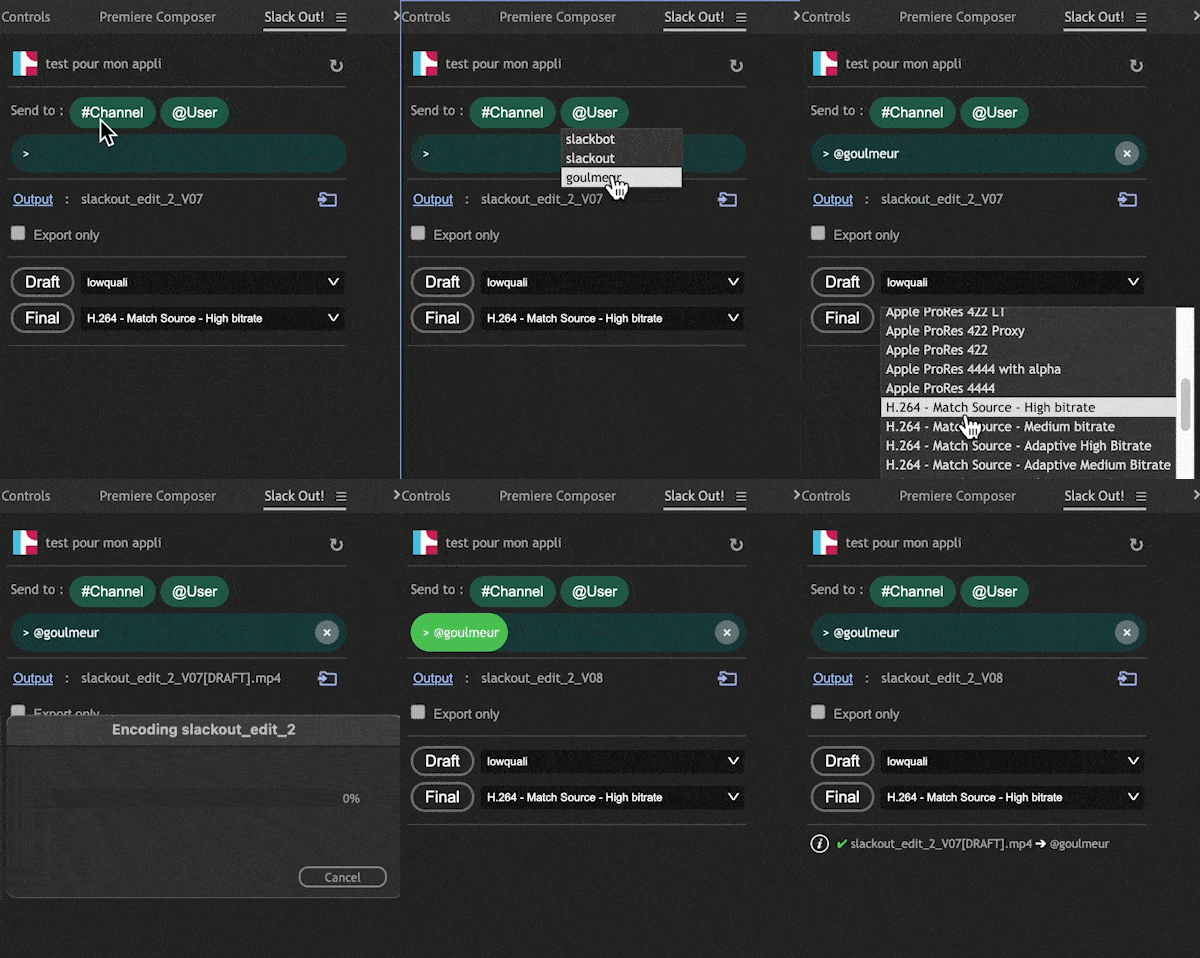
The panel has two export buttons : Draft and Final. Both have their own codec configuration next to it. The idea is that you can set up a light size file for draft export and high quality file for final exports. "[DRAFT]" or "[FINAL]" will be indicated at the end of the file so that you and your client are aware of the file type.
The panel also has a really useful "Go to export folder" button that will open the finder/explorer window to your destination folder.
If you created a new channel in Slack or a new export preset in Premiere Pro or After Effects, you can hit the update button in the top right corner. Click it to reflect the changes in the panel.
Privacy
The app communicates directly with your slack team, your data, profiles and tokens are only stored locally in your user root directory ( .slackout.json ) and can be deleted anytime manually or by login out inside the panel.
Slack Scopes
This is the list of Slack Scopes and authorizations used by the plugin to access and interact with your slack team:
Bot Token Scopes
Scopes that govern what your app can access.
View files shared in channels and conversations that Slack Panel for Adobe has been added to
Reason: to check if the file sent by SlackOut was successfully transferred and posted in the targeted slack channel or in the targeted user's wall
User Token Scopes
Scopes that access user data and act on behalf of users that authorize them.
View files shared in channels and conversations that a user has access to
Reason: to check if the video was successfully posted in the targeted slack channel / user's wall
Upload, edit, and delete files on a user’s behalf
Reason: To upload the video file to a channel or to a user in slack
View people in a workspace
Reason: To list users and channels for the user to choose the target for the video file upload
| After Effects | 2023, 2022, 2021 |
|---|---|
| Premiere | 2023, 2022, 2021 |
3.1.6 (Current version) - Jun 13, 2023
3.1.3 - Dec 12, 2022
- Multiple bug fixes
3.1.2 - Dec 12, 2022
- Multiple bug fixes
2.0.1 - Dec 2, 2022
1.3.0 - Oct 10, 2022
1.3.0 - Oct 8, 2022
1.3.0 - Oct 4, 2022
1.3.0 - Oct 4, 2022
-

- Compatibility Cavalry
Create Duplicator Sequence for Cavalry
Add to CartTurn ~12 steps into 1! Quickly create Dynamic Animated Sequences in Cavalry!
-
- Compatibility After Effects
REACH
Add to Cart
Ready to take your motion design workflow to uncharted territories? Reach is an all-encompassing, adaptable, and ever-evolving toolset.
It infuses the After Effects toolkit with a medley of uniquely innovative utilities. From elementary to intricate, Reach takes the expected and elevates it into the realm of the extraordinary. Simplify the complex, streamline the cumbersome, and catalyze your creativity with Reach - the quintessential companion for every After Effects adventurer
Elevate your art. Reach for the stars. -

- Compatibility After Effects
- Compatibility Premiere
ft-Filmic Contrast Bundle
Add to CartBundle of 3 plugins to ease the Filmic Color Grading process: ft-Filmic Contrast Pro, ft-Technicolor and ft-Auto White Balance.
-
- Compatibility Premiere
Transcriptive Rough Cutter
Add to CartTranscriptive Rough Cutter goes beyond automated transcriptions! Creating transcript-based rough-cuts in Premiere Pro and online is now easier than ever.
$199.00 -

- Compatibility After Effects
- Compatibility Media Encoder
MoDeck.io Annual Recurring Subscription
Add to CartMake your After Effects templates editable online through an easy to use, drag and drop editor. Also connect mogrt properties to spreadsheet data to generate many videos at once.
Download the FREE version by clicking on the green TRY button above.
MoDeck is also available as a monthly recurring subscription or an upfront subscription
-

- Compatibility After Effects
Faux Parent
Add to CartFaux Parent will give you all the power of normal parenting, but with the freedom that you will never get from a "real" parent. Faux Parent allows you to decide how much control the parent can have over the child in Adobe After Effects.