
Slice it Up 2
-
Compatibility After Effects Please check exact version compatibility under the "COMPATIBILITY" tab below
 Adding to cart...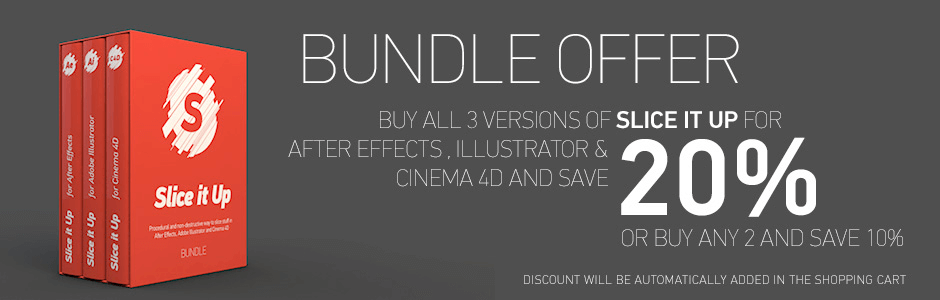
What is it
Slice it Up is a tool that cuts footage into any number of slices by duplicating it N times and applying random width masks to it. Those pieces are brought into one composition later and laid one over another to create an undistorted image. The tool provides controls to set random or linear offset to X, Y and Z position for each slice, adjust the expansion and rotation angles for the mask.
One of the most flexible things that Slice It Up provides is the ability to randomise slices in the UI panel at any time. If you don't like the width of your slices and feel like a change up, just randomise them in UI. If randomised position is not your taste, re-randomise it at any time without loosing your keyframes even after closing and opening the project.
While those buttons regenerated a new seed for width or position, button "<" will take one step back and regenerate previous seed value. This way you are free to skip through possible options and find a look that fits you best.

Slice it Up is procedural and non-destructive way to slice your footage in After Effects.
Adobe Illustrator and Cinema 4D
Features
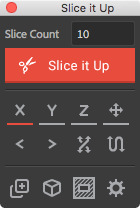
- Unlimited number of slices,
- Works in 2D and 3D space.
- Randomise width or height at any time,
- Randomise slice distribution at any time,
- Randomise slice axis direction,
- Random or linear slice distribution in space,
- Generate previous seed to get that perfect look,
- Shrink or expand slice mask.
Workflow
Select a layer you wish to slice, enter desired value for slices, and click a button. Sit back and watch the magic happen.
After slicing is finished you will see new composition that has Slice it Up effect controls attached to it. Parameters like X/Y/Z Offset are meant to be animated. Choose between linear and randomised offset for those values. Combining them together with Rotation and Expansion will result in great and unique animation.
You have the ability to randomise slices right in the UI at any time. If you don't like the width of each slice and want to have it different, hit "Randomise Width/Height". If distribution of the slices is not your taste, re-randomise them at any time without losing your keyframes even after closing / opening the project.
User manual
Looking for more info about the tool? Find it in User Manual.
Trial version
The free trial version is limited to maximum 10 slices can be downloaded above.
Upgrade Offer
If you purchase Slice it Up for After Effects v1 after September 1, 2017 you can upgrade for free. If you purchased it before the upgrade is only $5. To get the upgrade pricing, simply login to the same account that you purchase the v1 version with and the discount will be shown automatically. If you need any assistance please open a support request.
Bundle Offer
Buy 2 of Slice it Up for After Effects, Adobe Illustrator or Cinema 4D to save 10% OR get them all at once with a 20% discount. Discount shown automatically in shopping cart.
Slice it Up is available for 3 applications. Check them out!.


Featured work created using Slice It Up
Created by James Harford
| After Effects | 2024, 2023, 2022, 2021, 2020, CC 2019, CC 2018, CC 2017, CC 2015.3, CC 2015, CC 2014, CC, CS6, CS5.5, CS5, CS4 |
|---|
2.1 (Current version) - Nov 18, 2019
- Support for MacOS Catalina
2.0 - Feb 5, 2018
- Toggle slice axis (random, directional, bidirectional),
- Invert slice axis direction,
- Toggle Horizontal / Vertical slice alignment,
- Toggle 3D/2D at any time,
- Change "Container" mode at any time.
New in Effect Controls:
- Always uses Pseudo Effect,
- Groups linear and random offsets,
- Adds option to control slice Expansion: Height.
Other:
- Completely rewrites code,
- Optimised expressions,
- Drops CS3 support (anyone uses CS3 these days?).
-
- Compatibility After Effects
TinkerType
Break up animations, and have full control. All in just one text layer.Add to Cart -
- Compatibility Davinci Resolve
Pixel Sorter for Resolve
Add to CartPixel Sorter was the first tool to bring the pixel sorting glitch effect available for motion designers and video editors within After Effects and Premiere Pro. Experimenting with Pixel Sorting just became so much easier! Since its launch, AEPS had a huge success in Broadcast TV, Live performances, VJs, Music Videos, Video Games, Photography and even Apparel! Version 3 brings a lot of new useful features.
Pixel Sorter is also available for After Effects & Premiere Pro and Nuke as a separate license.
-

- Compatibility After Effects
BAO Boa
Add to CartBoa is a plugin for After Effects built to distort layers along mask paths.
-
- Compatibility After Effects
- Compatibility Premiere
- Compatibility Media Encoder
Pixel Sorter 3 for After Effects and Premiere Pro
Add to CartPixel Sorter was the first tool to bring the pixel sorting glitch effect available for motion designers and video editors within After Effects and Premiere Pro. Experimenting with Pixel Sorting just became so much easier! Since its launch, AEPS had a huge success in Broadcast TV, Live performances, VJs, Music Videos, Video Games, Photography and even Apparel! Version 3 brings a lot of new useful features.
Pixel Sorter is also available for Nuke and DaVinci Resolve as a separate license. PROMO: Get a 30% discount on the regular price on Nuke and Resolve licenses when you already have Pixel Sorter for AE/Premiere
-
- Compatibility After Effects
TextExploder V3
Add to CartSplit text layers into characters, words, lines and more. The placement of each character is accurately preserved without expressions, text animators or other tricks.
-

-

- Compatibility After Effects
Roll it!
Painless and super fun way to roll any shape or mask in After Effects.Add to Cart$29.99