
TakeMatPass
-
Compatibility Cinema 4d Please check exact version compatibility under the "COMPATIBILITY" tab below
 Adding to cart...
Surprisingly, Cinema 4D does not natively allow the output of materials in separate passes, either as a white mask or as each material represented in different colors. TakeMatPass is a plug-in for Cinema 4D R17 and higher that can create an additional "take" with a mask of the material/object/texture tag that can be output as a Color ID pass or multiple white masks.
Beauty pass

White matte mode

For each selected material/object/texture tag in the material manager, TakeMatPass creates a separate take, where material/object/texture tag is displayed with a white mask, and everything else, through the Material Override function, is black.
Color ID mode
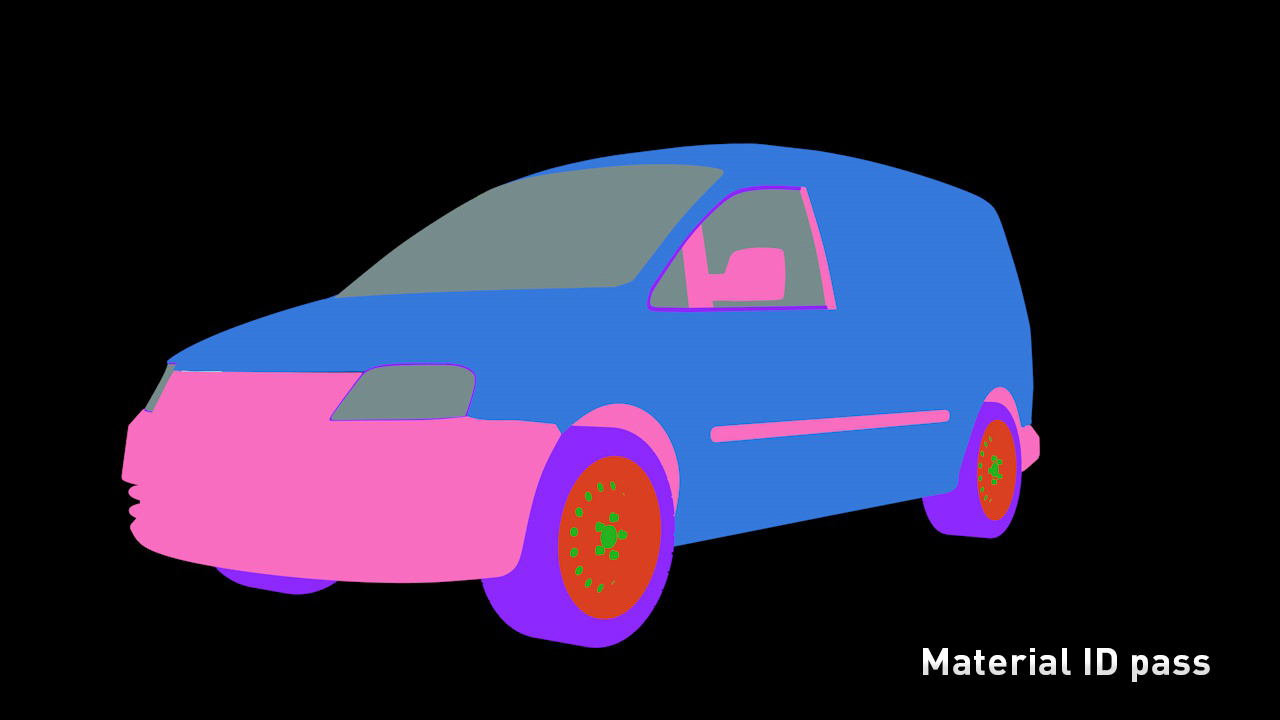
For all selected materials/objects/texture tags, TakeMatPass creates take with the name «MaterialID», here each material/object/texture tag is displayed with a separate unique color.
Limitations
-
Effects of visual geometry deformation (displacement) created by materials of third-party renderers are not supported.
- Each take operates independently as a separate document. Therefore, when rendering takes, you must first of all to bake simulations: dynamics, particles mograph animation and so forth.
How to install plugin
Unpack archive with installation files to here:
c:\Users\%USERNAME%\AppData\Roaming\MAXON\CINEMA 4D (version whatever)\plugins\FastSplineConnector.
If you are on a Mac just go to Applications > Maxon > Cinema 4D (version whatever) > plugins\FastSplineConnector.
Restart Cinema 4D.
| Cinema 4D | 2024, 2023, S26, R25, S24, R23, S22, R21, R20, R19, R18, R17 |
|---|
1.8.2 (Current version) - Dec 12, 2023
1.8.1 - Sep 28, 2021
1.8 - Sep 21, 2020
1.5.6 - Dec 12, 2019
Fixed some typos
1.5.5 - May 24, 2019
1. Ability to set the same White matte pass for the selected objects. To do this, select objects which you want to place on a single pass, hold SHIFT and press the Create button.
Changes of 1.5.5:
1. Now plug-in works correctly with inactive Lock Overrides parameters.
2. Main color id take now has name as 'ColorID'.
1.5.1 - Aug 2, 2017
1.5 - May 10, 2017
2. Ability to set the same color for the selected objects/materials/tags. To do this, hold SHIFT and press the Create button.
3. Support for non-standard materials Cinema 4D, as well as Octane and VrayC4d and other external renderers.
4. The Delete button removes all the information created by the plugin: takes, materials, render settings.
1.0 - Apr 13, 2017
-

- Compatibility After Effects
BG Renderer MAX
Add to CartNow supports native multi-threaded render. The power to render compositions in the background with full control!
Multiprocessing, rendering to both sequence and mp4/ProRes, remote monitoring, lots of integrations, notifications – all in one super tool.
-

- Compatibility Cinema 4d
Uniform Resizer C4D
Add to CartDo you want to homothetically resize objects, selection, splines or uvs using a precise size and not a factor ?
-

- Compatibility Cinema 4d
Umami
Umami is Python driven Cinema 4D plugin that generates parametric random splines. Easy as that. Need some random spline for your project? Then give this plugin a shot!Add to Cart -
- Compatibility After Effects
- Compatibility Cinema 4d
AEC4D PRO
Add to CartNow supporting Redshift. The most advanced C4D -> AE Importer
-
- Compatibility Cinema 4d
C4D Viewport Colors
Apply different type of colors to your objects in the viewport. Viewport Colors is a scripts package for C4D to improve your viewport workflowAdd to Cart -

- Compatibility Nuke
smartRender for Nuke
smartRender is a multi-threaded background rendering tool for Nuke. It lets you reduce your rendering times and makes final rendering and preview rendering dramatically faster compared to the standard rendering process. It uses all your hardware resources efficiently to speed up the processing. In addition you can export a detailed render log.Add to Cart
-

- Compatibility Cinema 4d
PolyDivider for Cinema 4D
Add to CartProduce random geometric patterns based on a rectangle in Cinema 4D.
$29.99 -

- Compatibility Cinema 4d
Target 4D
Add to CartFast and easy way to move or copy selected objects onto any surface in Cinema 4D!
$29.99 -

- Compatibility Cinema 4d
Custom Buttons for Cinema 4D
Add to CartCreate user command buttons assigned to specific presets in Cinema 4D.
$29.99 -

- Compatibility Cinema 4d
Flash Buffer Pro
Add to CartCinema 4D Object Buffer manager. Dramatically improve your workflow.
$24.99 -

-

- Compatibility Cinema 4d
Batch Processor for Cinema 4D
Add to CartEasily batch convert between all the 3D formats that are supported by Cinema 4D
$39.99