
Flash Buffer Pro
-
Compatibility Cinema 4d Please check exact version compatibility under the "COMPATIBILITY" tab below
 Adding to cart...
 Flash Buffer for Cinema 4D is a plugin that helps you to create Object Buffer channels when you need to prepare scene for rendering. With this plugin you can also quickly and easily assign the available channels, delete unnecessary or select objects to which it are assigned. Rename function will help specify the names of the results of rendering passes, as well as convenient to distribute all the sequences on the subdirectories.
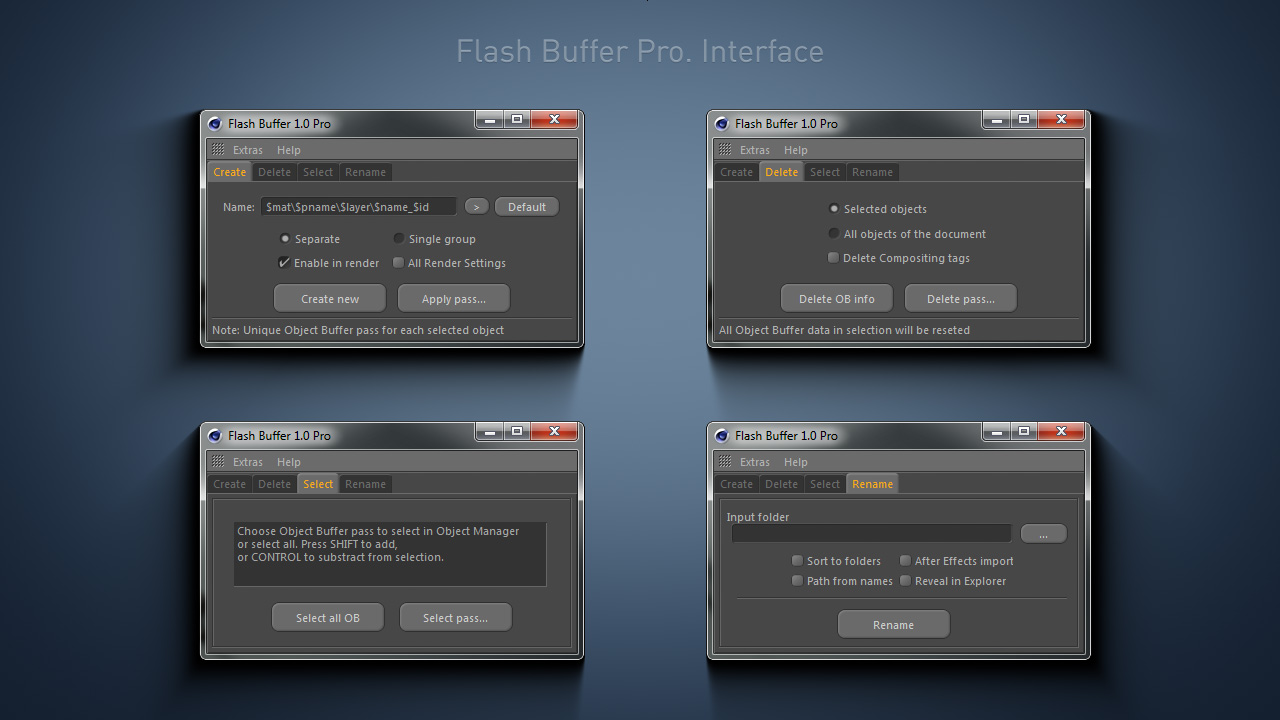
Main features
- Name variables (tokens);
- Creating individual and group passes;
- Removal of passes for the entire scene at once and for the objects individually;
- Renaming and sorting rendering results into folders;
- The script for After Effects to import sequences after renaming;
- Support for versions of Cinema 4D R12-20, Win and Mac.
Fast and easy
Set in the Name field the needed template of pass name and press Create new button. The plugin will analyze all the Object Buffer numbers used in the scene, will find first unused and apply it to a new or existing Compositing tag. After that you will see a new Object Buffer pass with the specified name in the Render Settings.
Say no to the numbers and yes to the names!
Flash Buffer save you from having to remember the number of passes when working with Compositing tags. This is the basic concept of the plugin. By specifying the name of the pass, you do work with it more productive. You can also use text variables to speed up the process.
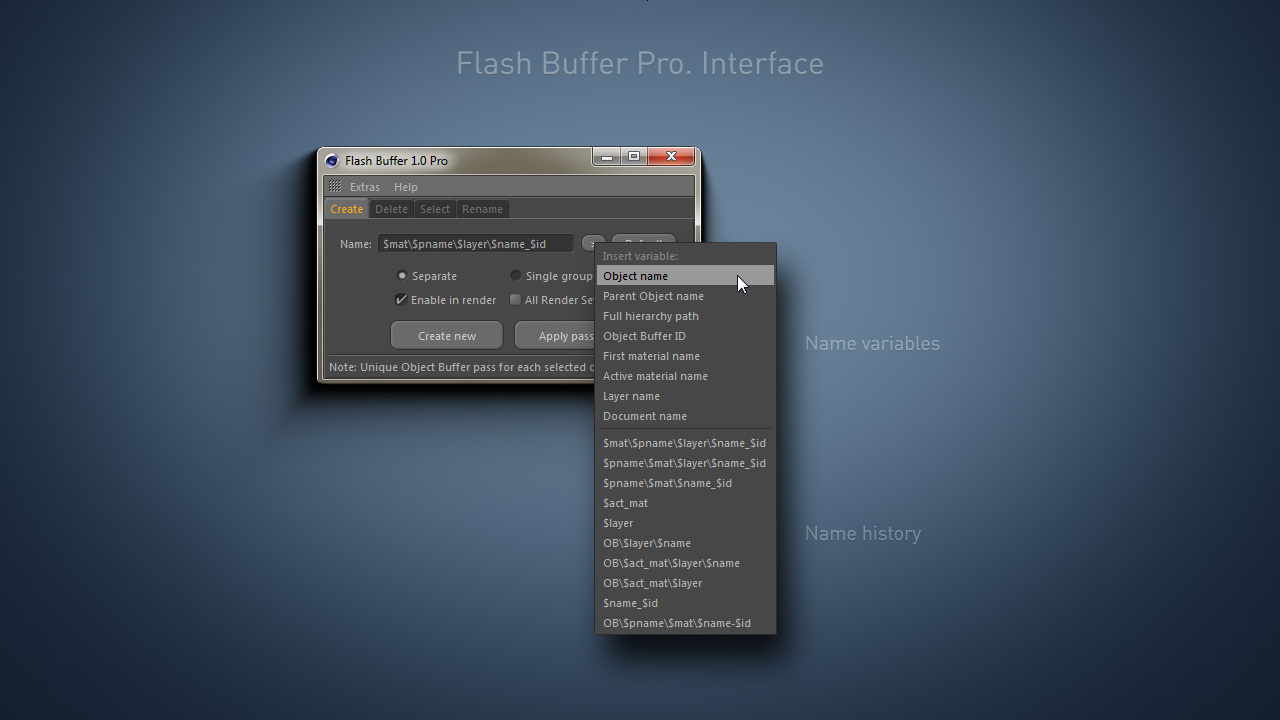
Key features
| Cinema 4D | 2024, 2023, S26, R25, S24, R23, S22, R21, R20, R19, R18, R17 |
|---|
1.2.7.1 (Current version) - Sep 28, 2021
1.2.7 - Sep 10, 2021
- New License System
1.2.7 - Sep 10, 2021
New License System
1.2.3 - Dec 9, 2019
1.2.2 - Mar 11, 2019
1.2.1 - Oct 21, 2018
1.201 - Mar 30, 2018
1.2 - Mar 29, 2018
1.102 - Jun 12, 2016
1.101 - May 29, 2016
1.1 - May 31, 2016
1.01 - May 26, 2016
1.0 - May 27, 2016
-
- Compatibility Cinema 4d
C4D Viewport Colors
Apply different type of colors to your objects in the viewport. Viewport Colors is a scripts package for C4D to improve your viewport workflowAdd to Cart -

- Compatibility Cinema 4d
Motion Manager for Cinema 4D
Add to CartMotion Manager enhances the efficiency of animation workflows in Cinema 4D. It is packed with features to speed up keyframing, such as copying and pasting easing, creating bounce and elastic animations, and more.
What's New in v1.2:
- Live preview feature for each curve editor.
- Improved usability of the presets library -

- Compatibility Cinema 4d
Isolate Tools for Cinema 4D
Add to CartOne of the most powerful features in Cinema 4D is the lack of isolate tools. This set of tools for c4d is the ultimate solution to isolate objects and light independently in your scene. Designed to work efficiently and easy to use with your scene. Integrate a perfect match between vision and creativity. A set of two Cinema 4D plugins that will independently isolate the selected lights or objects in your scene. Works with third-party renderers!
-
- Compatibility After Effects
- Compatibility Cinema 4d
AEC4D PRO
Add to CartNow supporting Redshift. The most advanced C4D -> AE Importer
-

- Compatibility Cinema 4d
Line Connection for Cinema 4D
Add to CartGenerate connection lines between selected objects in Cinema 4D.
-

- Compatibility After Effects
- Compatibility Cinema 4d
Paint & Stick 2
Add to CartPaint directly in comp with your custom and Photoshop brushes plus onion skinning (great for cel animation). "Stick" your paint on 3D renders. You gotta see it to believe it!
Please note Paint & Stick is not compatible with Apple Silicon machines
-

- Compatibility Cinema 4d
Custom Buttons for Cinema 4D
Add to CartCreate user command buttons assigned to specific presets in Cinema 4D.
$29.99 -

- Compatibility Cinema 4d
Switch Camera By Markers C4D
Add to CartCinema 4D Stage Object alternative, easy to control when to cut to a particular camera.
$10.00 -

- Compatibility Cinema 4d
Target 4D
Add to CartFast and easy way to move or copy selected objects onto any surface in Cinema 4D!
$29.99 -

- Compatibility Cinema 4d
Batch Processor for Cinema 4D
Add to CartEasily batch convert between all the 3D formats that are supported by Cinema 4D
$39.99 -

- Compatibility Cinema 4d
PolyDivider for Cinema 4D
Add to CartProduce random geometric patterns based on a rectangle in Cinema 4D.
$29.99 -

- Compatibility Cinema 4d
Fast Spline Connector 2
Connect spline segments in Cinema 4D fast and easy!Add to Cart$15.00