
Chameleon - Adobe Kuler Color Theme Browser
-
Compatibility After Effects Please check exact version compatibility under the "COMPATIBILITY" tab below
 Adding to cart...
 THIS PRODUCT HAS BEEN DISCONTINUED AND IS NO LONGER AVAILABLE.
Please check out Ray Dynamic Color as an alternative tool to manage colors in After Effects.
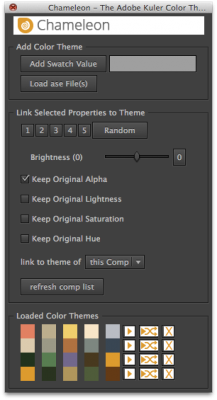
Assists you to browse through color themes obtained from Adobe Kuler. Dynamically link any color property within your comp to a color of the color theme. If you select another color theme, all linked colors in your comp update automatically to the new color theme.
Features:
- Develop your motion graphics based on some Adobe kuler color theme and once you are finished see how it looks with a different one. Simply load a new color theme and your entire composition updates automatically.
- Do color correction based on Adobe kuler color themes by pushing highlights, midtones and shadows towards different colors of your color theme.
- Your projects still work on machines where the script is not installed.
Tutorial:
You can watch a tutorial explaining Chameleon on Aetuts+.
How does it work?
Chameleon allows you to conveniently work with color themes from Adobe kulerin 3 steps.
- Load color themes in After Effects either from color themes downloaded at the kuler website or via cut and paste from the kuler desktop application
- Apply any loaded color theme to your comp with just one click
- Dynamically link any color property within your comp to a color theme color. Once you load a new color theme, all linked color properties in your comp update accordingly.


| After Effects | CC 2015.3, CC 2015, CC 2014, CC, CS6, CS5.5, CS5, CS4, CS3 |
|---|
2.1 (Current version) - Aug 31, 2013
- 2.1 Updated interface, fixed translation issues, new CI, simplified installation - September 2013
- 2.0 Updated interface, automatic update check, ability to link to themes of other comps, support of large color themes, ability to load set of default color themes on start-up, reset for brightness slider - December 2010
- 1.0 Initial release on aescripts.com - October 2009
-

- Compatibility After Effects
Templater Pro Subscription Recurring
Templater Pro extends Templater Rig by offering desktop automation, allowing you to render or replicate batches of versioned compositions using your data source. Yearly Recurring as well as 1, 3, 6, or 12 month licenses are also available.Add to Cart$225.00 As low as: $135.00 -

Events - A.I. Image & Video Sorter
Add to CartEvents uses A.I. based face recognition to automatically find and categorize all photos and videos by subject
$49.99 -

- Compatibility After Effects
Path Me!
Add to CartCopy asset paths from the project panel, timeline, or render queue with a single click. Importing assets from paths is just as simple.
-

- Compatibility After Effects
Quick Access 2
Add to CartSave time finding your files and folders. Now with all new UI, improved workflow and favorites plus much more.
-

- Compatibility After Effects
EFX Keying-Alpha Free
Three free plugins from the full EFX Keying/Alpha Plugin Suite. These plugins are useful when keying or creating alpha mattes. Check out the full suite for the rest of the toolbox.Add to Cart -

- Compatibility After Effects
Advanced Color Control
Add to CartControl colors like never before in After Effects!
-

- Compatibility After Effects
Squash & Stretch Pro
Add to CartCreate animations in no time with Squash & Stretch, featuring a vast range of ready to use behaviors, carefully handcrafted by professionals and controlled by an intelligent system. This Pro version includes over 60 extra behaviors and 350 extra sound effects and can also be extended with additional behavior bundles.
$99.99 -

- Compatibility After Effects
MochaImport+ V6
Add to CartMochaImport simplifies your workflow between mocha and After Effects. Create stabilized precomps, move masks, effect points and layers, and distort them in perspective.
$49.99 -

- Compatibility After Effects
- Compatibility Premiere
- Compatibility Audition
QuickImporter
Your next generation file import dialog with super-fast, fuzzy keyword search and a built-in audio player - for Premiere Pro, After Effects and Audition.Add to Cart$39.99 -

- Compatibility After Effects
iExpressions 3
Add to CartCreate complex expression-driven templates, character rigs, shape animations and more without writing any code!
$99.99 -
- Compatibility Premiere
Automation Blocks for Premiere Pro
Add to CartAutomation Blocks is an infinite collection of premade, one-click tools for any task. With Automation Blocks, you can fully customize all the tools, and even create your own!
$59.99 -

- Compatibility After Effects
MaskTracker+
Move layers, make corner pins, stabilize clips and create stabilized precomps with the AE mask tracker.Add to Cart$49.99