
pt_Multiplane
-
Compatibility After Effects Please check exact version compatibility under the "COMPATIBILITY" tab below
 Adding to cart...
Instantly turn layered Photoshop or Illustrator files into 3D multiplanes. pt_Multiplane adds expressions that let you freely move layers on the z axis without changing the look of the shot from the original camera position, making it easy to experiment with depth in your scene.
The multi-plane effect was made famous by the movie: "The Kid Stays in the Picture"
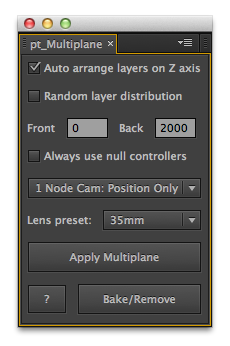
- AUTO ARRANGE LAYERS: With Auto Arrange checked layers are automatically distributed along the z axis between the specified range of values. There's also an option to have layers distributed randomly inside that range.
- NULL CONTROLS: If a layer has previously been animated or scaled, a null will be used to control the layer, and you should use this to move the layer on the z axis. Check 'Always use null controllers' if you want to control all layers in this way. To remove them you can simply delete the nulls if you've finished making Z Position adjustments.
- 1 OR 2 NODE CAMERA: Choose whether to use a 1 node camera with just a Position property or a 2 node camera with an additional Point of Interest property.
- LENS PRESET: Choose a lens preset for the multiplane camera.
- APPLY MULTIPLANE: Either select specific layers in a comp first, or it will be applied to all layers. This applies the scale expressions that pt_Multiplane uses to compensate when layers are moved on the z axis.
- BAKE/REMOVE: Use this option if you've finished adjusting your layers and want to remove the pt_Multiplane scale expressions. In many cases you can leave them applied, but you should remove them if you plan on animating the Scale or Z Position.
| After Effects | 2024, 2023, 2022, 2021, 2020, CC 2019, CC 2018, CC 2017, CC 2015.3, CC 2015, CC 2014, CC, CS6, CS5.5, CS5, CS4 |
|---|
2.88 (Current version) - Dec 20, 2023
2.87 - Jan 23, 2023
2.86 - Jan 30, 2022
2.85 - Apr 11, 2021
2.84 - Dec 2, 2019
2.83 - Jul 21, 2019
2.82 - Aug 30, 2018
2.81 - Apr 29, 2018
2.8 - Apr 16, 2018
2.7 - Apr 23, 2017
Fix for drop-downs not displaying correctly on Windows HiDPI displays
Fix for help window not closing on Windows
2.6 - Dec 7, 2015
Fixed random distribution in CC 2015
2.5 - May 14, 2014
Fixed licensing issue with security false positive warnings.
- 2.4 Bug fixes - Apr 2013
- 2.3 - Jan 2012
- Now works on layers that have been transformed/animated.
- Option to use null controllers.
- Various improvements / bug fixes.
- 2.2 Added CS5 compatibility - May 2010
- 2.1 Added AE6.5 and AE7 compatibility - Dec 2009
- 2.0 Initial release on aescripts.com - Dec 2009
-

- Compatibility After Effects
Sortie
Provides quick, powerful methods to sort layers vertically in the timeline.Add to Cart -

- Compatibility Illustrator
Icon Mason
Add to CartOpen, import, and create IconJar icon archives directly in Adobe Illustrator.
-
- Compatibility After Effects
Add Edit Markers
Will add Layer or Comp markers at the in and out points of the selected layers in a comp.Add to Cart -
- Compatibility After Effects
Random Layer Selector
Randomly selects layers. There's 4 options for how many layers are selected randomly: You can randomly select most of the layers, many of the layers, not many and finally you can have it randomly select very few of the layers.Add to Cart$4.99 -

- Compatibility After Effects
Super Resize Me!
Name Your Own Price!Add to CartBatch resize After Effects projects.
-

- Compatibility After Effects
Boxcam 2
Add to CartBoxcam is the 2D camera solution that allows users to easily showcase their scene similar to a traditional 3D camera
-

- Compatibility After Effects
pt_FrameRestorer 2
Add to CartFrameRestorer uses the power of motion interpolation to fix a range of footage issues, from capture and conversion problems to visual effects clean-up work.
$49.99 -
- Compatibility After Effects
pt_ExpressEdit 2
Search, apply and edit expressions throughout your project. Expressions can be saved, or instantly applied to one or more properties. It can also check for broken expressions, re-enabling them automatically where possible.Add to Cart$39.99 -

- Compatibility After Effects
pt_ShiftLayers
Quickly shift or stagger selected layers in time.Add to Cart$9.99 -

- Compatibility After Effects
pt_OpenSesame Server
Add to CartOpenSesame Server offers server automation for custom template versioning and rendering video on demand.
$499.99 -

- Compatibility After Effects
pt_LayerMarkers
Split layers using their layer markers, or add markers at cut points to assist comp navigation.Add to Cart$9.99 -
- Compatibility After Effects
pt_SSAKaraokeAnimator
Create animated karaoke text subtitles from Substation Alpha (.ssa/.ass) or KaraFun (.kfn) file formatsAdd to Cart$29.99 As low as: $19.99