
AEVIEWER 2 Pro
-
Compatibility After Effects Please check exact version compatibility under the "COMPATIBILITY" tab below
-
Compatibility Premiere Please check exact version compatibility under the "COMPATIBILITY" tab below
 Adding to cart...
BETTER, FASTER AND MORE POWERFUL WORK WITH YOUR MEDIA FILES!


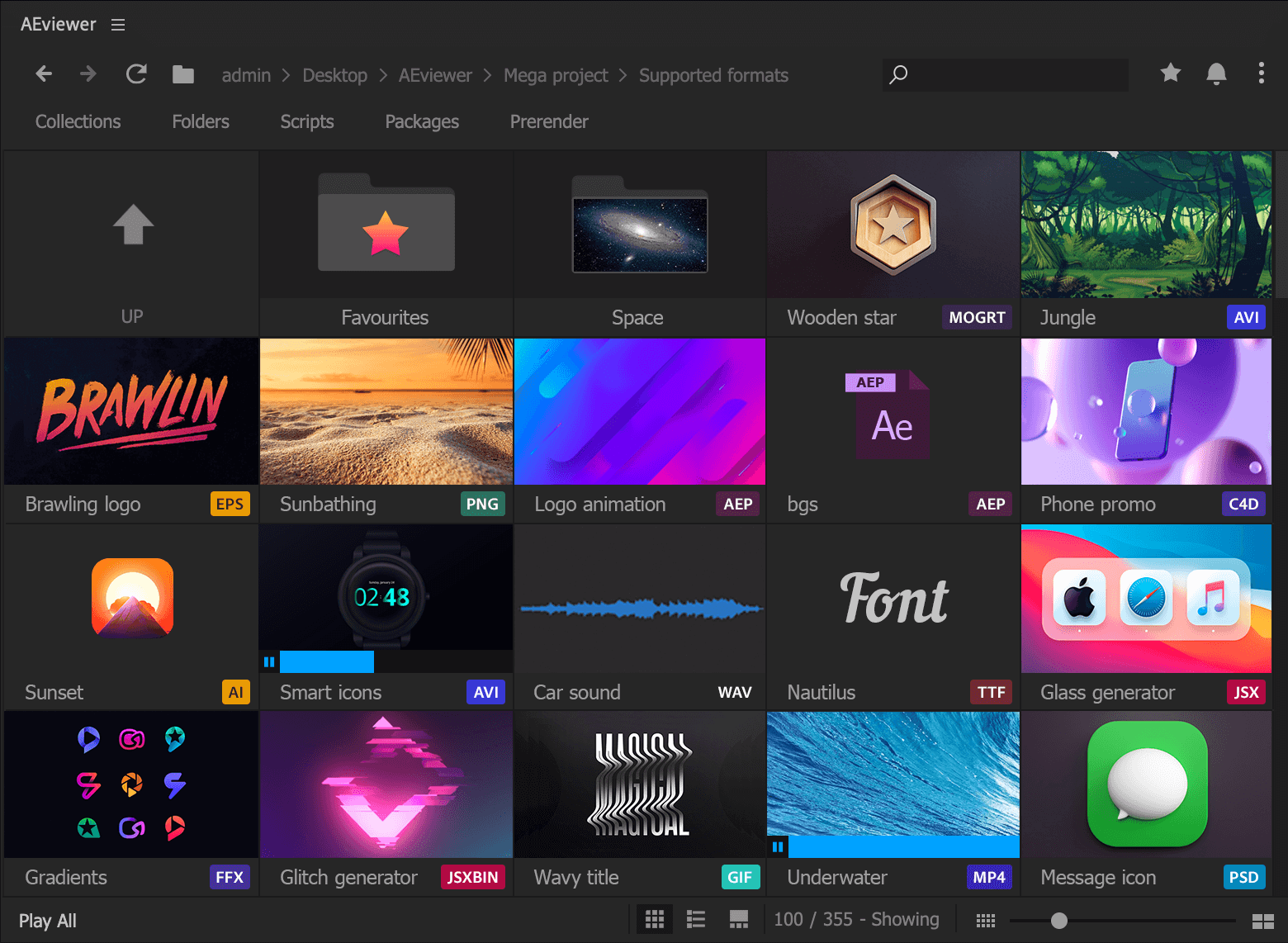
to save your day

or moodboards

and favourites

fast access

in one place

separate projects and
automaticaly create
previews for them


Then hover on the tracks to listen


Just select the expression and do a couple clicks
and references or thematic groups
Curate your own list
Including subfolders
And create your own secured packages
Customer Testimonials
I see a lot of these tweets and I get them. But...
— Andrew Embury (@aembury) September 4, 2018
AE Viewer saved my life this weekend. Thank you so much @motion_land, I don't think I could have survived without such a valuable tool.https://t.co/oN0nGs4pWM
Thank you.
AE Viewer is nearing essential status & I've just started using it – ever notice that AE has a Media Browser that does just about NOTHING for you?
— Ryan Summers (@Oddernod) November 22, 2017
AE Viewer is Media Browser that Adobe couldn't build, but @aescripts did.
.@motion_land your #AEviewer extensions looks amazing. Thanks for this powerful tool.
— michamedia (@michamedia) November 22, 2017
... this is a fantastic tool to use in After Effects. Really should be a feature in to After Effects.
— Creative Dojo January 31, 2019
mind-blowing indeed.
— Evan Abrams Jun 30, 2023
Sweet!!
— Kelsey (Premiere Gal on YouTube) Jun 30, 2023
| Free | Pro | ||
|---|---|---|---|
| Core Features | Preview and import AEP, MOGRT, FFX, C4D, PRPROJ, PSD, AI, AET, AEPX,WAV, MP3, MP4, AVI, MOV, PNG, JPEG, JPG, GIF | ✅ | ✅ |
| Premiere Pro version | ✅ | ✅ | |
| Auto preview generation | ❌ | Coming soon | |
| Execute scripts JSX, JSXBIN | ✅ | ✅ | |
| Number of preview modes | 2 | 3 (includes advanced List mode) | |
| Import options | 3 | 6 | |
| Preview and import vector files | Only .ai | ✅ | |
| Preview and apply fonts | ❌ | ✅ | |
| Preview and import C4D files | ❌ | ✅ | |
| Instant search (subfolders supported) | ✅ | ✅ | |
| Collections | ✅ | ✅ | |
| Favourite folders | ✅ | ✅ | |
| Open file in the default program | ❌ | ✅ | |
| Packages (install packs and templates) | ✅ | ✅ | |
| API available | ✅ | ✅ | |
| Options | |||
| More supported formats: SQPRESET, EPS, JSON, MGJSON, CSV, TSV, TXT, FLAC, OGV, OGM, OGG, OGA, M4A, AAC, APNG, MXF, MKV, EXR, NEF, DPX, PAM, PBM, PCX, PTX and more | ❌ | ✅ | |
| Rename files | ❌ | ✅ | |
| Additional import options (import and replace, import and precomp) | ❌ | ✅ | |
| "Reduce AEP size (up to 90%)" feature | ❌ | ✅ | |
| "Create Preset from Expression" feature | ❌ | ✅ | |
| Authoring tools for template and package authors (Prerender tab) | ❌ | ✅ | |
| Organize your collection of scripts, add categories | ❌ | ✅ | |
| Apperance customization (font preview, files to load, search settings and more) | ❌ | ✅ | |
| Actions tab (customize actions before or after import of the files) | ❌ | Coming soon | |
| Priority support | ❌ | ✅ | |
| Pricing | |||
| Price | $0 | $59.99 | |
| After Effects | 2024, 2023, 2022, 2021 |
|---|---|
| Premiere | 2024, 2023, 2022, 2021 |
2.2.2 (Current version) - Jul 4, 2024
- Invalid MOGRT data
- Getting system drives information
- Fixed batch-preview generation (Pre-render tab)
2.2.1 - Jun 13, 2024
- Updates search UI and its results
- Shift+F to toggle search
- Rember big thumbnail size
-
[FIX]
- GIF previews
- Correct placement of MOGRT in Premiere Pro
- Improved disks loading speed
- Running scripts via sidebar
- Set min characters for search to 2 characters for Japanese, Chinese, and Korean
2.2 - Apr 25, 2024
- EXR sequences preview/import
- SVG import
- Support of FFX with animated previews (default AE presets)
- Delete file feature
- Drag&Drop files to import
- 10 times faster image and fonts loading speed
- New shortcuts:
“A” and "S" keys to navigate through files, Enter to import file or open folder
Open "Quick Access" folders with Shift+num key
CTRL+F to activate the search
- Preview generation for comps
- Resizeable "Big thumbnail" preview mode
[FIX]
- Missing libraries issue
- New folder selection dialog
- Tree view duplicates on Windows
- Right click menu in the List mode
- Autoscroll to the previously opened folder
- Files D&D experience, video previews for folders
- Remove the tilde key from registered keys in Windows
- Speed up batch file adding to collections
2.1.4 - Nov 22, 2023
- More fonts are supported inside AE
- Images are now loaded asynchronously
- You can now add GIFs for large MOV files as previews
- Render previews to custom folders
- FFX: If no layer is selected, apply to a new solid
- CMD/CTRL + R to refresh files
[FIXED]
- Support internationalized MOGRT files
- Minor fixes for import of media files
- Minor fixes for sequence import detection
- Japanese fonts loading
- Fixed previews for damaged files
- FFX + GIF
- aev_before.jsx and aev_after.jsx for PPRO
- Fixed display of favorite files in the List mode
- Fixed "Previews are ready" dialog
2.1.2 - Aug 1, 2023
- MOGRT import for packages
2.1.1 - Jul 27, 2023
- [PRO] Opt out from notifications
- Bigger folder previews
- Backspace to open the parent folder
- Support of CloudStorage folder on macOS
- Better AEP import (if no comp is marked with an “Aeviewer” comment, the first comp will be imported)
[FIXED]
- Import to the selected folder in Premiere Pro
- Proper name sorting in Packages
- File preview playback when opening the folder
- Sequence detection improved
- Previews for FFX and AEP files with MP4 and PNG files improved
- Settings compatibility
2.1 - Jun 19, 2023
- [PRO version] Preview and import sequences
- [PRO version] "Reduce project size" feature for AEP files
- Pack and share collections
- Preview SVG files (import is coming soon!)
- Support ".aevpack" files
- API for system fonts: https://github.com/axwt/aeviewer-api#get-an-object-with-available-system-fonts
[FIXED]
- Getting sys drives on Windows
- Compatibility with offline files from cloud drives
- Fixed issue with a large settings file
- Sound level settings
- Premiere Pro import
- "Place file at the beginning of the composition" for AEP files
- Add the file to the beginning of the collection
2.0.4 - Feb 7, 2023
- Control sound level
- Two new import settings
- Fast project open
- New "Remove missing items" window for collections
[FIXED]
- "Create preset" function
- Compatibility with Dropbox offline files
- Installation of the free packages
- Fix for removing items from favorites
- Fixed disk names on Windows
- Updates license framework
2.0.3 - Mar 12, 2022
- Full support of Unicode and UTF-8 (collections, files, everywhere)-
- Added API. Check more details here: https://github.com/axwt/aeviewer-api
- Encrypted packs
- Trial mode for packs
- MOGRT resize. Add "Scene Width" and "Scene Height" properties to your responsive MOGRT files to support automatic resize
- "Open in Photoshop" feature on right click for media files
[FIXED]
- Compatibility with Curva script
- Compatibility with Dropbox and system policy
- "CSXS Event doesn't have a constructor" was fixed
- Remove file from the collection
- Right-click on the file when using List mode
- Drag&Drop inside the collection when using List mode
- Removed alert on start when a computer is offline
- Item placement on the track inside PPro
2.0.2 - Sep 16, 2021
- MOGRT files now have video previews
- Improved loading speed of media preview
[FIXED]
- Import of the files in Premiere Pro
- Import to the root folder of the project in Premiere Pro
- Set active comp when applying preset
- Compatibility with other scripts
- "Adobe After Effects Auto-Save" folder can be shown now
2.0.2 - Sep 16, 2021
- MOGRT files now have video previews
- Improved loading speed of media preview
[FIXED]
- Import of the files in Premiere Pro
- Import to the root folder of the project in Premiere Pro
- Set active comp when applying preset
- Compatibility with other scripts
- "Adobe After Effects Auto-Save" folder can be shown now
2.0.1 - Jul 31, 2021
- MOGRT files now have video previews
- Improved loading speed of media preview
[FIXED]
- Import of the files in Premiere Pro
- Import to the root folder of the project in Premiere Pro
- Set active comp when applying preset
- Compatibility with other scripts
- "Adobe After Effects Auto-Save" folder can be showed now
2.0 - Jul 28, 2021
-

- Compatibility After Effects
- Compatibility Premiere
- Compatibility Davinci Resolve
Glitch Preset Pack for TRANSITION MASTER 2
Add to CartGLITCH PRESET PACK for TRANSITION MASTER 2 BASIC and TRANSITION MASTER 2 PRO
-

- Compatibility After Effects
CelWizard Frame by Frame Library
Add to CartSave 50% Introducing a library of over 320 editable elements animated FRAME-BY-FRAME. Cel animation, aka frame-by-frame animation, brings depth and a unique aesthetic to motiongraphics video, but it's also really time-consuming. With Cel Wizard LIbraries you can power up your motion graphics project using frame-by-frame elements, without wasting hours, if not days, of work.
-
- Compatibility After Effects
ToothPaste
Add to CartAn After Effects tool that lets you quickly paste SVGs from the clipboard.
-

- Compatibility Premiere
Motion Presets for Premiere Pro
Add to CartA handy tool to make animations in Premiere Pro
-

- Compatibility After Effects
- Compatibility Photoshop
- Compatibility Premiere
- Compatibility Illustrator
Stock Search Pro
Add to CartSearch and download unlimited free stock assets directly from any Creative Cloud application.
-

- Compatibility After Effects
Quick Access 2
Add to CartSave time finding your files and folders. Now with all new UI, improved workflow and favorites plus much more.
-
- Compatibility After Effects
aw-Autosaver V2
Add to Cartaw-Autosaver is a powerful replacement of the standard After Effects autosave option with lots of options.
$30.00 -

- Compatibility After Effects
Animography Controller
Add to CartAnimography Controller is a free tool that will help you to control your characters from one layer.
$0.00 -
- Compatibility After Effects
Font Manager
Add to CartBrand new way to work with animated typefaces. Create and write in a few clicks.
$39.99 -

- Compatibility After Effects
Aep to Mogrt Pro
Add to CartBatch-add properties to the Essential Graphics Panel in one click. Export multiple compositions to Motion Graphics Template (.mogrt), add keywords, image and video previews to MOGRT files
$59.99 -

- Compatibility After Effects
- Compatibility Premiere
AEVIEWER 2
Add to CartTotally Free! Revolutionary media browser for After Effects and Premiere Pro. Preview, apply, and import projects and media files in one click.
$0.00 -

- Compatibility After Effects
MotionLand Bundle
Add to CartSave 50% on MotionLand's best-selling and greatest products: AEVIEWER Pro, Font Manager, AepToMogrt Pro, Nexa Bold, Autosaver 2
Regular Price: $260.00
Special Price: $130.00