
Isolate
-
Compatibility After Effects Please check exact version compatibility under the "COMPATIBILITY" tab below
 Adding to cart...
 THIS PRODUCT HAS BEEN DISCONTINUED
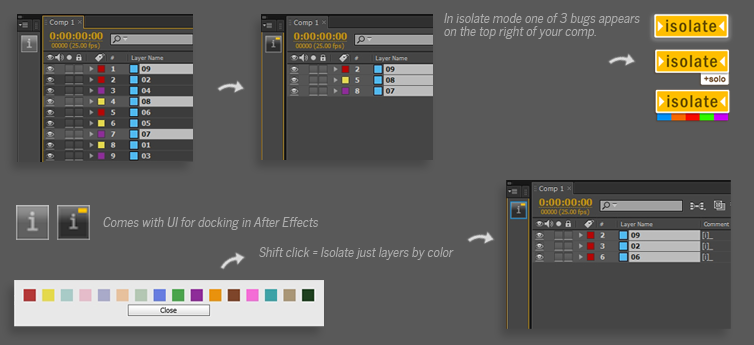
Isolates layers in your comp based on what modifier keys are held down. Adds a bug to the comp to indicate being in "Isolate" mode.
Simply click again to un-isolate. Function to isolate by label colour included. Comes with a UI version to use on its own and a UI-less version for use with ft-Toolbar
Think of it as a simple version of Zorro that does not need layers to be tagged.
Click = Isolate | Alt Click = Isolate in timeline with solo | Shift Click= Isolate layers based on label colour (CS5+).
3 bugs appear in comp - Isolate,Isolate with Solo and Isolate by color.
Video - Quickstart.
Video - Install and Shortcut Key tips.
| After Effects | CS6, CS5.5, CS5, CS4 |
|---|
1.5 (Current version) - Apr 26, 2013
1.5 - Alt +Shift Click= Isolate layers based on label colour (CS5+) with Solo.
1.5 - Fixed getting rid of icon bug frome project without duplicates.
1.5 - Got rid of 3 Global vars to prevent conflicts with other scripts.
1.5 - Now there are 3 bugs indicating - Isolate, Isolate with Solo and Isolate by colour.
1.5 - New more after effects style icons.
1.5 - Using script retains selected layers when isolated and then also when un-Isolated.
1.5 - Script will retain previous layer comments and restore them on 'un-isolate'.
1.5 - Fixed stability issues.
- 1.11 - Fixed download for mac users - Sep 2012
- 1.1- Dumped the concept of renaming the layers with [i] (causes problems with expressions) - Aug 2012
- -The comment field is now used instead to tag the layers.
- 1.0 - Initial release - Apr 2012
-

- Compatibility After Effects
Smart Adapt - Recurring Subscription
Add to CartSmart Adapt is an After Effects extension that allows you to create hundreds of screen adaptations in a few steps, with the ability to export the list of your screens to use next time.
Please note that this is a monthly recurring subscription, it is also available as an annual subscription (get 2 months free)
-

- Compatibility After Effects
Gridder 2
Add to CartGridder arranges layers into a customizable grid in many ways - rectangle, 3d, circular or spiral.
-
- Compatibility After Effects
Array
Array makes things much easier for you when you need to duplicate layers a lot of times or change the basic properties of selected layers.Add to Cart -

- Compatibility After Effects
pt_ShiftLayers
Quickly shift or stagger selected layers in time.Add to Cart$9.99 -

- Compatibility After Effects
Bend Layers
Bend layers without RayTracing in all versions of After Effects.Add to Cart$29.99 As low as: $23.99 -

- Compatibility After Effects
Marker Batch Editor
Batch edit all marker attributes. Now supports comp markers and marker duration. Also has an option to export the marker to a text file.Add to Cart