
Maskform
-
Compatibility After Effects Please check exact version compatibility under the "COMPATIBILITY" tab below
 Adding to cart...
 Tired of wrestling with imprecise mask transformations in After Effects? Maskform is here to revolutionize your workflow! This powerful, user-friendly script grants you the ability to transform masks with unparalleled precision using numerical controls.
Familiar Controls
Maskform provides transformation controls similar to native “Transform” effect so you can dive in without having to read a manual.
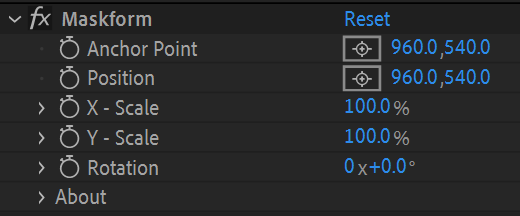
Say Hello to Pinpoint Accuracy!
Maskform empowers you to effortlessly manipulate masks with intuitive numerical input values, ensuring every adjustment is pixel-perfect and work with confidence knowing every mask transformation is precise and repeatable.
Here's what elevates Maskform above the rest:
- Unmatched Precision: Ditch the guesswork! Dial in exact mask values for flawless control.
- Effortless Workflow: Streamline your process with Maskform's intuitive interface.
Center Anchor Points in Masks
Center mask anchor points automatically, saving you valuable time and energy for what truly matters — bringing your vision to life.
KBar Support
Maskform also features a headless version compatible with KBar and other script runners.
Tutorial
Unlock the boundless potential of Maskform, revolutionizing the After Effects experience. Streamline your workflow with precision, innovation, and seamless workflow. Invest in Maskform today, where creativity meets precision!
| After Effects | 2024, 2023, 2022, 2021, 2020, CC 2019, CC 2018 |
|---|
1.1.0 (Current version) - Jun 21, 2024
ADDED:
• Support for Motion Paths. Use the new "Create Null Layer for Position" toggle to animate using Motion Paths.
CHANGED:
• Modifier keys in the headless version. Now headless execution is based on the last used values from the UI.
1.0.0 - May 21, 2024
-

- Compatibility After Effects
TextBox 2
Add to CartTextBox is a native plugin that creates a perfectly sized, customisable shape behind your text that updates automatically and is applied directly to the text layer so no need for parenting, mattes or expressions.
-
- Compatibility After Effects
Precomp Anchor Repo
Add to CartAlign anchor points and positions to layer, composition, or parent area. Detects areas of precomps + masks + track mattes + expressions + more.
$30.00 -
- Compatibility After Effects
RepositionAnchorPoint
Allows you to reposition the anchor point of the selected layers around the layer edges while keeping the layers at the same position in the comp window.Add to Cart -
- Compatibility After Effects
Masks to Cropped Layers II
Add to CartMasks to Cropped Layers II is a utility that helps to animate vector graphics, as well as improving the performance of vfx compositing. It works on layers that have multiple masks, for example when artwork is pasted from Illustrator, or when areas are tracked in Mocha. Each mask is copied to a new solid (for animation) or used to create a pre-comp. Each new layer is cropped to the size of the mask, providing flexibility for animation while dramatically improving performance.
-
- Compatibility After Effects
Break It!
Add to CartA simple-to-use tool to shatter and break objects in After Effects.
-
- Compatibility After Effects
Add Anchor Point
Add to CartReach the peak of creativity with infinite anchor points!
-

- Compatibility After Effects
Easy Rounder
Add to CartName Your Own Price!
Now with KBar & MoBar Support! Dynamically round corners in percentages instead of pixels.$9.99 -
- Compatibility After Effects
Advanced Color Control
Add to CartControl colors like never before in After Effects!
$15.00