Screen Saver Exporter

Export your movie to a screen saver in one click!

Learn about license types
  $399.99
  • Free Trial
Description

On the price change:

It’s almost the sixth year anniversary of the Screen Saver Exporter plugin. Over the years, our plugin has been downloaded hundreds of times, and our user’s screen savers now run on thousands of computers in over 50 countries around the world. Throughout the year, we have reached out to users and have accumulated a mountain of user feedback. We used that feedback to fine-tune and grow Screen Saver Exporter into a plugin of tremendous value. Now, after a year of many improvements, we are proud to offer to you the definitive version of Screen Saver Exporter. The new price reflects our support commitment to these improvements, allowing Screen Saver Exporter to continue its strong growth in its second year and thereafter.

Thanks for a great year!

Late for Dinner Studios, LLC


Create it. Export it. Sell it.

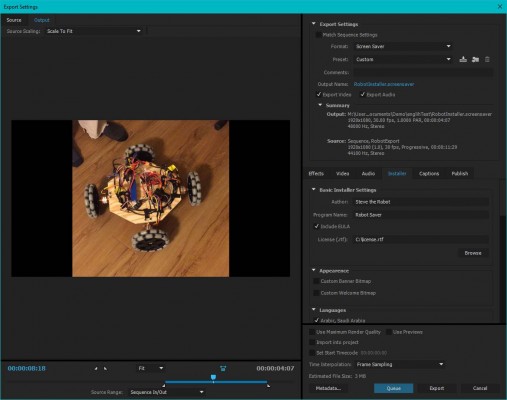
Are you a creative professional or studio who uses Adobe After Effects or Premiere Pro? Did you know you can turn your After Effects or Premiere Pro movie into a screen saver with only one-click? It's never been easier to create your own innovative and unique screensaver from scratch while making them instantly available to your clients for distribution!

Start seeing profits as soon as you create, export and sell your screen savers created with Screen Saver Exporter

Features:

  • Professional and Simple with One-Click Ease: Exports to an installer that takes care of the technical details for you. Distributing your screen saver is as easy as copy/pasting an .avi file making it easier for you to send them to your clients and even easier for your clients to distribute them as needed!
  • Start Selling Right Away: Exported screensavers can be used and sold commercially – the screen saver engine uses video and audio codecs unencumbered by patents!
  • More Efficient and Reliable: Works seamlessly on multiple monitor setups to keep you on the cutting edge while maximizing your studio's time spent on each project!
  • These Aren't Your Grandpa's Screen Savers: Supports audio and video so you can meet any of your client screen saver needs!
  • One Size Fits All: Works on Mac and Windows in a single plugin!
  • Easy Installation: Export directly to .scr or an .msi installer for easy install!

Support for Media Encoder:

  • Adobe Premier Pro CS6 to Latest
  • Adobe After Effects CC to Latest

Exported screen savers support:

  • Windows XP To Windows 11
  • version 2.0 and onwards: macOS 13 (Ventura) - 15 (Sequoia). Both Intel and Apple Silicon macs
  • version 1.0-1.34: macOS (OS X) 10.10 – 12 (also known as macOS 12 Monterey). Both Intel and Apple Silicon macs

You can even export to Windows from macOS, and to macOS from Windows! No matter your platform, you can export a screen saver for everyone.

Professional is as simple does with the Export Screen Saver plugin, but the bottom line is this...

Having More Studio Resources Means You Can Take On More Clients Making You More Money!
Discussions

Want to talk about it?

Head over to r/aescripts to chat with fellow users about this product.

Need Support?

Please open a support ticket to be connected directly with the author of this product

Version History

2.2 -

Aug 28, 2024

Fixes a bug that caused still images to be only 1 frame long no matter their length.

2.1 -

Aug 14, 2024

Fixes a bug that caused issues on Intel Macs.

2.0 -

Aug 12, 2024

This release includes an Apple Silicon native plugin plus a new screen saver engine (MovieSaver2.saver). The new saver engine is not only Apple Silicon native, it also reduces the CPU usage by 10x and reduces the file size by a lot too.

New exports will use this engine automatically. For existing installations and exports, use the included UpgradeSavers.app to "upgrade your savers".

1.34 -

Oct 17, 2022

Added information on how to run Screen Saver Exporter on Apple Silicon.

1.33 -

Jun 13, 2022

Fixed a bug that caused render failures when exporting macOS screen savers from Windows.

1.32 -

Mar 4, 2022

You can now export a macOS screen saver from Windows! Exported Mac screen savers work with both Intel and Apple Silicon Macs.

1.31 -

Jan 26, 2022

Fixed a bug with sound playback on macOS, and increased maximum video output size. Also, added a new tutorial for Apple Silicon macs.

1.30 -

Oct 28, 2020

Added support for macOS Big Sur (aka macOS 11 or macOS 10.16) and support for Apple Silicon macs. Fixed an error in .scr screen savers that caused a black screen on some windows computers.

1.29 -

Feb 3, 2020

Added a high quality export option. A higher quality screen saver with less compression artifacts.

1.28a -

Dec 2, 2019

Last upload was invalid. This is the real version 1.28

1.28 -

Dec 1, 2019

Fixed an issue with a black screen in macOS Catalina

1.27 -

Nov 29, 2019

Fixed an issue with export in macOS Catalina

1.26 -

Oct 8, 2019

Fixed an issue with multi-monitor support in Windows.

1.25 -

Oct 4, 2019

Added support for macOS 10.15 Catalina and for AE 2020.

1.24 -

May 3, 2019

Fixed an issue with video speed when exporting from Windows.

1.23 -

Feb 7, 2019

Fixed a license issue.

1.22 -

Oct 23, 2018

Fixed the macOS Tutorial. It would not play GIFs on on macOS 10.12 and earlier

1.21 -

Oct 9, 2018

Fixed a macOS issue where it would display a blank screen and ask you to update the software

1.20 -

Oct 8, 2018

Added a macOS Tutorial, so you can quickly learn how to export both macOS and windows Screen Savers from a mac.

1.19 -

Oct 1, 2018

Adds support for dark mode in macOS Mojave

1.18 -

Jan 24, 2018

Now windows screen savers support Power & Sleep settings.

1.17 -

Nov 29, 2017

Added information about changing the thumbnail icon on macOS.

1.16 -

Nov 27, 2017

Fixed an macOS export problem where the Screen Saver exporter would return error code 99 because of a multi-threading issue.

1.15 -

Jul 29, 2017

Fixed an additional macOS installer problem where the installer could not locate the video file in .secretData/{name}/videoFile

1.14 -

Jul 15, 2017

Fixed a macOS installer problem where the installer could not locate the video file in .secretData/{name}/videoFile

1.11 -

Feb 9, 2017

Fixed a bug where .msi exports would be blank if the export audio option was unchecked

1.12 -

Feb 7, 2017

Fixed a bug in the windows where the screen saver would not export if the path was too long

1.10 -

Dec 18, 2016

Added support for testing .scr files by double-clicking on them

1.9 -

Dec 14, 2016

Added helpful installation instructions to .scr exports.

1.8 -

Nov 25, 2016

Fixed a bug in macOS sierra where system preferences would display an window. Added crop mode where the screen saver will crop the video if it is too big for a monitor.

1.7 -

Oct 16, 2016

Fixed a bug where the screen saver would run in a "window" in a .scr export from a mac

1.6 -

Oct 10, 2016

Fixed a bug where the plugin would not export because of a file not found error.

1.5 -

Oct 4, 2016

Added .scr export! Export a raw .scr file for windows! Also fixed the fit mode, sometimes not displaying an image, and fixed a bug where exported video would not play.

1.4 -

Sep 21, 2016

Fixed a macOS bug where the display would not turn off while the screen saver is running

1.3 -

Sep 14, 2016

Added ability to play screen savers in Fit mode. In Fit mode the aspect ratio is preserved. What was normal before, is now called Stretch mode, where the screen saver will stretch the video to cover the whole screen.

1.2 -

Sep 3, 2016

Added free trial! Also fixed windows 7 installer location bug.

1.1 -

Sep 2, 2016

Now you can export a windows screen saver from macOS!

1.0 -

Aug 24, 2016

Initial release

Compatibility

After Effects

2025, 2024, 2023, 2022, 2021, 2020, CC 2019, CC 2018, CC 2017, CC 2015.3, CC 2015, CC 2014, CC, CS6

Media Encoder

2025, 2024, 2023, 2022, 2021, 2020, CC 2019, CC 2018, CC 2017, CC 2015

Photoshop

2025, 2024, 2023, 2022, 2021, 2020, CC 2019, CC 2018, CC 2017, CC 2015.5, CC 2015, CC 2014, CC, CS6

Premiere Pro

CS6

EULA

END USER LICENSE AGREEMENT

This software ("the Software Product") and accompanying documentation is licensed and not sold. This Software Product is protected by copyright laws and treaties, as well as laws and treaties related to other forms of intellectual property. The author owns intellectual property rights in the Software Product. The Licensee's ("you" or "your") license to download, use, copy, or change the Software Product is subject to these rights and to all the terms and conditions of this End User License Agreement ("Agreement").

Acceptance
YOU ACCEPT AND AGREE TO BE BOUND BY THE TERMS OF THIS AGREEMENT BY SELECTING THE "ACCEPT" OPTION AND DOWNLOADING THE SOFTWARE PRODUCT OR BY INSTALLING, USING, OR COPYING THE SOFTWARE PRODUCT. YOU MUST AGREE TO ALL OF THE TERMS OF THIS AGREEMENT BEFORE YOU WILL BE ALLOWED TO DOWNLOAD THE SOFTWARE PRODUCT. IF YOU DO NOT AGREE TO ALL OF THE TERMS OF THIS AGREEMENT, YOU MUST SELECT "DECLINE" AND YOU MUST NOT INSTALL, USE, OR COPY THE SOFTWARE PRODUCT.

License Grant
This Agreement entitles you to install and use one copy of the Software Product. In addition, you may make one archival copy of the Software Product. The archival copy must be on a storage medium other than a hard drive, and may only be used for the reinstallation of the Software Product. This Agreement does not permit the installation or use of multiple copies of the Software Product, or the installation of the Software Product on more than one computer at any given time, on a system that allows shared used of applications, on a multi-user network, or on any configuration or system of computers that allows multiple users. Multiple copy use or installation is only allowed if you obtain an appropriate licensing agreement for each user and each copy of the Software Product.

Restrictions on Transfer
Without first obtaining the express written consent of the author, you may not assign your rights and obligations under this Agreement, or redistribute, encumber, sell, rent, lease, sublicense, or otherwise transfer your rights to the Software Product.

Restrictions on Use
You may not use, copy, or install the Software Product on any system with more than one computer, or permit the use, copying, or installation of the Software Product by more than one user or on more than one computer. If you hold multiple, validly licensed copies, you may not use, copy, or install the Software Product on any system with more than the number of computers permitted by license, or permit the use, copying, or installation by more users, or on more computers than the number permitted by license.

You may not decompile, "reverse-engineer", disassemble, or otherwise attempt to derive the source code for the Software Product.

Restrictions on Alteration
You may not modify the Software Product or create any derivative work of the Software Product or its accompanying documentation. Derivative works include but are not limited to translations. You may not alter any files or libraries in any portion of the Software Product.

Restrictions on Copying
You may not copy any part of the Software Product except to the extent that licensed use inherently demands the creation of a temporary copy stored in computer memory and not permanently affixed on storage medium. You may make one archival copy which must be stored on a medium other than a computer hard drive.

Disclaimer of Warranties and Limitation of Liability
UNLESS OTHERWISE EXPLICITLY AGREED TO IN WRITING BY THE AUTHOR, THE AUTHOR MAKES NO OTHER WARRANTIES, EXPRESS OR IMPLIED, IN FACT OR IN LAW, INCLUDING, BUT NOT LIMITED TO, ANY IMPLIED WARRANTIES OF MERCHANTABILITY OR FITNESS FOR A PARTICULAR PURPOSE OTHER THAN AS SET FORTH IN THIS AGREEMENT OR IN THE LIMITED WARRANTY DOCUMENTS PROVIDED WITH THE SOFTWARE PRODUCT.

The author makes no warranty that the Software Product will meet your requirements or operate under your specific conditions of use. The author makes no warranty that operation of the Software Product will be secure, error free, or free from interruption. YOU MUST DETERMINE WHETHER THE SOFTWARE PRODUCT SUFFICIENTLY MEETS YOUR REQUIREMENTS FOR SECURITY AND UNINTERRUPTABILITY. YOU BEAR SOLE RESPONSIBILITY AND ALL LIABILITY FOR ANY LOSS INCURRED DUE TO FAILURE OF THE SOFTWARE PRODUCT TO MEET YOUR REQUIREMENTS. THE AUTHOR WILL NOT, UNDER ANY CIRCUMSTANCES, BE RESPONSIBLE OR LIABLE FOR THE LOSS OF DATA ON ANY COMPUTER OR INFORMATION STORAGE DEVICE.

UNDER NO CIRCUMSTANCES SHALL THE AUTHOR, ITS DIRECTORS, OFFICERS, EMPLOYEES OR AGENTS BE LIABLE TO YOU OR ANY OTHER PARTY FOR INDIRECT, CONSEQUENTIAL, SPECIAL, INCIDENTAL, PUNITIVE, OR EXEMPLARY DAMAGES OF ANY KIND INCLUDING LOST REVENUES OR PROFITS OR LOSS OF BUSINESS) RESULTING FROM THIS AGREEMENT, OR FROM THE FURNISHING, PERFORMANCE, INSTALLATION, OR USE OF THE SOFTWARE PRODUCT, WHETHER DUE TO A BREACH OF CONTRACT, BREACH OF WARRANTY, OR THE NEGLIGENCE OF THE AUTHOR OR ANY OTHER PARTY, EVEN IF THE AUTHOR IS ADVISED BEFOREHAND OF THE POSSIBILITY OF SUCH DAMAGES. TO THE EXTENT THAT THE APPLICABLE JURISDICTION LIMITS THE AUTHOR'S ABILITY TO DISCLAIM ANY IMPLIED WARRANTIES, THIS DISCLAIMER SHALL BE EFFECTIVE TO THE MAXIMUM EXTENT PERMITTED.

Limitation of Remedies and Damages
Any claim must be made within the applicable warranty period. All warranties cover only defects arising under normal use and do not include malfunctions or failure resulting from misuse, abuse, neglect, alteration, problems with electrical power, acts of nature, unusual temperatures or humidity, improper installation, or damage determined by the author to have been caused by you. All limited warranties on the Software Product are granted only to you and are non-transferable. You agree to indemnify and hold the author harmless from all claims, judgments, liabilities, expenses, or costs arising from your breach of this Agreement and/or acts or omissions.

Governing Law, Jurisdiction and Costs
This Agreement is governed by the laws of New York, without regard to New York's conflict or choice of law provisions.

Severability
If any provision of this Agreement shall be held to be invalid or unenforceable, the remainder of this Agreement shall remain in full force and effect. To the extent any express or implied restrictions are not permitted by applicable laws, these express or implied restrictions shall remain in force and effect to the maximum extent permitted by such applicable laws.

Updated: Oct 21, 2025 1:35 AM