
Taxon
-
Compatibility After Effects Please check exact version compatibility under the "COMPATIBILITY" tab below
 Adding to cart...
Easily manage your composition by controlling layers with similar attributes.
The panel is divided into a few tabs:
Type: Select layers by their type (shape, camera, null, text, etc.)
Name: Select layers by their name
Attributes: Select layers that share the same attributes (locked, visible, parent, etc.)
Label Color: Select layers by their label
Blend Mode: Select layers by their blend mode
Custom: Combine selectors from all the tabs above to create custom tabs
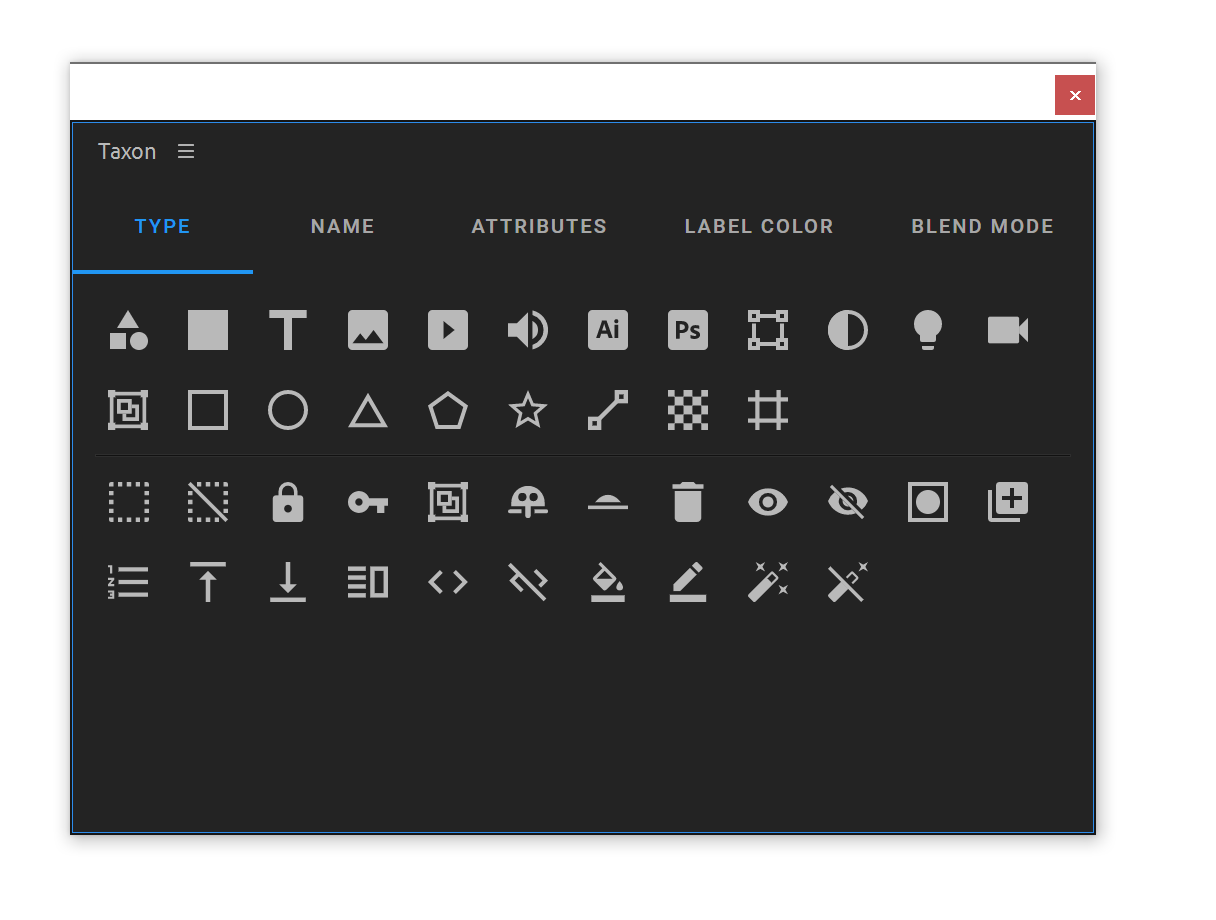
This update is so good! Really makes selecting layers based on type or attribute so fast.
— Kevin Snyder (@freshmograph) October 10, 2022
To discover all the features Taxon offers, check out our tutorial:
| After Effects | 2022, 2021 |
|---|
1.1.3 (Current version) - Dec 2, 2023
- New selection buttons
- Action buttons are showing even when "Default Action" is enabled
- Bug fix - "Name" selection works with default action
- Action buttons are showing even when "Default Action" is enabled
- Bug fix - "Name" selection works with default action
1.1.2 - Oct 9, 2022
- New selection buttons
- Action buttons are showing even when "Default Action" is enabled
- Action buttons are showing even when "Default Action" is enabled
1.0.2 - Jun 17, 2022
Compatibility fix for older versions of AE
1.0.1 - May 5, 2022
Bug Fix: Label colors in the panel were black if the user never opened the preferences panel in After Effects
1.0.0 - Apr 29, 2022
Initial Release
-

- Compatibility After Effects
Mask Unlinker
Add to CartUnlink your masks from your layer's transformations. No more need for separate matte layers!
-

- Compatibility After Effects
pt_ShiftLayers
Quickly shift or stagger selected layers in time.Add to Cart$9.99 -

- Compatibility After Effects
Evil Twin Stereo 3D
Work in Stereo 3D without compromise. If you can do it in 2D, Evil Twin can do it in stereoscopic 3D.Add to Cart$99.00 As low as: $79.20 -
- Compatibility After Effects
Ray Dynamic Color 2
Add to CartThe industry leading Color Palette for After Effects.
$29.99 -

- Compatibility After Effects
Tiny Tools
13 small (but awesome) tools in one toolbar to help your daily struggles!Add to Cart -
- Compatibility After Effects
COB_SSD-Sequence Section Destroyer
Allows you to quickly and easily delete a section of a image file sequence in the finder for those times when you need to re-render only a section.Add to Cart