
DecomposeText
-
Compatibility After Effects Please check exact version compatibility under the "COMPATIBILITY" tab below
 Adding to cart...
 Breaks up text into separate layers.
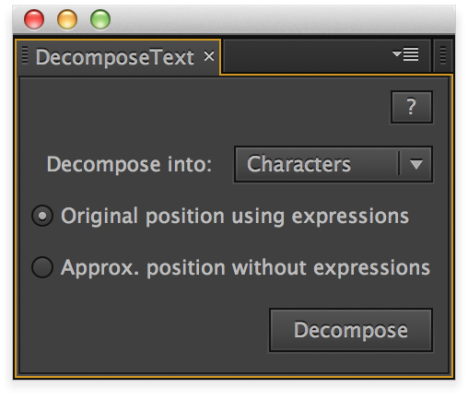
Based on user feedback v3 now has 2 modes:
- Keep original position using expressions (new layers have the same text as the original layer with some elements hidden)
- Approximated position without expressions (new layers are 1 char/word/line long)
Each mode has 3 choices:
- Split into characters
- Split into words
- Split into lines
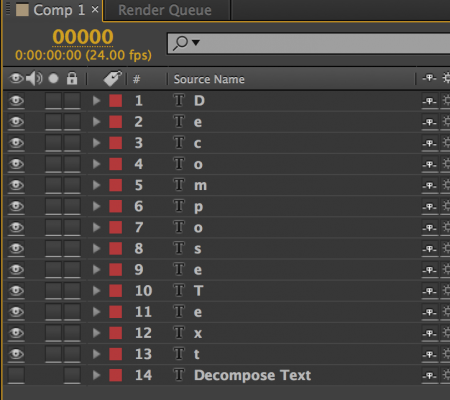
After completion you will have a layer for each character/word/line.
| After Effects | 2024, 2023, 2022, 2021, 2020, CC 2019, CC 2018, CC 2017, CC 2015.3, CC 2015, CC 2014, CC, CS6 |
|---|
3.1 (Current version) - Feb 15, 2023
3.0 - Oct 15, 2021
- 3.0 - Aug 2013
- 2 modes: keep original position using expressions (new layers have the same text as the original layer with some elements hidden), approximated position without expressions (new layers are 1 char/word/line long)
- small bugfix in the decomposition
- throw alert when paragraph text is detected (not supported)
- rewrite Help/About box
- AE CC compatibility
- 2.5 - Added CS6 Compatibility - Dec 2012
- 2.4 - New UI, 3 choices, initial position preserved - July 2012
- 2.3 - Fixed foreign language compatibility with CS5.5 - Nov 2011
- 2.2 - Minor bug fixed, added CS5 compatibility (Aug 2010)
- 2.1 - Added separate into words and separate into lines option by Lloyd Alvarez (21 Jan 2010)
- 2.0 - Initial Release on aescripts.com (05 June 2009)
-

- Compatibility After Effects
Smart Selector
Add to CartPoint, click, and select any layer you can see. Smart Selector sees through bounding boxes, adjustment layers, precomps and layer transparency to find the select layers using the most advanced layer selection algorithm. Welcome to the new way of working in After Effects.
-

- Compatibility After Effects
EmojiKit
Add to CartAnimated Emojis in After Effects!

Searchable | Loopable | Lottie compatible
Make animated or still emojis with 1 click -

- Compatibility After Effects
iExpressions 3
Add to CartCreate complex expression-driven templates, character rigs, shape animations and more without writing any code!
-

- Compatibility After Effects
rd: Kinda Sorta
Displays a palette with controls for sorting layers based on specific criteria.Add to Cart#devforacause
This script is part of the rd: scripts collection. Please consider making a donation to a charity important to you. Thanks.$0.00 -

- Compatibility After Effects
Zercon - Animated Typeface
Add to CartA highly customizable animated typeface for Adobe After Effects. The animation for each character is generated with random input, so no two animations are the same. Control color, duration, stroke width, particle count, offset, random seed and many other parameters with 31 convenient controls.Order 4 or more Animography Typefaces and save an additional 25%
-
- Compatibility After Effects
Loopy
Add to CartThe handy panel for looping keyframes, paths, pre-comps and footage.
-

- Compatibility After Effects
Randomizer
Assigns random values within a certain range to the transform properties of the selected layers.Add to Cart$19.99 -

- Compatibility After Effects
ReverseMaskPath
Reverses the direction of the selected masks.Add to Cart$9.99 -

- Compatibility After Effects
LockProperties
Locks selected properties by adding an expression with the current value.Add to Cart$9.99 -

- Compatibility After Effects
AlignLayers
Aligns the selected layers along the x, y or z axis.Add to Cart$14.99 -
- Compatibility After Effects
RepositionAnchorPoint
Allows you to reposition the anchor point of the selected layers around the layer edges while keeping the layers at the same position in the comp window.Add to Cart$9.99 -

- Compatibility After Effects
CenterMasks
Allows you to reposition the selected masks around the center of their containing layer.Add to Cart$9.99