
Match Comp Duration
-
Compatibility After Effects Please check exact version compatibility under the "COMPATIBILITY" tab below
 Adding to cart...
Match Comp Duration allows you to perform quick pre-comp and layer duration changes to the deepest level of your project! Save your precious time instead of manually modifying the settings of every pre-comp layer within pre-comp layer within pre-comp layer.
Features
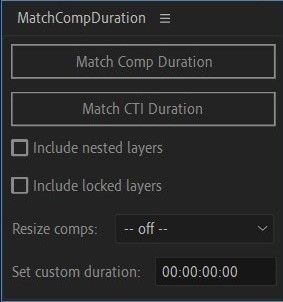
- Match Comp Duration - Match selected pre-comps and layers to the current composition duration in a click.
- Match CTI Duration - Match selected pre-comps and layers to the current time indicator duration.
- Include nested layers - Include all nested pre-composed layers to the deepest level pre-comp.
- Include locked layers - Include all nested locked layers to the deepest level pre-comp.
- Resize Comps - Resize all nested comps to the current comp (fit, width or height).
- Set Custom Duration - When set the selected layers will match this instead of the current comp duration.
Notes
- Set Custom Duration matches the time display format of your current composition (either frames or timecode). To reset it you can delete the numbers and press enter, or make it 0.
- Match Comp Duration changes the total duration of the selected layers and won't reposition them in time.
| After Effects | 2020, CC 2019 |
|---|
1.1.0 (Current version) - May 30, 2023
1.0.0 - Jan 1, 2021
-

- Compatibility After Effects
MarKey
Quickly preview your keyframes using markers without wasting space on the timeline!Add to Cart -

- Compatibility After Effects
Flip Aspect Ratio
Quickly flip the aspect ratio of the selected comp(s) with a single click!Add to Cart -
- Compatibility After Effects
CI Move Anchor
Reposition the anchor point wherever you want while retaining the animation path.Add to Cart -
- Compatibility After Effects
Smart Adapt - Recurring Subscription
Add to CartSmart Adapt is an After Effects extension that allows you to create hundreds of screen adaptations in a few steps, with the ability to export the list of your screens to use next time.
Please note that this is a monthly recurring subscription, it is also available as an annual subscription (get 2 months free)
-

- Compatibility After Effects
Pre-compose Pro
Add to Cart25% Off until July 20. A major update to the native AE Pre-compose tool — Pre-compose Pro gives you a brand new pre-comping experience with loads of new features.
-
- Compatibility After Effects
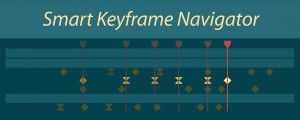
Smart Keyframe Navigator
Add to CartSmart Keyframe Navigator for AE enables you to intuitively navigate keyframes with your keyboard.
-

- Compatibility After Effects
- Compatibility Blender
BlenderAe
Add to CartBlenderAe is a Blender addon that enables bidirectional data transfer between Blender and After Effects. Connect, select and export data from Blender or import layers from After Effects!
$30.00 -

- Compatibility Premiere
Swift Slides
Add to CartSwift Slides lets you create simple fast slideshows that fit to your selected audio in Premiere Pro!
$39.00