
Magic Switcher PRO
-
Compatibility After Effects Please check exact version compatibility under the "COMPATIBILITY" tab below
 Adding to cart...
The Magic Switcher lets you turn On and Off Layer Styles, Effects, and Adjustment Layers with a single click.
Hmmm… now you probably ask yourself “That’s it?”
Yeah, that’s it.
But, and that’s a big but – with the right process it can do magic.
The Magic Switcher enables you to fine-tune your scene styling to the max without thinking about how it’s going to affect the animation process at all!
You can tweak your scene, applying the perfect look, and once you’re satisfied with the result and ready to move on to the animation, you just turn off all the effects in a single click.
Now you can work on the animation, and you can do it fast.
Once you’re done with the animation – turn all the effects and layer styles back on, and Voila! Your beautiful-looking animated scene is ready for rendering.

New Smaller Design:
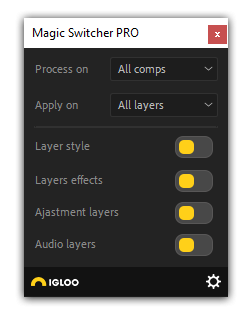
(** PRO version only **)
If you don't need it to work across your entire project, the free version works on the active composition only
| After Effects | 2023, 2022, 2021, 2020, CC 2019, CC 2018, CC 2017, CC 2015.3 |
|---|
2.5 (Current version) - Dec 21, 2023
2.3.1 - Jan 19, 2023
A newly added audio function has been added. You can now mute and unmute the audio for all layers in your project at once. It will unmute only audio that was enabled before Magic Switcher mute it.
2.3 - Jan 19, 2023
A newly added audio function has been added. You can now mute and unmute the audio for all layers in your project at once. It will unmute only audio that was enabled before Magic Switcher mute it.
2.2 - Dec 17, 2022
2.1 - Dec 9, 2022
2.0 - Oct 25, 2022
2.0 - Oct 25, 2022
-

- Compatibility After Effects
- Compatibility Premiere
SlackOut
Add to CartSlackOut is a plugin for Adobe Premiere Pro and After Effects that automates exporting and delivering of your videos to Slack.
-

- Compatibility After Effects
Advanced Selection
Add to CartExpands the capabilities of After Effects to select layers. It offers a vast amount of filters you can choose from to narrow down your selection, like layer types, layer options, blending modes, search by name, label colors, and more.
-
- Compatibility After Effects
- Compatibility Premiere
Anchor Pro
Add to CartFree Trial
Take control over your Anchor Point in Premiere Pro & After Effects! -
- Compatibility Premiere
Transmitter for Premiere Pro
Free TrialAdd to CartAnimate and work with "Transform" effect x10 faster!
-

- Compatibility After Effects
Trigger
Add to CartQuickly setup and retime animations by triggering animations inside a precomp using layer markers. Easily create Trigger comps, add markers, and trigger animations from inside a precomp . Turn your linear workflow into an automated event based workflow, allowing you to non-destructively retime complex animations, easily test out multiple versions of an animation, and sequence together multiple animation events easily from your global composition.
-

-
- Compatibility After Effects
Move To
Add to CartThe Move To tool is an After Effects tool that allows you to move layers, easily and quickly, in the timeline..
$10.00 -

- Compatibility After Effects
SF Caddy
Add to CartNow lip-sync using markers. SF-Caddy is a quick assets replacement tool for After Effects. Super handy for character animation and lip-sync.
$27.00 As low as: $17.50