
Project Item Labels
-
Compatibility After Effects Please check exact version compatibility under the "COMPATIBILITY" tab below
 Adding to cart...
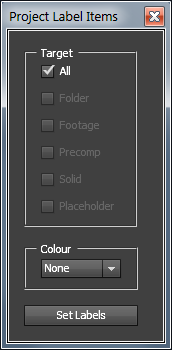
 This script sets the label colour for all selected items as specified. If a folder is in the selection, the script will recursively search through and find all items within that folder.
Useful for when importing existing projects/AEPs, to set the label colour in one fell swoop for all imported objects.
So-- select some items (or an imported project folder) in your project panel, select the item types you wish to colour & a target colour, then hit the button and it'll do all the magic for ya.
Options:
- Target - Choose what item types to colour in your project panel. Selecting 'all' will colour everything selected / everything in the folders.
- Colour - Choose the label colour to set.
Originally requested by Ronald Molina.
| After Effects | 2024, 2023, 2022, 2021, 2020, CC 2019, CC 2018, CC 2017, CC 2015.3, CC 2015, CC 2014, CC, CS6, CS5.5 |
|---|
1.5 (Current version) - Feb 16, 2017
- Fixes bug with crashing on launch
- Cleans up code a _lot_
- 1.0 - Initial release - May 2013
-
- Compatibility After Effects
COB_Latest Version
Easily and quickly determine whether or not an After Effects file is the most up-to-date compared to its auto-saved versions.Add to Cart$9.99 -
- Compatibility After Effects
Font Collect
Add to CartAutomatically collects project fonts. Just like how After Effects collects footage!
$18.99 -

- Compatibility After Effects
Find My AEP
Name Your Own Price!Add to CartReveal your After Effects project file in the Finder.
-
-

-
- Compatibility After Effects
Squirrel
Add to CartA hierarchy editor that converts your timeline into an interactive treeview based on layer parenting, much like what you would find in any 3D application.
New Features! A/V switches and Cut, Copy, and Paste buttons!
$35.00
-
- Compatibility After Effects
Find Large Files
Find large files in your project by file size or resolution.Add to Cart$5.99 -

- Compatibility After Effects
Create Pivotal Null
Quickly create a null at key layer points & parent layer to null.Add to Cart$4.99 -

- Compatibility After Effects
Easy Bake
Convert expressions to keyframes faster, simpler and with more control than ever before.Add to Cart$14.99 -

- Compatibility After Effects
Explode Shape Layers 3
Add to CartTake control of your shape layers! Explode & merge for greater precision.
$29.99 -

- Compatibility After Effects
ASH Syntax Highlighter
ASH brings code-editor syntax highlighting to your AE text layers! Perfect for FUI artists everywhere!Add to Cart$69.99 -

- Compatibility After Effects
Trim Comp to Contents
Trim or extend comp duration to fit layer contents.Add to Cart$4.99